Meow's AIML - MCP Protocol Overview / MCP 协议概述
MCP Protocol Overview / MCP 协议概述
ref:
- https://cloud.google.com/discover/what-is-model-context-protocol?hl=en
- https://onevcat.com/2025/02/mcp/
- https://blog.logto.io/zh-TW/what-is-mcp
- https://aws.amazon.com/cn/blogs/china/agentic-ai-infrastructure-practice-experience-series-four-mcp-server-from-local/
Overview 概述
What is MCP 什么是 MCP
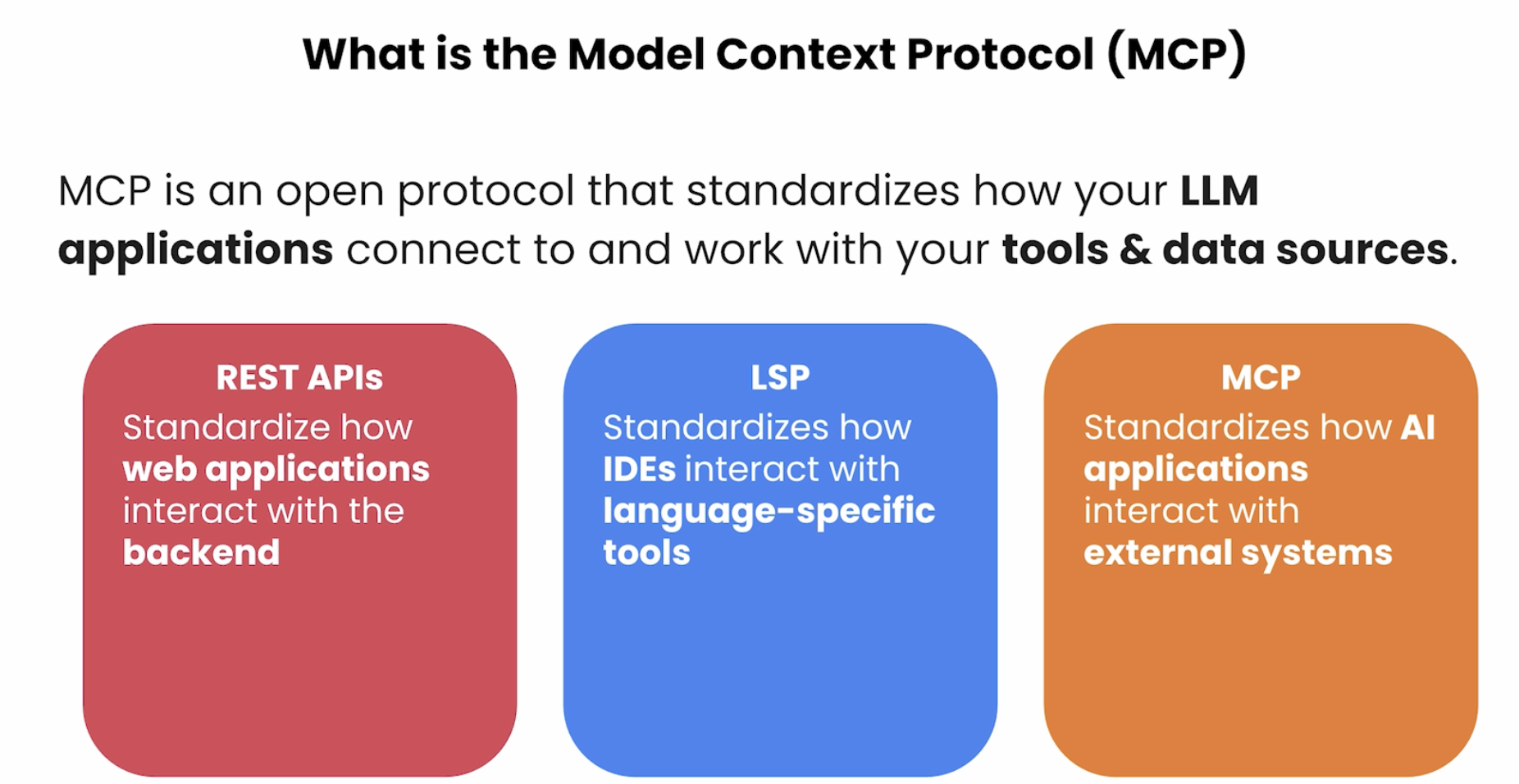
MCP (Model Context Protocol)is an open, model-agnostic protocol that standardizes how LLMs connect to external tools, data sources, and services — turning a model into an active agent rather than a passive text generator.
MCP(模型上下文协议)是一个开放的、与模型无关的协议,用于标准化大语言模型(LLM)与外部工具、数据源和服务之间的交互方式,使模型从被动的文本生成器转变为主动的智能体(Agent)。
LLMs have two fundamental knowledge gaps MCP is designed to bridge: private content (files on your filesystem, database records, private wikis, personal notes) and real-time information (current stock prices, live news, tomorrow’s weather). Beyond knowledge, LLMs also struggle with precise actions: calling a third-party API to book a flight or ticket, or performing exact computation like comparing 9.8 vs 9.11 or counting the letter “r” in “Strawberry.”
LLM 存在两类根本性知识盲区,MCP 正是为此而设计:私有内容(文件系统中的文件、数据库记录、私有 wiki、个人笔记)和实时信息(当前股价、实时新闻、明日天气)。除知识层面外,LLM 在精细操作上同样力不从心:调用第三方 API 完成订票订餐,或执行精确计算(比较 9.8 与 9.11 哪个更大、数出 “Strawberry” 中有几个字母 r)。
A helpful analogy: just as HTTP standardizes how any website and any browser exchange data regardless of who built them, MCP is the "HTTP for AI" — any LLM can connect to any tool using the same rules, eliminating custom integrations for every model-tool combination.
一个有用的类比:就像 HTTP 协议让任何网站与任何浏览器都能按相同规则交换数据,MCP 就是 "AI 世界的 HTTP"——任何 LLM 都能用相同规则连接任何工具,消除了为每个模型-工具组合编写定制集成的需要。
An additional dimension of the knowledge gap: LLM training takes 6+ months and enormous compute resources. By the time a new model ships, its knowledge has already started falling behind. Beyond recency, LLMs also lack domain-specific knowledge — a hospital’s internal processes, a company’s product catalog, an organization’s proprietary documentation are never in the training data. MCP solves both by letting LLMs query authoritative external sources at runtime.
知识盲区的另一个维度:LLM 训练通常需要6个月以上的时间和庞大的计算资源,模型发布时知识就已开始落后。除时效性外,LLM 还缺乏专业领域知识——医院的内部流程、公司的产品目录、组织的专有文档从未出现在训练数据中。MCP 通过让 LLM 在运行时查询权威外部源来同时解决这两个问题。
- MCP (Model Context Protocol) / 模型上下文协议: An open, model-agnostic protocol. / 开放、与模型无关的标准化协议。
- Purpose / 目的: Allows LLMs to interact with tools, data, and prompts via a standardized architecture. / 允许 LLM 通过标准化架构与工具、数据和提示词进行交互。
- Launch / 发布时间: Introduced by Anthropic in Nov 2024. / 2024 年 11 月由 Anthropic 推出。
- Adoption / 采用情况: Rapidly integrated into open-source and production tools. / 迅速被开源社区和生产环境工具广泛采用。
- Builds on / 基于: Extends existing concepts like tool use and function calling, but standardizes them across vendors. / 扩展了工具调用和函数调用等已有概念,并将其跨厂商标准化。
Pre-MCP Integration Landscape / 出现之前:集成方式一览
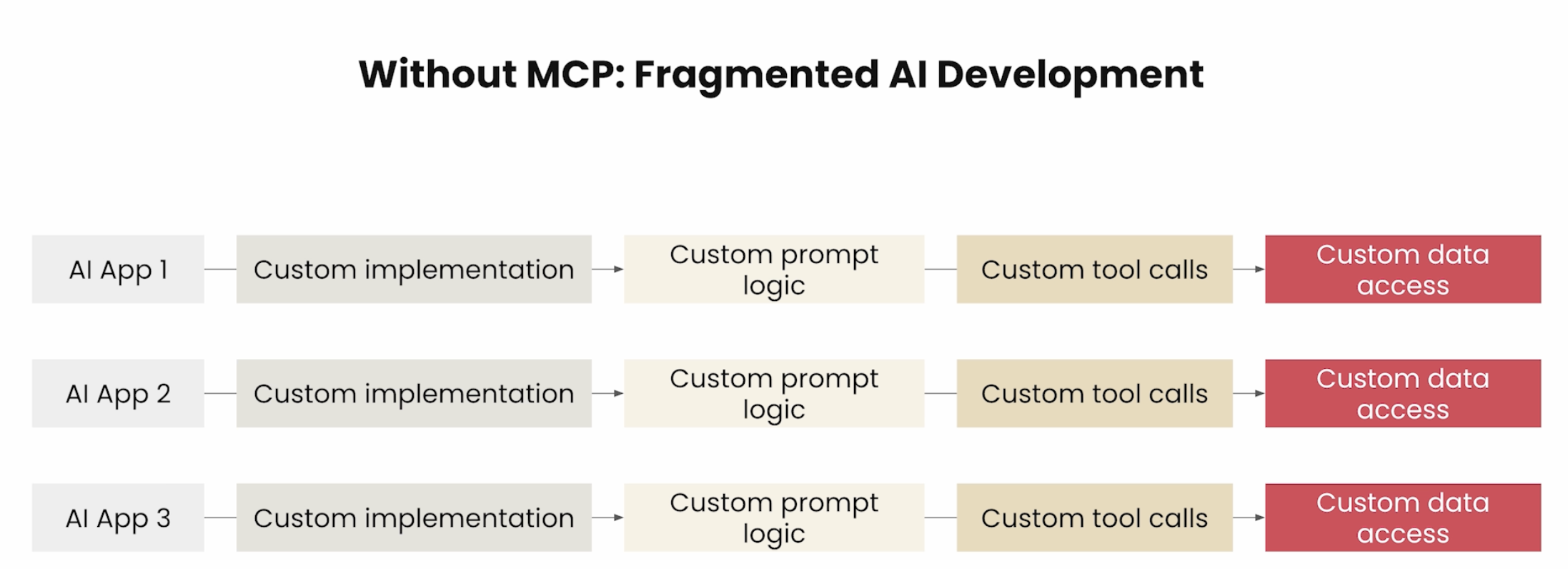
Before MCP, developers had four main options for connecting LLMs to external data — each with significant limitations that drove the need for a universal standard:
在 MCP 出现之前,开发者有四种主要方式将 LLM 连接至外部数据,但每种方式都存在明显局限,正是这些局限催生了对通用标准的需求:
| Method / 方式 | Representative tools / 代表工具 | Limitation / 局限性 |
|---|---|---|
| Direct API + custom code / API 接口 + 自定义代码 | Python pymysql, requests, etc. | N×M explosion — every model×tool pair needs bespoke code / N×M 爆炸,每个模型-工具组合都需独立编写 |
| AI framework integrations / AI 框架集成 | LangChain SQLDatabaseChain, LlamaIndex vector connectors | Tied to one specific framework; cannot reuse across frameworks / 绑定特定框架,无法跨框架复用 |
| Low-code AI platforms / 低代码 AI 平台 | Dify, Alibaba Bailian | Platform-specific; limited customization; vendor lock-in / 平台专属,定制有限,存在厂商锁定 |
| Plugin systems / 插件系统 | ChatGPT Plugins | Works only with the vendor’s own model ecosystem / 只与该厂商模型兼容,生态封闭 |
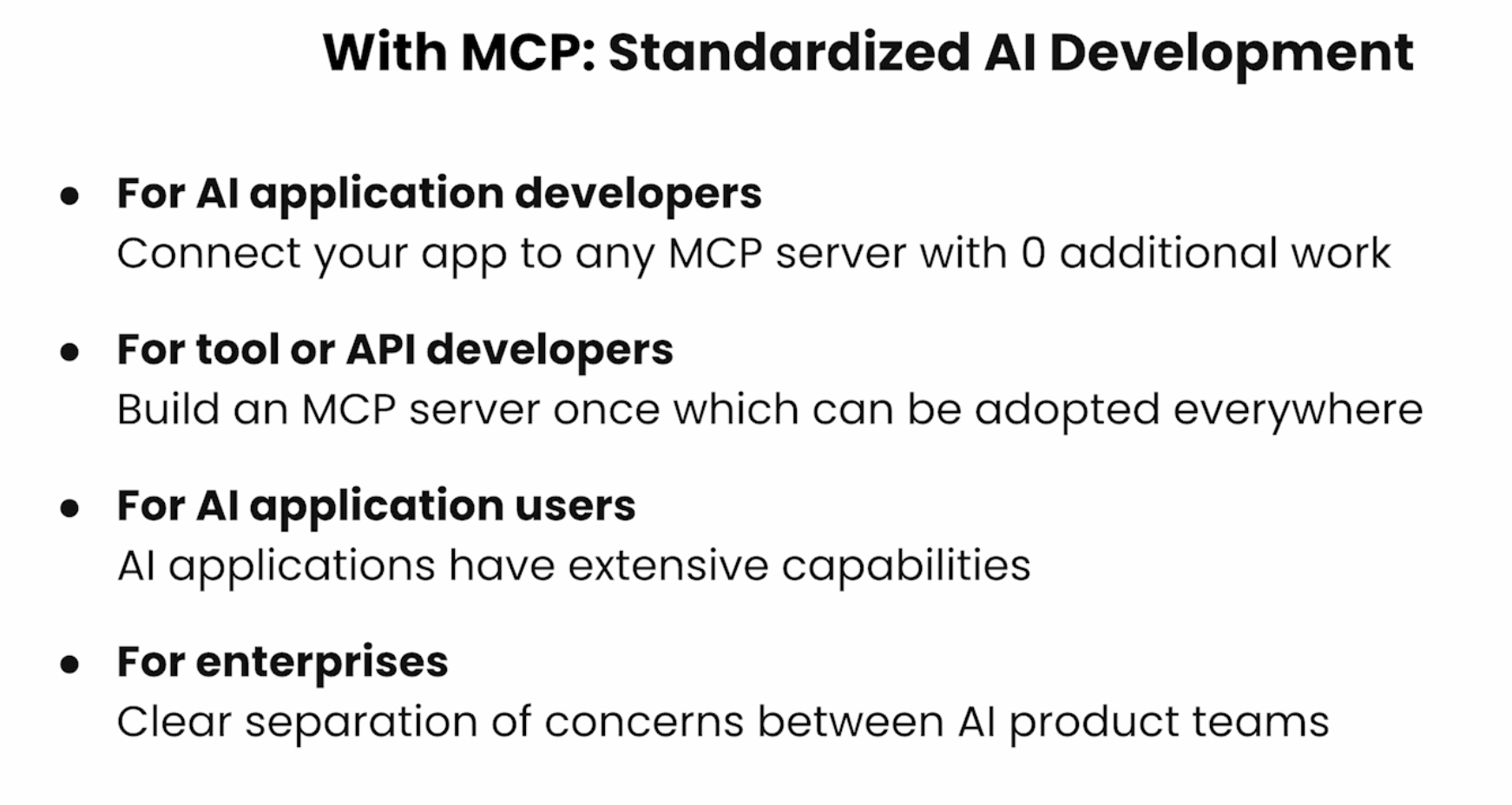
MCP’s insight: make the integration layer a neutral, open protocol so tool vendors write their MCP server once and any LLM can use it — without either side knowing anything about the other’s internals.
MCP 的洞见:将集成层变成中立的开放协议,工具提供方只需编写一次 MCP 服务器,任何 LLM 都可以使用,双方无需了解对方的内部实现。
Architecture & Components 架构与组件
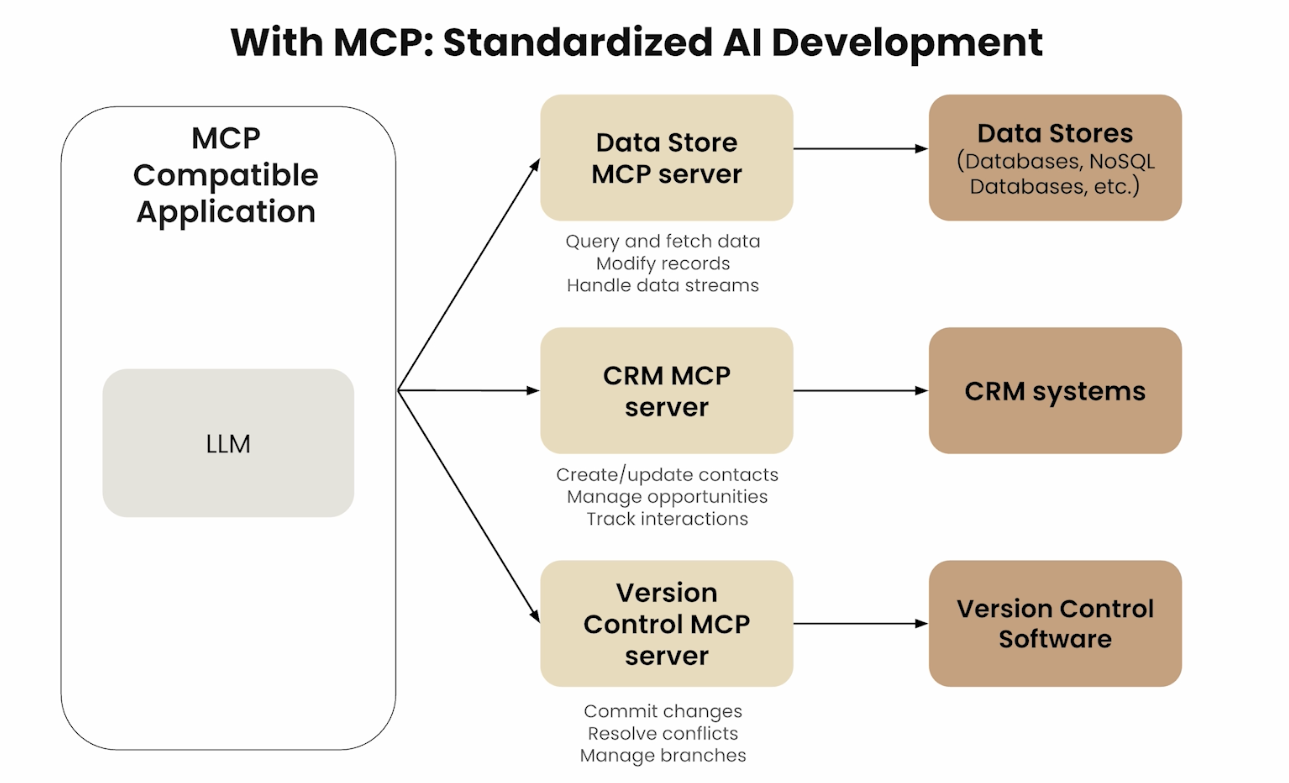
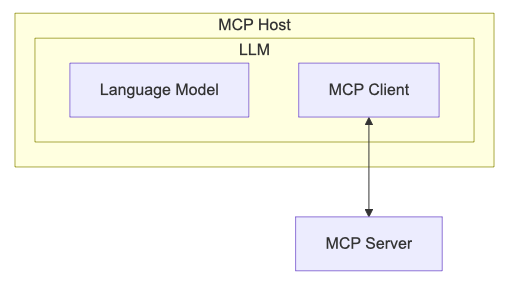
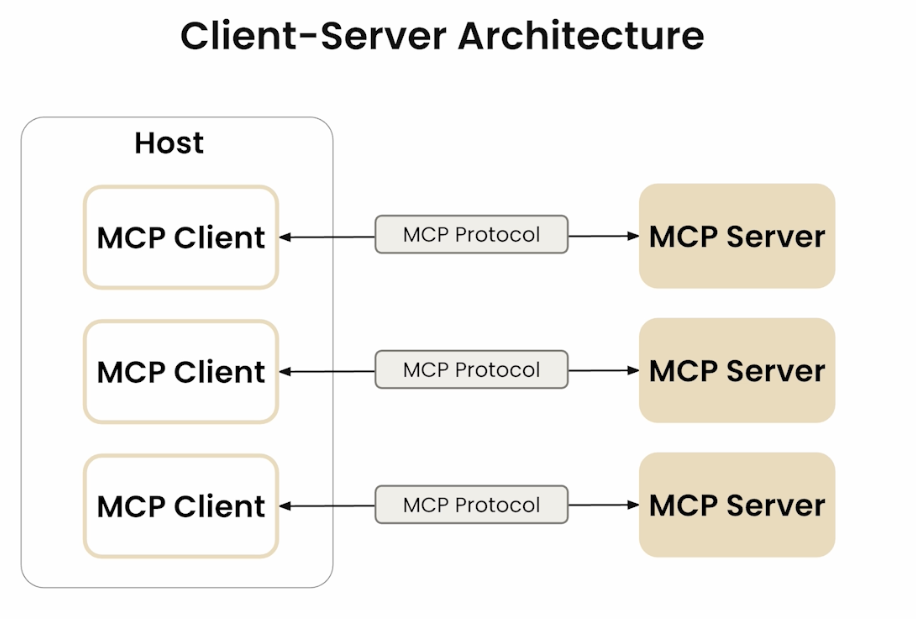
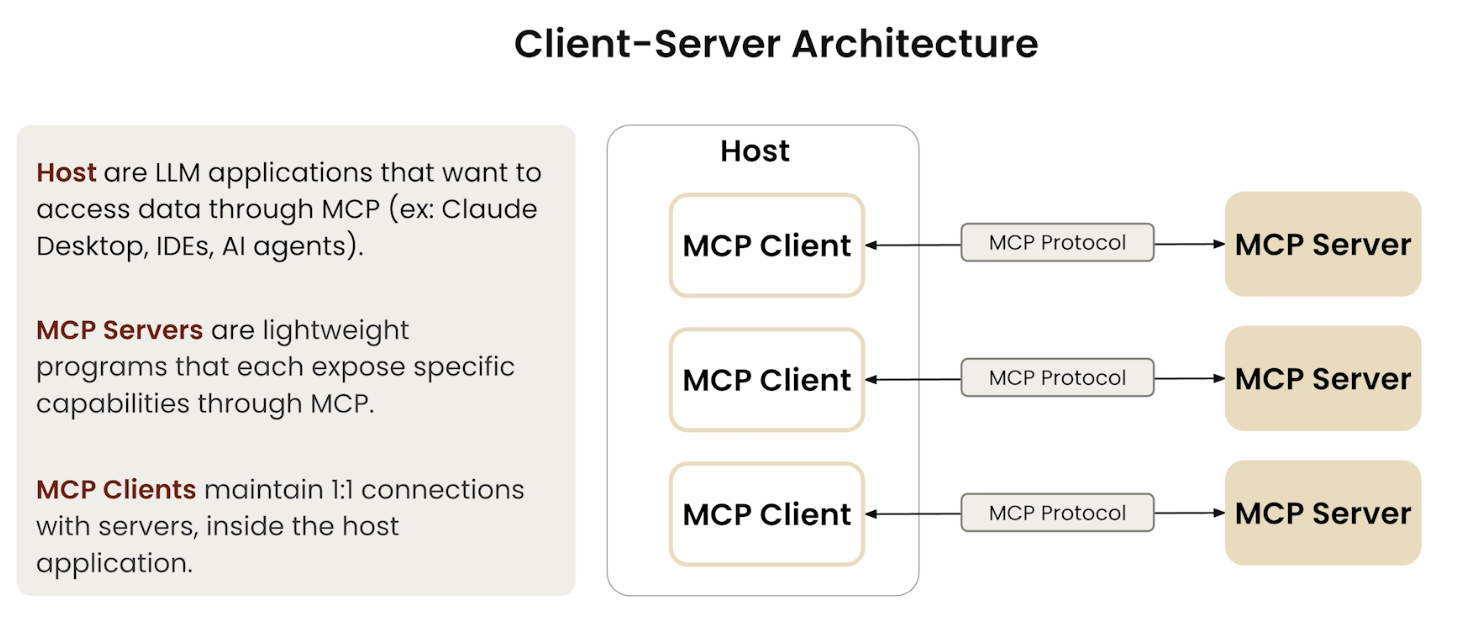
The MCP architecture has three distinct layers: the Host, the Client (inside the Host), and the Server (external). Understanding the difference between Host and Client is key.
MCP 架构由三个独立层次构成:宿主(Host)、客户端(Client,位于宿主内部) 和 服务器(Server,外部)。区分宿主与客户端是理解 MCP 的关键。
MCP Host 宿主
The MCP Host is the AI application or environment that contains the LLM — for example, an AI-powered IDE, a conversational AI assistant, or Claude Desktop. This is the user’s primary interaction point. The host uses the LLM to process requests that may require external data or tools.
MCP 宿主是包含 LLM 的 AI 应用程序或环境,例如 AI 驱动的 IDE、对话式 AI 助手或 Claude Desktop。这是用户的主要交互入口,宿主使用 LLM 处理可能需要外部数据或工具的请求。
MCP Client 客户端
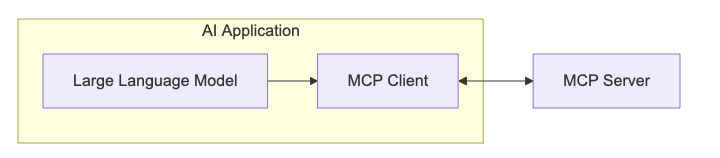
The MCP Client lives inside the MCP Host. It acts as the translator and negotiator between the LLM and MCP servers — converting the LLM’s requests into MCP-formatted messages and converting server responses back into something the LLM can use. It also discovers and manages available MCP servers.
MCP 客户端驻留在宿主内部,充当 LLM 与 MCP 服务器之间的翻译和协调者。它将 LLM 的请求转换为 MCP 格式的消息,并将服务器响应转回 LLM 可理解的内容,同时负责发现和管理可用的 MCP 服务器。
MCP Server 服务器
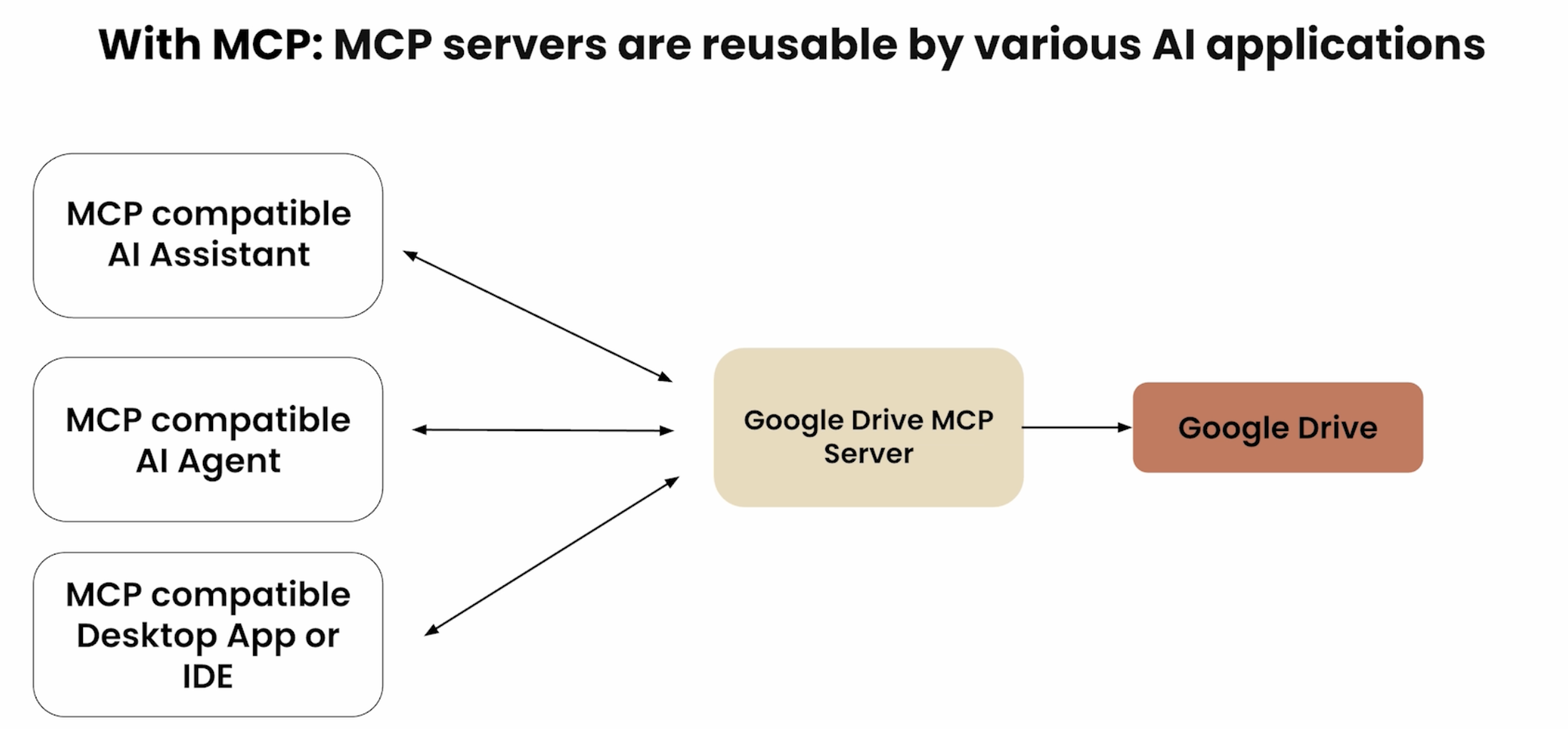
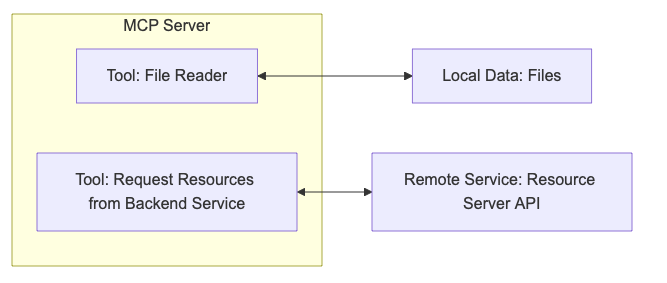
The MCP Server is the external service that provides context, data, or capabilities to the LLM. It connects to external systems (databases, web services, file systems) and translates their responses into a format the LLM can understand. A single application may connect to multiple MCP servers simultaneously.
MCP 服务器是向 LLM 提供上下文、数据或能力的外部服务。它连接到外部系统(数据库、Web 服务、文件系统),并将其响应转换为 LLM 可理解的格式。一个应用可同时连接多个 MCP 服务器。
MCP servers act as a Proxy or Sidecar between the AI application and the specific tool: they translate standard MCP requests into the tool’s native format, execute the operation, then return the result in MCP format. This design achieves loose coupling — tool providers develop and maintain their own MCP servers independently, with no need to coordinate with the AI framework. When a tool’s API changes, only its MCP server needs updating, leaving all AI clients unaffected.
MCP 服务器充当 AI 应用与具体工具之间的代理(Proxy)或边车(Sidecar):将标准 MCP 请求转换为工具原生格式,执行操作后再以 MCP 格式返回结果。这种设计实现了松耦合——工具提供方独立开发和维护各自的 MCP 服务器,无需与 AI 框架协调。当工具 API 变更时,只需更新其 MCP 服务器,所有 AI 客户端均无感知。
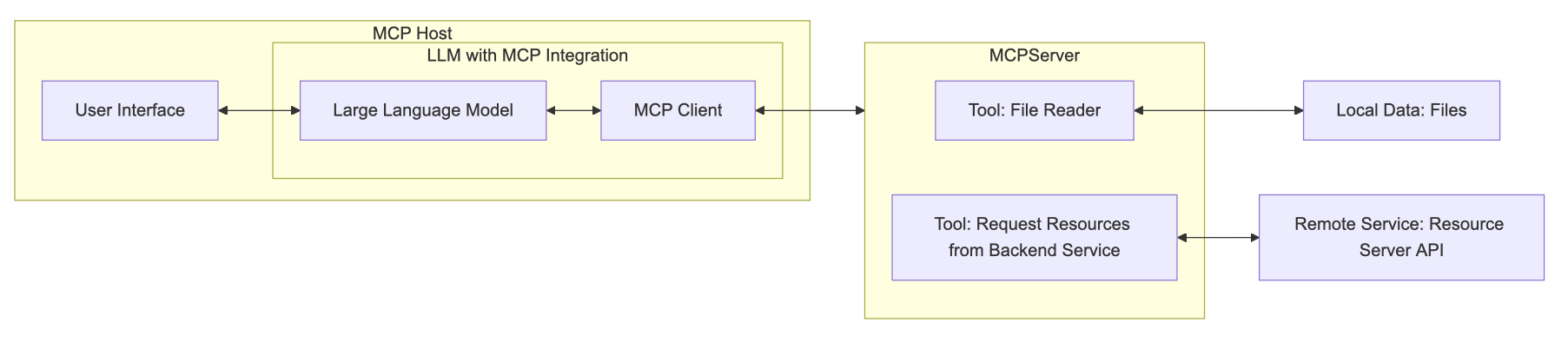
- Open Ecosystem / 开放生态:
- Community-contributed servers and tools. / 由社区贡献的服务器和工具,任何人都可以构建自己的 MCP 服务器。
- Official support by Anthropic and growing ecosystem of partners. / 获得 Anthropic 官方支持,合作伙伴生态持续扩大。
MCP Primitives 原语
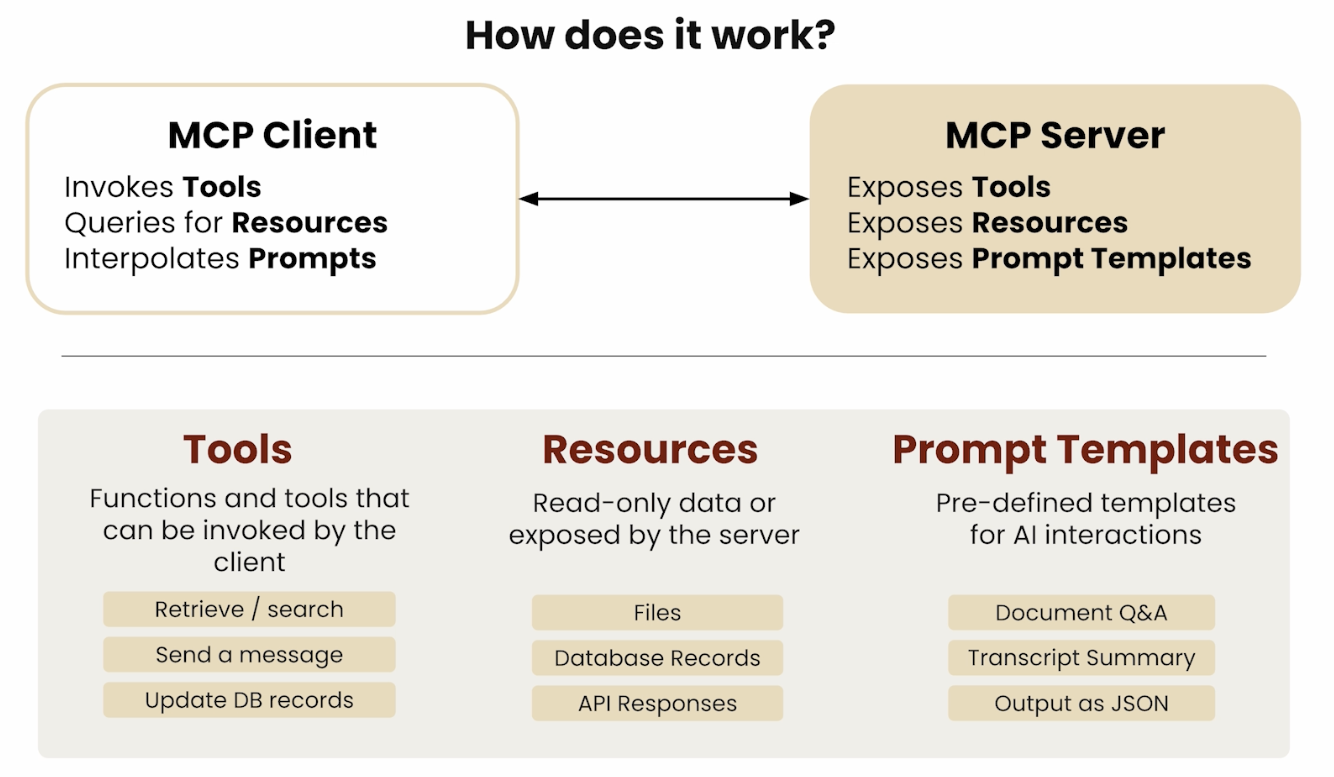
MCP defines six canonical primitives — the fundamental building blocks that servers and clients expose to each other. They split cleanly into two categories based on who provides them.
MCP 定义了六类原语——服务器与客户端相互暴露的基本构建块。根据提供方可清晰分为两类:
| Primitive / 原语 | Provider / 提供方 | Control / 控制权 | Purpose / 用途 |
|---|---|---|---|
| Tools / 工具 | Server | Model-controlled / 模型控制 | Executable functions the LLM can invoke / LLM 可调用的可执行函数 |
| Resources / 资源 | Server | Application-controlled / 应用控制 | Structured data the client reads / 客户端读取的结构化数据 |
| Prompts / 提示词 | Server | User-controlled / 用户控制 | Pre-defined prompt templates / 预定义提示词模板 |
| Sampling / 采样 | Client | Server-controlled / 服务器控制 | Server asks LLM to generate text / 服务器请求 LLM 生成文本 |
| Elicitation / 引出 | Client | Server-controlled / 服务器控制 | Server collects structured user input / 服务器收集结构化用户输入(2025-06-18 新增) |
| Roots / 根目录 | Client | Server-controlled / 服务器控制 | Client exposes filesystem boundary hints / 客户端暴露文件系统边界提示 |
The “control” column indicates whose decision it is to invoke the primitive: the LLM autonomously calls Tools; the host application decides when to read Resources; the end-user selects Prompts (often via slash commands); Sampling and Elicitation are server-driven requests that go back to the client; Roots are boundary hints the client advertises.
“控制权”列表示由谁决定调用该原语:LLM 自主调用工具;宿主应用决定何时读取资源;终端用户选择提示词(通常通过斜杠命令);采样和引出是服务器发起的、回到客户端的请求;根目录是客户端主动广播的边界提示。
Server Primitives: Resources 服务器原语:资源
Resourcesrepresent structured data that an MCP server exposes for clients to read — file contents, database records, API responses, screenshots, logs, etc. Unlike Tools, Resources are application-controlled: the host decides when to include them in context rather than the LLM autonomously selecting them.
资源是 MCP 服务器暴露供客户端读取的结构化数据——文件内容、数据库记录、API 响应、截图、日志等。与工具不同,资源是应用控制的:由宿主决定何时将其纳入上下文,而非 LLM 自主选择。
Protocol messages / 协议消息:
| Message / 消息 | Direction / 方向 | Purpose / 用途 |
|---|---|---|
resources/list | Client → Server | Discover available resources / 发现可用资源 |
resources/read | Client → Server | Read content of a specific resource URI / 读取特定资源 URI 的内容 |
resources/templates/list | Client → Server | List URI templates for parameterized resources / 列出参数化资源的 URI 模板 |
resources/subscribe | Client → Server | Subscribe to change notifications for a resource / 订阅资源变更通知 |
notifications/resources/updated | Server → Client | Notify that a subscribed resource changed / 通知订阅资源已变更 |
notifications/resources/list_changed | Server → Client | Notify that the resource list changed / 通知资源列表已变更 |
Resource annotations / 资源注解:
Each resource can carry optional annotations that help clients prioritize and route context:
每个资源可携带可选注解,帮助客户端优先化和路由上下文:
audience: intended consumer —user,assistant, or both / 预期消费者:user、assistant或两者priority: float 0.0–1.0 indicating importance (1.0 = highest) / 0.0–1.0 的重要性权重(1.0 最高)lastModified: ISO 8601 timestamp for cache freshness decisions / 供缓存新鲜度决策的 ISO 8601 时间戳
Common URI schemes / 常见 URI 方案:
file:///path/to/file— local filesystem resource / 本地文件系统资源https://example.com/api/data— remote HTTP resource / 远程 HTTP 资源git://repo/path/to/file— version-controlled content / 版本控制内容- Custom schemes for domain-specific resources (e.g.,
db://table/rowid) / 自定义方案用于领域特定资源
Resource content is either text (with MIME type) or blob (base64-encoded binary for images, PDFs, etc.) / 资源内容为文本(含 MIME 类型)或 blob(图片、PDF 等的 base64 编码二进制)
Server Primitives: Prompts 服务器原语:提示词
Promptsare pre-defined, reusable message templates exposed by MCP servers. They are user-controlled: the user explicitly selects them, typically via slash commands in the client UI (e.g., typing /summarize activates a prompt template). Prompts accept typed arguments and return a full sequence of user/assistant turns.
是 MCP 服务器暴露的预定义、可复用的消息模板。它们是用户控制的:用户明确选择,通常通过客户端 UI 中的斜杠命令(如输入 /summarize 激活提示词模板)。提示词可接受有类型的参数并返回完整的用户/助手对话序列。
Protocol messages / 协议消息:
| Message / 消息 | Direction / 方向 | Purpose / 用途 |
|---|---|---|
prompts/list | Client → Server | List all available prompt templates / 列出所有可用提示词模板 |
prompts/get | Client → Server | Retrieve a prompt with specified arguments / 获取带指定参数的提示词 |
notifications/prompts/list_changed | Server → Client | Notify when prompt list changes / 通知提示词列表变更 |
Each prompt template specifies name (identifier), description (human-readable), and arguments (typed parameter definitions). UX pattern: most clients call prompts/list on startup and register each prompt as a slash command — the user discovers and invokes them without knowing the underlying MCP messages.
每个提示词模板包含名称(标识符)、描述(人类可读)、参数(有类型的参数定义数组)。UX 模式:大多数客户端在启动时调用 prompts/list,将每个提示词注册为斜杠命令——用户无需了解底层 MCP 消息即可发现和调用。
Client Primitives: Sampling, Elicitation, Roots 客户端原语
These three primitives reverse the direction — the MCP server makes requests back to the client, giving servers the ability to invoke LLM generation, collect user input, and query filesystem boundaries.
这三类原语反转了方向——MCP 服务器向客户端发起请求,让服务器能够调用 LLM 生成、收集用户输入并查询文件系统边界。
Sampling 采样
Sampling lets MCP servers request that the client’s LLM generate text — enabling servers to use AI as a sub-component of their own logic without holding model credentials directly.
采样让 MCP 服务器请求客户端的 LLM 生成文本,使服务器无需直接持有模型凭证即可将 AI 用作其自身逻辑的子组件。
sampling/createMessage: server sends a message list and receives an LLM completion / 服务器发送消息列表,接收 LLM 的补全结果- Model preferences / 模型偏好:
hints(model name suggestions),costPriority,speedPriority,intelligencePriority— all floats 0.0–1.0; higher = more important to that dimension - Human-in-the-loop: clients should present sampling requests to users for review/approval before sending to the LLM / 客户端应在发给 LLM 前向用户展示采样请求以供审查/批准
- The client always makes the actual LLM API call — servers never get direct model access / 客户端始终负责实际的 LLM API 调用,服务器永不直接访问模型
Elicitation 引出 (added in protocol version 2025-06-18 / 2025-06-18 协议版本新增)
Elicitation lets MCP servers request structured input from the human user — a server can pause mid-task and ask the user to fill in a form rather than guessing or failing silently.
引出让 MCP 服务器请求人类用户提供结构化输入——服务器可在任务中途暂停,要求用户填写表单,而非猜测或静默失败。
elicitation/create: server sends amessage+requestedSchema(JSON Schema defining the structure to collect) / 服务器发送消息 +requestedSchema(定义待收集内容结构的 JSON Schema)- Three response actions / 三种响应动作:
accept— user submitted the requested data / 用户提交了请求数据decline— user declined to provide data / 用户拒绝提供数据cancel— user dismissed the request / 用户关闭了请求
- The host renders a native form/UI to the user; the server receives only the structured result / 宿主向用户渲染原生表单/UI,服务器只收到结构化结果
- Use cases / 使用场景: collect missing parameters mid-task, request confirmation before destructive actions, gather credentials without hardcoding them in config / 收集任务中途缺失的参数、在破坏性操作前请求确认、无需硬编码地收集认证凭证
Roots 根目录
Roots let MCP clients advertise to servers which filesystem locations they are permitted to operate within — an advisory boundary mechanism.
根目录让 MCP 客户端向服务器广播其被允许操作的文件系统位置——一种建议性边界机制。
roots/list: server requests the client’s list of root URIs / 服务器请求客户端的根 URI 列表notifications/roots/list_changed: notification when roots change (e.g., user opens a different workspace) / 根目录变更通知(如用户打开了不同的工作区)- Only
file://URI scheme is currently supported / 目前仅支持file://URI 方案 - Advisory, not enforced: servers should respect roots, but there is no protocol-level mechanism to prevent a server from accessing out-of-scope paths — enforcement relies on server implementation / 建议性,非强制:服务器应遵守根目录,但协议层面无法阻止服务器访问范围外路径,执行依赖服务器实现
- Typical use: an IDE tells an MCP server “you may only operate within these project folders” / 典型用途:IDE 告知 MCP 服务器”你只能在这些项目目录内操作”
Protocol Lifecycle 协议生命周期
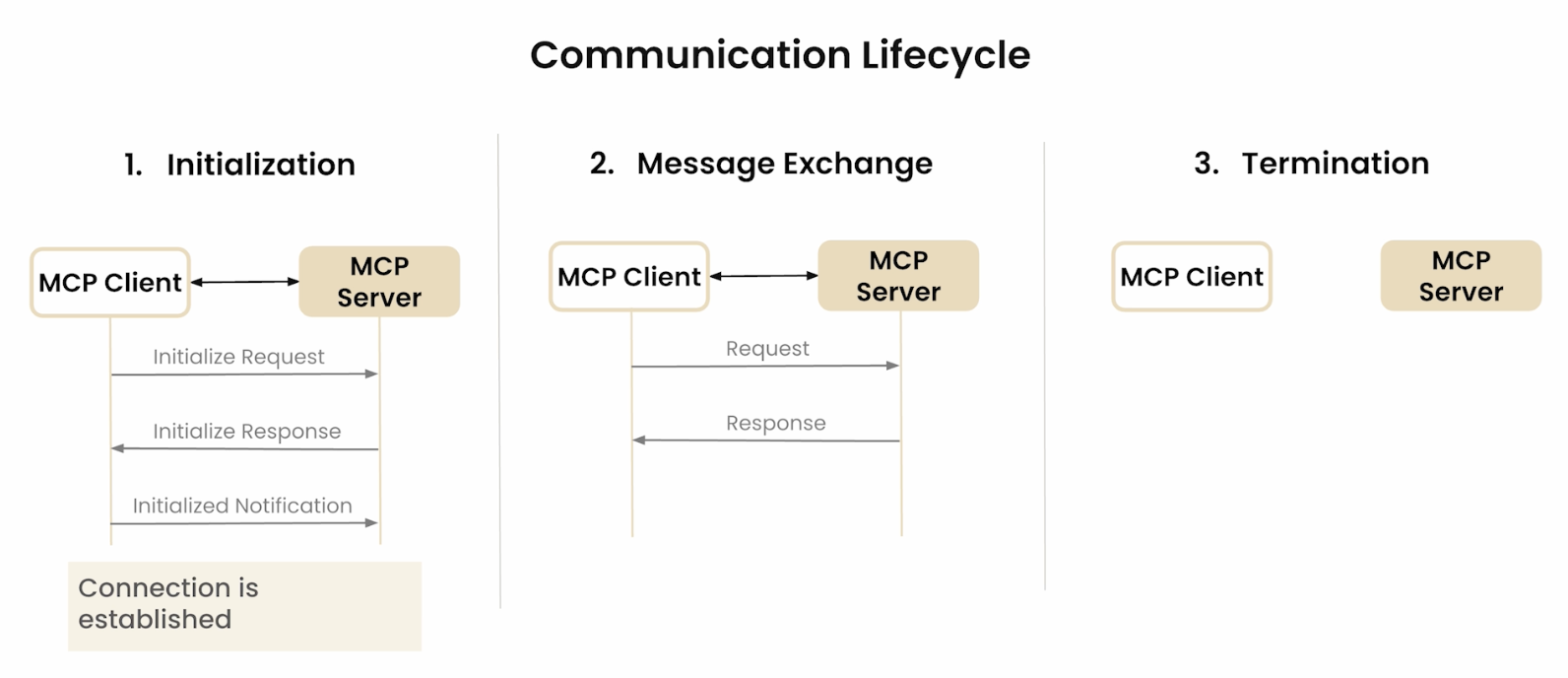
Every MCP connection follows a structured three-phase lifecycle: initialization, normal operation, and shutdown.
每个 MCP 连接遵循结构化的三阶段生命周期:初始化、正常操作、关闭。
Phase 1 — Initialization / 阶段1:初始化
- Transport connection is established (subprocess for stdio, HTTP connection for Streamable HTTP).
- Client sends
initializerequest with:protocolVersion: client’s preferred version (YYYY-MM-DD format)capabilities: client feature declarations (e.g.,roots,sampling,elicitation)clientInfo:{ name, version }
- Server responds with:
protocolVersion: negotiated version (must be ≤ client’s requested version or server’s own latest)capabilities: server feature declarations (e.g.,tools,resources,prompts,logging)serverInfo:{ name, version }
- Client sends
notifications/initializedto signal it is ready to begin normal operation.
Capability negotiation table / 能力协商表:
Neither party should invoke capabilities the other did not declare — the negotiation establishes the authorized feature set for that session.
双方均不应调用对方未声明的能力——协商确定了该会话的授权功能集。
| Capability / 能力 | Declared by / 声明方 | Enables / 启用的功能 |
|---|---|---|
tools | Server | Tool listing and invocation (+ optional listChanged sub-capability) / 工具列表和调用 |
resources | Server | Resource listing and reading (+ subscribe, listChanged) / 资源列表和读取 |
prompts | Server | Prompt listing and retrieval (+ listChanged) / 提示词列表和获取 |
logging | Server | Server can emit log notifications / 服务器可发送日志通知 |
completions | Server | Server supports argument completion suggestions / 服务器支持参数补全建议 |
roots | Client | Client can provide root URI list / 客户端可提供根 URI 列表 |
sampling | Client | Client can handle LLM sampling requests / 客户端可处理 LLM 采样请求 |
elicitation | Client | Client can display user input forms (added 2025-06-18) / 客户端可展示用户输入表单(2025-06-18 新增) |
Phase 2 — Normal operation / 阶段2:正常操作
JSON-RPC 2.0 request/response exchanges, plus server-initiated requests (sampling, elicitation) and server notifications (tool/resource/prompt list changes, log messages).
Phase 3 — Shutdown / 阶段3:关闭
Either side closes the transport. For stdio, the subprocess exits; for Streamable HTTP, the session ends and the Mcp-Session-Id is invalidated.
Protocol Versions 协议版本
MCP version strings use YYYY-MM-DD date format. Version negotiation happens during initialization: the client proposes its preferred version; if the server supports a different version, it responds with its latest supported version. The client decides whether to continue or abort.
MCP 版本字符串使用YYYY-MM-DD 日期格式。版本协商在初始化阶段完成:客户端提出首选版本,若服务器支持不同版本则以自身最新支持版本响应,客户端根据兼容性决定继续或终止。
| Version / 版本 | Status / 状态 | Key changes / 主要变更 |
|---|---|---|
| 2025-11-25 | Current / 当前 | Removes deprecated HTTP+SSE transport; elicitation stabilized / 移除已弃用的 HTTP+SSE 传输;elicitation 稳定化 |
| 2025-06-18 | Prior | Adds elicitation client primitive / 新增 elicitation 客户端原语 |
| 2025-03-26 | Prior | Adds OAuth 2.1 authorization framework / 新增 OAuth 2.1 授权框架 |
| 2024-11-05 | Deprecated / 已弃用 | Initial release; introduced HTTP+SSE transport (now replaced by Streamable HTTP) / 初始版本;引入 HTTP+SSE 传输(已被 Streamable HTTP 取代) |
Clients MUST send MCP-Protocol-Version: <negotiated-version> as an HTTP header on every Streamable HTTP request after initialization. Servers use this header to correctly route requests when supporting multiple protocol versions concurrently.
客户端必须在初始化后的每个 Streamable HTTP 请求中发送 MCP-Protocol-Version: <协商版本> HTTP 头。服务器使用该头在同时支持多个协议版本时正确路由请求。
Transport Layer 传输层
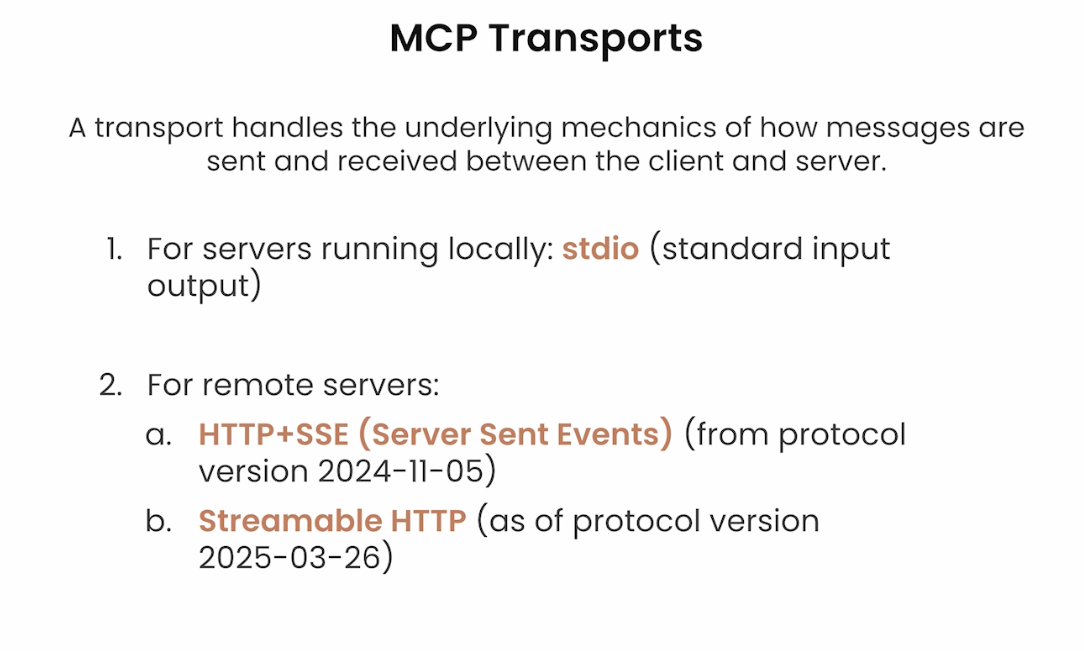
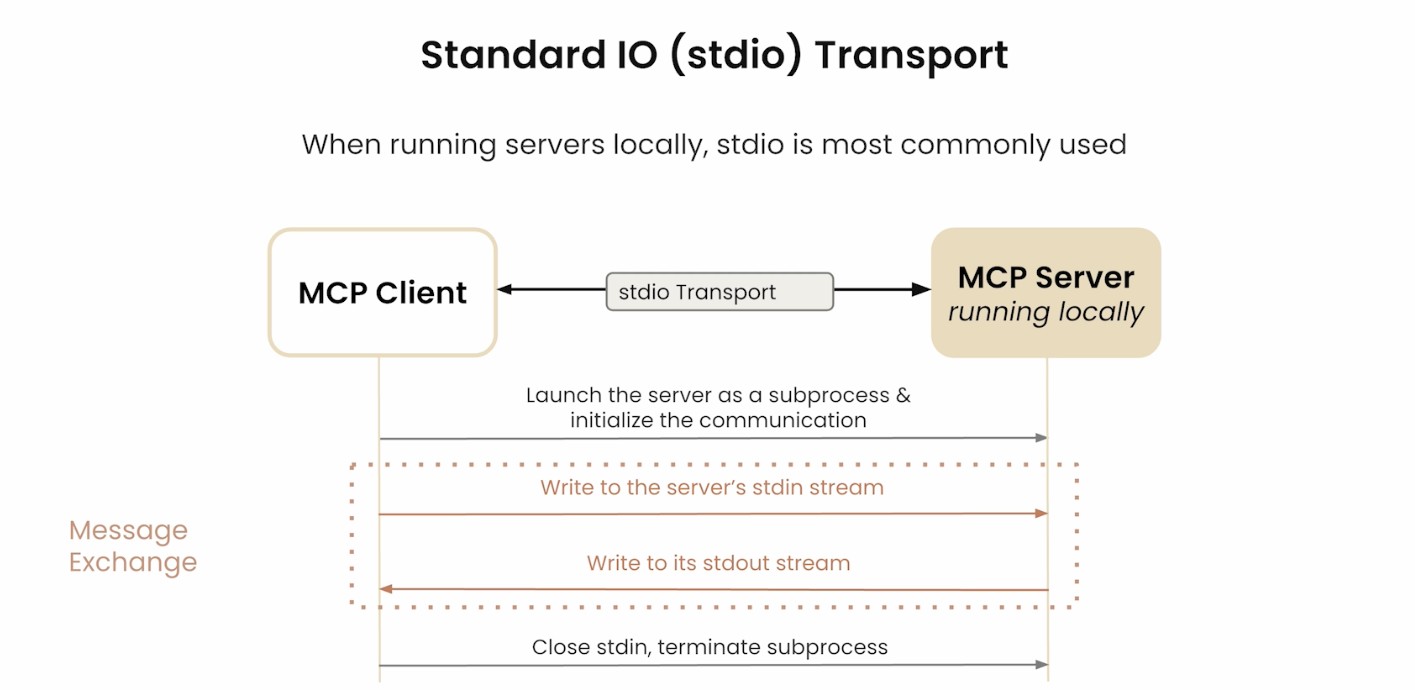
The transport layer handles the actual communication between MCP Client and MCP Server using JSON-RPC 2.0 messages. Two transport methods exist, chosen based on whether the server is local or remote.
传输层使用 JSON-RPC 2.0 消息处理 MCP 客户端与服务器之间的实际通信。根据服务器是本地还是远程,有两种传输方式可选。
| Transport / 传输方式 | Best for / 适用场景 | Characteristics / 特点 |
|---|---|---|
| stdio (Standard I/O) | Local servers / 本地服务器 | Fast, synchronous, low-latency / 快速、同步、低延迟 |
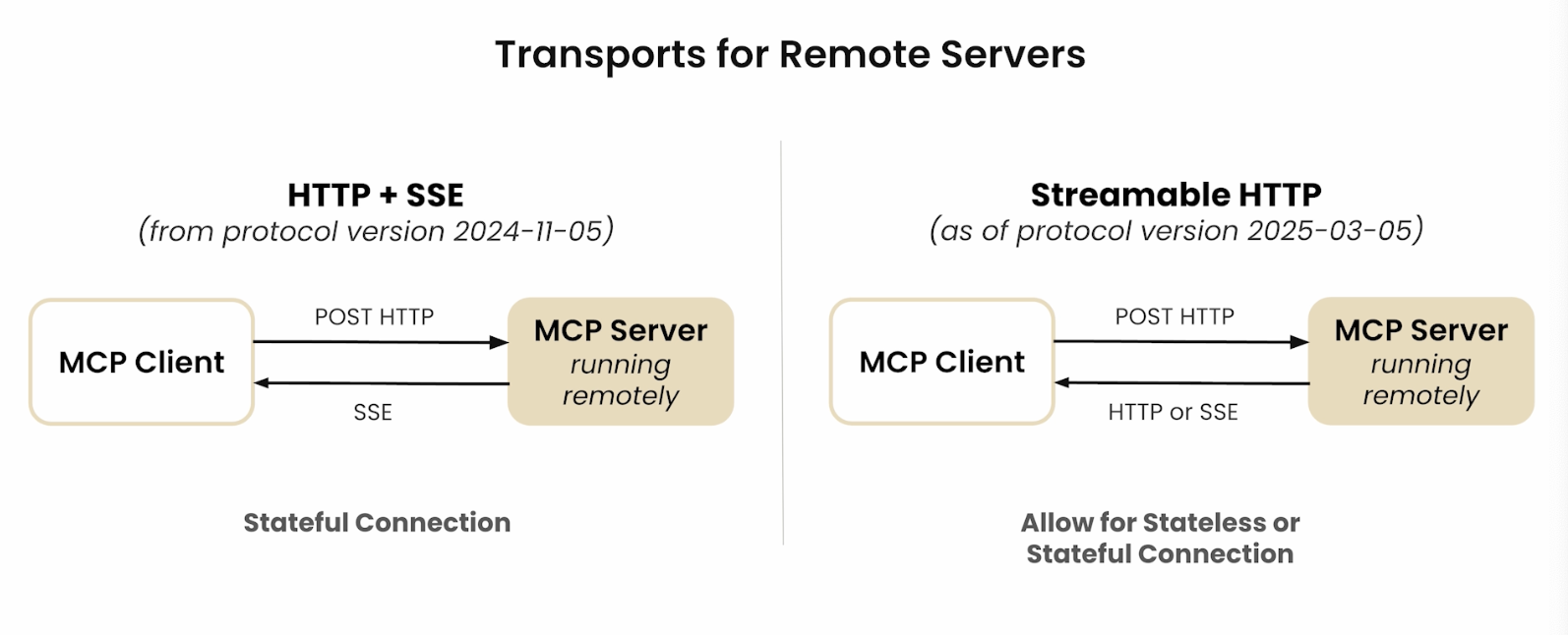
| Streamable HTTP | Remote servers / 远程服务器 | HTTP 1.1 + lightweight SSE extension; real-time streaming, async / HTTP 1.1 + 轻量 SSE 扩展;实时流式传输、异步 |
- stdio: Works well for local resources — fast synchronous message passing via system pipes, no network hop. The client creates a subprocess and communicates over stdin/stdout. / 适用于本地资源,通过系统管道实现快速同步消息传递,无需网络跳转。客户端创建子进程并通过 stdin/stdout 通信。
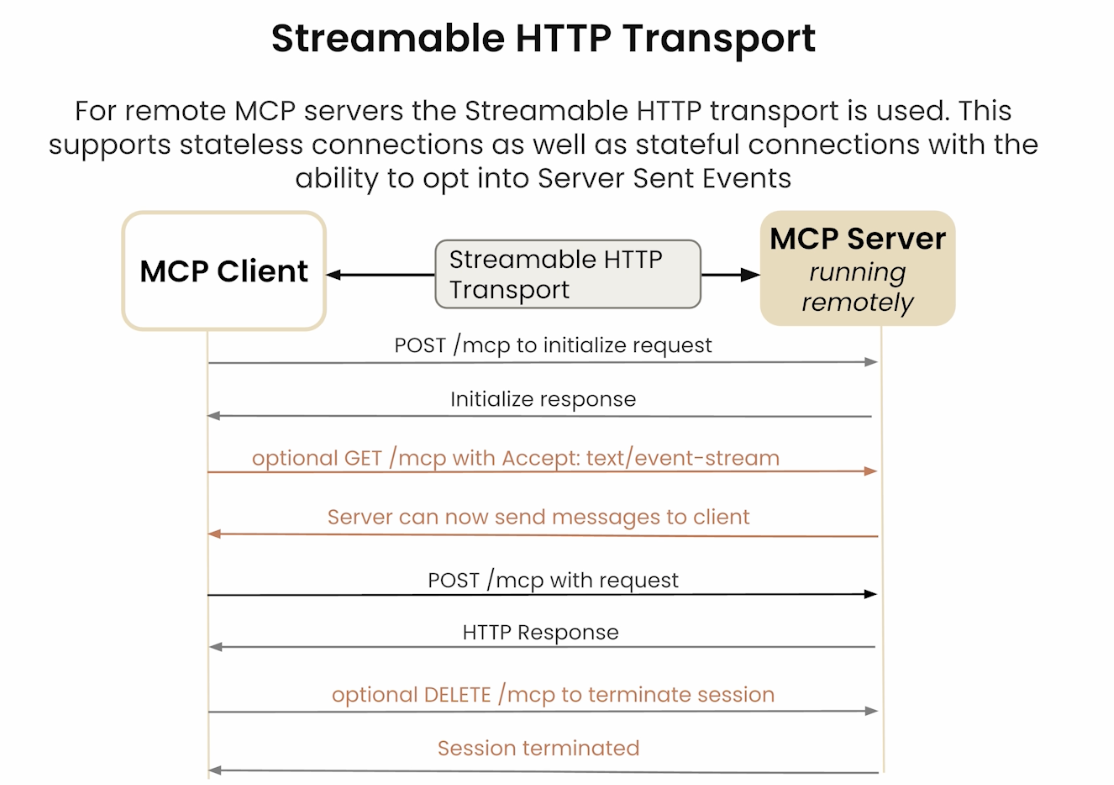
- Streamable HTTP: An extension of HTTP 1.1 with lightweight Server-Sent Events (SSE) support for remote servers. On session init the client connects to the server’s HTTP endpoint; subsequent requests use HTTP POST. For long-running tasks, the connection upgrades to SSE so the server can stream partial results back incrementally. / 远程服务器的 HTTP 1.1 扩展,支持轻量级 SSE。会话初始化时客户端连接服务器 HTTP 端点;后续请求使用 HTTP POST。对于长耗时任务,连接可升级为 SSE,服务器以流式方式逐步返回结果。
Streamable HTTP session management / Streamable HTTP 会话管理:
| Mechanism / 机制 | Header / 头字段 | Purpose / 用途 |
|---|---|---|
| Session binding / 会话绑定 | Mcp-Session-Id | Server assigns on initialize response; client includes in all subsequent requests / 服务器在 initialize 响应时分配,客户端在后续所有请求中携带 |
| SSE resumability / SSE 可恢复性 | Last-Event-ID | When an SSE stream is interrupted, client reconnects with this header to resume from the last received event / SSE 流中断时,客户端携带此头重新连接,从上次收到的事件继续 |
| Protocol routing / 协议路由 | MCP-Protocol-Version | Client sends negotiated version on every request; server uses it to route when supporting multiple versions concurrently / 客户端在每次请求中发送协商版本,服务器用于多版本并发时的路由 |
- DNS rebinding protection / DNS 重绑定防护: Servers MUST validate the
Originheader on all incoming HTTP requests and reject requests whereOrigindoes not match an expected host. This prevents malicious web pages from issuing cross-origin requests to a locally running MCP server via the browser. / 服务器必须验证所有传入 HTTP 请求的Origin头,拒绝Origin不匹配预期主机的请求,防止恶意网页通过浏览器对本地运行的 MCP 服务器发起跨域请求。 - Deprecated HTTP+SSE transport (2024-11-05) / 已弃用的 HTTP+SSE 传输: The original 2024-11-05 transport used a persistent SSE connection for server→client messages and separate HTTP POST for client→server. Streamable HTTP supersedes this in all current versions — new implementations should not use it. / 2024-11-05 原始传输使用持久 SSE 连接用于服务器→客户端消息,HTTP POST 用于客户端→服务器。Streamable HTTP 在所有当前版本中取代了它——新实现不应使用旧传输。

Real-world Use Cases 实际应用场景
MCP enables LLMs to move beyond text generation into active interaction with real systems and live data.
MCP 使 LLM 能够突破纯文本生成的局限,主动与真实系统和实时数据进行交互。
- Provides LLMs with seamless access to / 为 LLM 提供对以下内容的无缝访问:
- Source code repositories (e.g., GitHub) / 源代码仓库(如 GitHub)
- Cloud storage (e.g., Google Drive) / 云存储(如 Google Drive)
- Local machine file systems / 本地机器文件系统
- Databases and APIs / 数据库与 API 接口
- Integrated into applications like Claude Desktop for system-level access. / 已集成到 Claude Desktop 等应用中,实现系统级访问能力。
- Enables agentic workflows: read code, run queries, write files, trigger pipelines. / 支撑 Agent 工作流:读取代码、执行查询、写入文件、触发流水线。
Pre-built MCP server integrations available in the ecosystem / 生态系统中已有的预构建 MCP 服务器集成:
| Category / 类别 | Examples / 示例 |
|---|---|
| Databases / 数据库 | PostgreSQL, SQLite |
| Developer tools / 开发工具 | Git, GitHub, GitLab |
| Web tools / 网络工具 | Brave Search, Fetch |
| Productivity / 生产力 | Slack, Google Maps |
| File systems / 文件系统 | Local filesystem, cloud storage |
How MCP Works 工作流程
At its core, MCP lets an LLM delegate work to external tools, wait for results, and compose those results into a final response. The flow follows five steps.
MCP 的核心是让 LLM 将工作委派给外部工具,等待结果,再将结果整合成最终响应。整个流程分为五个步骤。
Key implementation detail / 关键实现细节: On startup, the MCP Client reads its configuration, connects to available servers, and fetches the full tool list. When the user sends a query, the client bundles the tool list together with the query before sending to the LLM — unlike a standard Q&A model, an MCP-aware LLM simultaneously receives both the question and a catalog of available tools, then decides whether any tool invocation is needed. / 客户端启动时读取配置文件,连接可用服务器并获取工具列表。用户发送查询时,客户端将工具列表与查询内容一同打包发给 LLM——与传统问答不同,支持 MCP 的 LLM 同时收到问题和可用工具目录,再决定是否需要调用工具。
Example query / 示例查询: “Find the latest sales report in our database and email it to my manager.” / “从数据库中找到最新的销售报告,并发邮件给我的经理。”
- Request & Tool Discovery / 请求与工具发现
- LLM recognizes it cannot access a DB or send email alone. / LLM 识别到自己无法独立访问数据库或发送邮件。
- Uses MCP Client to discover available tools — finds
database_queryandemail_sender. / 通过 MCP 客户端发现可用工具,找到database_query和email_sender。
- Tool Invocation / 工具调用
- LLM generates a structured call to
database_query, specifying the report name. / LLM 生成对database_query的结构化调用,指定报告名称。 - MCP Client routes the request to the appropriate MCP Server. / MCP 客户端将请求路由到对应的 MCP 服务器。
- LLM generates a structured call to
- External Action & Data Return / 外部操作与数据返回
- MCP Server translates the request into a secure SQL query, retrieves the report, formats the result, and returns it to the LLM. / MCP 服务器将请求转换为安全的 SQL 查询,检索报告,格式化结果并返回给 LLM。
- Second Action / 第二次操作
- LLM calls
email_senderwith the manager’s address and report content. / LLM 调用email_sender,传入经理邮箱和报告内容。 - Server confirms the email was sent. / 服务器确认邮件已发送。
- LLM calls
- Final Response / 最终响应
- LLM returns: “I have found the latest sales report and emailed it to your manager.” / LLM 回复:”已找到最新销售报告并发送给您的经理。”
System Prompt as the key mechanism / 关键机制:工具描述即 System Prompt: When the MCP Client sends the user query to the LLM, it includes the full registry of available MCP Servers and Tool names + descriptions. These descriptions are effectively a System Prompt — the product of prompt engineering — that tells the LLM what tools exist and what each does. After a tool call completes, the client sends the original question + the tool result back to the LLM for a final formatting pass before responding to the user. This two-phase pattern (select tool → execute → reformat with LLM) is why tool description quality is the single highest-leverage variable in an MCP system. / 客户端发送查询时,一并传入所有可用 MCP 服务器和工具的名称与描述。这些描述本质上是 System Prompt(提示工程的产物),让 LLM 知道有哪些工具可用及其用途。工具调用完成后,客户端将原始问题 + 工具返回结果再次发给 LLM 进行最终格式化,再返回给用户。正是这一两阶段模式(选工具 → 执行 → LLM 重新格式化)使工具描述质量成为 MCP 系统中杠杆最高的单一变量。
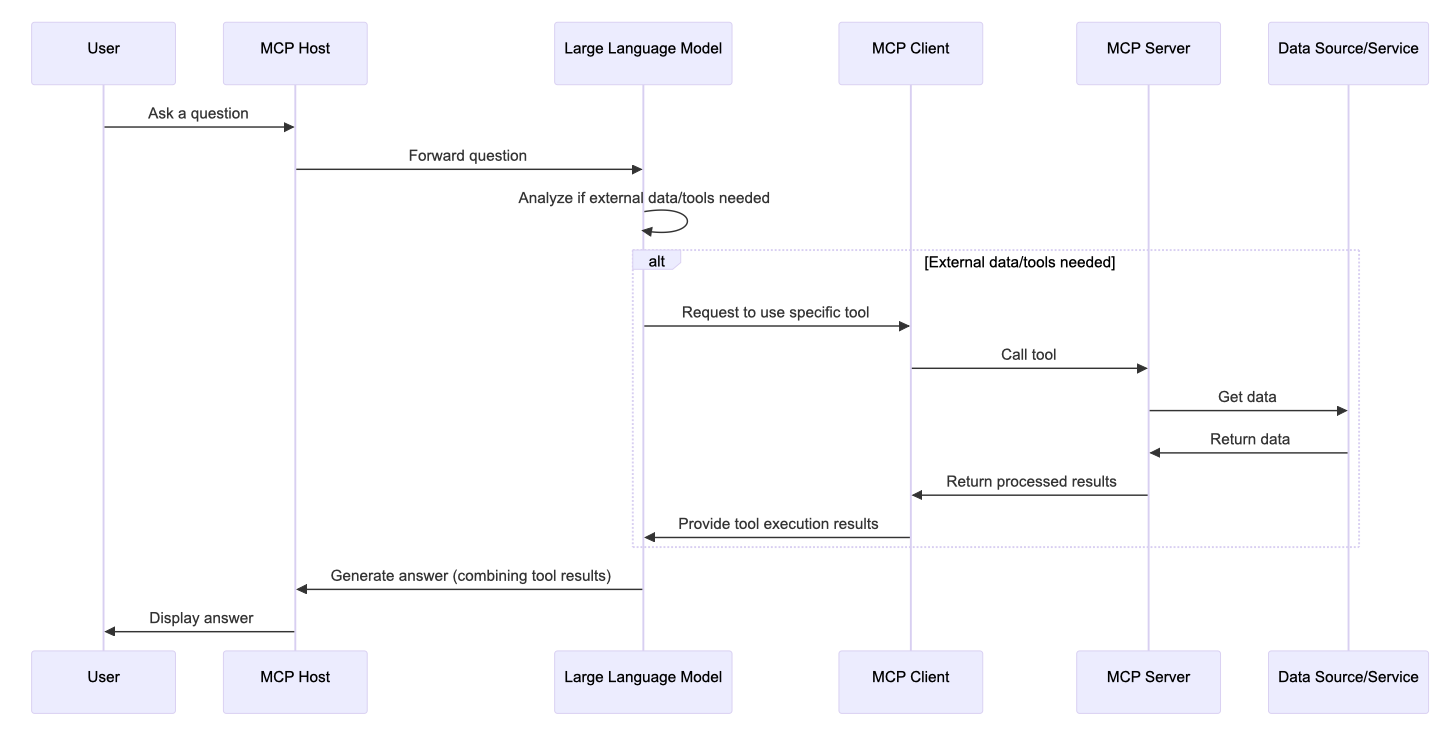
MCP vs RAG 对比
Both MCP and RAG augment LLMs with external information, but they serve fundamentally different purposes: RAG is for retrieval; MCP is for interaction and action.
MCP 和 RAG 都能用外部信息增强 LLM,但目的根本不同:RAG 用于检索;MCP 用于交互和操作。
| Feature / 特性 | MCP | RAG |
|---|---|---|
| Primary goal / 主要目标 | Standardize two-way LLM ↔ external tool communication, enabling actions / 标准化 LLM 与外部工具的双向通信,支持执行操作 | Enhance responses by retrieving relevant text from a knowledge base / 从知识库检索相关文本以增强响应 |
| Mechanism / 机制 | LLM invokes external functions via a standard protocol / LLM 通过标准协议调用外部函数 | Query → retrieve relevant chunks → augment prompt → generate / 查询 → 检索相关片段 → 增强提示词 → 生成 |
| Interaction / 交互方式 | Active — executes tasks in external systems / 主动型,在外部系统中执行任务 | Passive — retrieves text to inform generation / 被动型,检索文本辅助生成 |
| Output type / 输出类型 | Structured tool calls + real-time results + human-readable response / 结构化工具调用 + 实时结果 + 自然语言响应 | Text response augmented by retrieved documents / 由检索文档增强的文本响应 |
| Standardization / 标准化 | Open standard protocol across vendors / 跨厂商开放标准协议 | Technique / framework, not a universal protocol / 技术/框架,非通用协议 |
| Use cases / 典型场景 | Booking flights, updating CRM, running code, real-time data / 订机票、更新CRM、运行代码、实时数据 | Q&A, document summarization, reducing hallucinations / 问答、文档摘要、减少幻觉 |
Mental model / 心智模型: RAG = LLM with a library card. MCP = LLM with hands that can reach out and do things. / RAG = 带借书证的 LLM;MCP = 长了手、能主动做事的 LLM。
Claude Skill vs MCP Server 对比
Acore distinction: Access vs. Knowledge
- MCP Server provides physical access to external tools and data
- Claude Skill teaches Claude the best way to perform a specific workflow.
Think of it this way: a Claude Skill is the instruction manual (teaching Claude how to perform a workflow), while an MCP Server is the toolbox (giving Claude physical access to external tools and data).
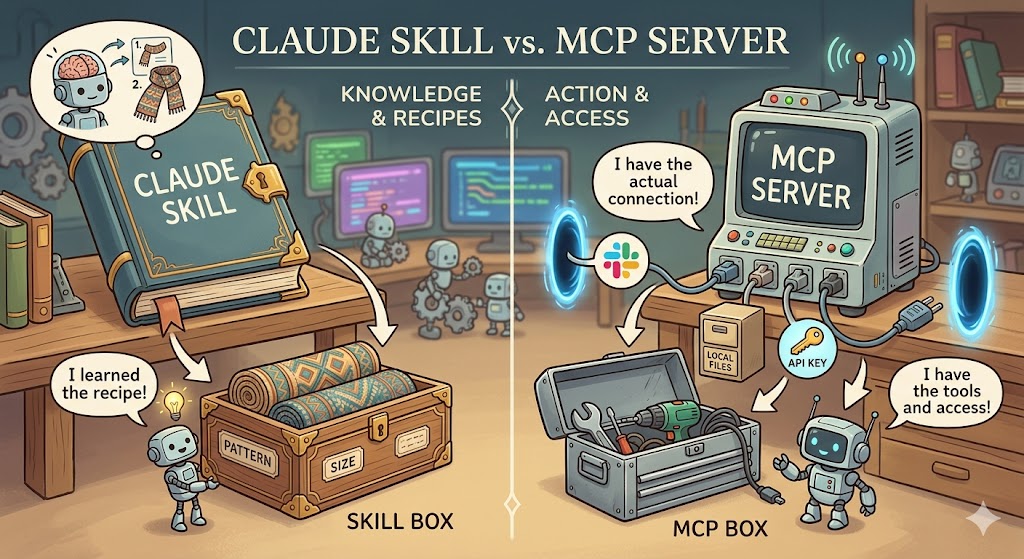
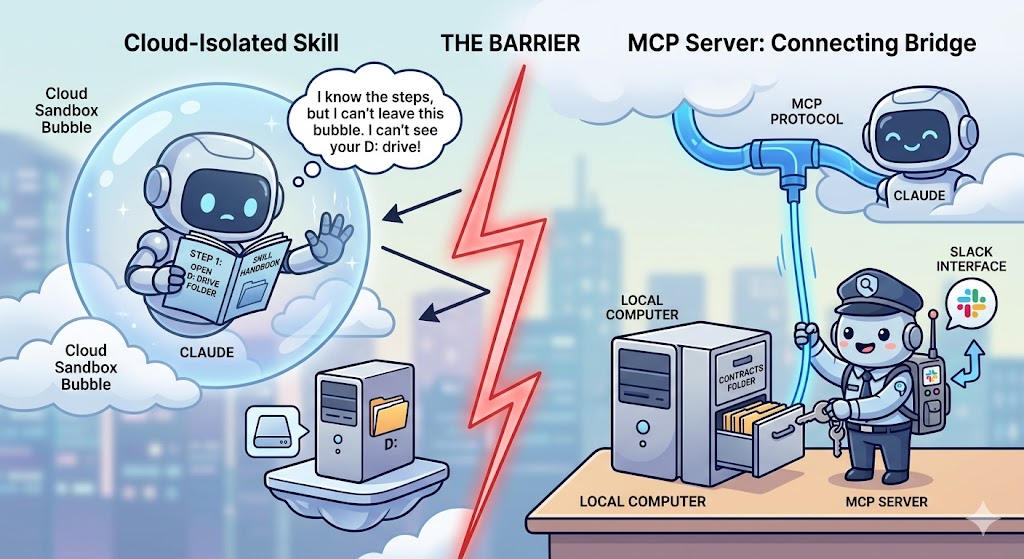
Key Differences 核心差异
| Feature | Claude Skill | MCP Server |
|---|---|---|
| Primary Goal | Standardize behavior: teaches Claude a specific “how-to” for a workflow | Provide access: connects Claude to external software (Slack, GitHub, local files) |
| Activation | Loads dynamically based on user intent in the prompt | Always available as a live connection once the server is running |
| Hosting | Lives as a folder with instructions/scripts inside Claude’s environment | Requires a separate server process (local or remote) to be running |
| Complexity | Easy to build with Markdown and simple scripts | Higher technical barrier; requires setting up a server and protocol |
| Analogy | A Runbook: “Here is how we format our team’s reports” | A Port: “Here is the plug to connect to the company database” |
Claude Skill: The Instructional Layer 知识/指令层
A Skill is a packaged set of instructions (usually a SKILL.md file) and helper scripts that tell Claude how to handle a repeatable task.
Skill 是一套打包的指令(通常是 SKILL.md 文件)和辅助脚本,告诉 Claude 如何处理可重复的任务。
- How it works: When you ask Claude to do something, it scans available skills; if one matches, it loads that skill into context and follows it.
- Best for: Ensuring consistency — e.g., every finance report uses a specific color scheme and formula structure.
- Characteristic: Skills are static knowledge. They live inside Claude’s “brain” and define a thinking pattern for a well-defined job.
- 工作原理:向 Claude 发出请求时,它会扫描可用的 Skill;若匹配,则加载到上下文并执行。
- 适合场景:保证一致性。例如,让 Claude 生成的每份财务报告都使用特定颜色方案和公式结构。
- 特点:Skill 是静态知识,存储在 Claude 的”大脑”中,为特定任务提供思维定势。
MCP Server: The Integration Layer 集成/访问层
MCP is an open standard that lets Claude communicate with anything that has an API. It acts as a bridge between the AI and your actual applications.
MCP 是一个开放标准,让 Claude 与任何有 API 的工具通信,充当 AI 与实际应用之间的桥梁。
- How it works: You run an MCP server (e.g., for Google Drive or your terminal). Claude uses the protocol to call functions on that server — reading a file, sending a message, querying a database.
- Best for: Real-time data and external actions — checking actual Jira tickets, querying a live database, sending a Slack message.
- Characteristic: MCP is dynamic and real-time — a physical entity running outside Claude that gives it the ability to act in the world.
- 工作原理:启动一个 MCP Server(如 Google Drive 或本地终端的 MCP)。Claude 通过协议调用服务器上的函数——读取文件、发送消息、查询数据库。
- 适合场景:实时数据和外部操作。查看实际的 Jira 单子、实时数据库或发送 Slack 消息,必须使用 MCP Server。
- 特点:MCP 是动态且实时的——一个运行在 Claude 之外的物理实体,赋予 Claude 在真实世界中行动的能力。
Why Not Just Hardcode Tokens in a Skill? 为什么不直接把 Token 写进 Skill?
Hardcoding credentials inside a Skill looks like a shortcut but creates three fundamental problems:
在 Skill 里直接写入凭证看似捷径,但存在三个根本问题:
Security 安全性
Skill files are readable text. A hardcoded token is plaintext in your config. If you share the Skill with a colleague, they gain your identity. MCP Server keeps credentials entirely outside Claude’s reach — authentication is handled internally and Claude only sees a function interface.
Skill 文件是可读文本,Token 以明文存储。分享 Skill 给同事意味着分享你的身份凭证。MCP Server 让凭证完全不暴露给 Claude——认证在服务端内部处理,Claude 只能调用功能接口。
Capabilities 执行能力
Claude’s runtime is a sandboxed cloud process. It cannot directly reach your local filesystem, access internal corporate APIs behind a firewall, or maintain persistent background processes. An MCP server runs as a native process on your machine with full local permissions — it is Claude’s mechanical arm into the physical world.
Claude 的运行时是受限的云端沙盒,无法直接访问本地文件系统、内网 API 或维持持久化后台进程。MCP Server 作为本机进程运行,拥有完整的本地权限——它是 Claude 伸向物理世界的机械臂。
Standardization 标准化
A Skill that calls Slack works only for that Skill. A Slack MCP Server works for any MCP-compatible AI client — Claude, future models, or any tool that supports the standard. MCP is the USB-C of AI integrations.
为 Slack 写的 Skill 只服务于该 Skill;而 Slack 的 MCP Server 可供所有支持 MCP 协议的 AI 客户端使用——Claude、未来的模型或任何兼容工具。MCP 是 AI 集成领域的 USB-C 接口。
Choosing the Right Tool 如何选择
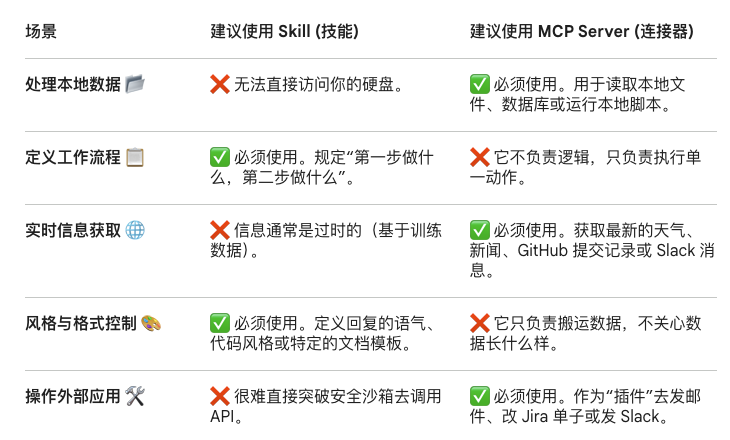
| Scenario / 场景 | Use Skill / 用 Skill | Use MCP Server / 用 MCP |
|---|---|---|
| Processing local data / 处理本地数据 | No — cannot access your disk | Yes — reads local files, databases, scripts |
| Defining a workflow / 定义工作流程 | Yes — defines “step 1, then step 2” logic | No — only executes individual actions |
| Real-time information / 实时信息获取 | No — knowledge is from training data | Yes — fetch live weather, GitHub commits, Slack messages |
| Style & format control / 风格与格式控制 | Yes — defines tone, code style, document templates | No — only moves data, doesn’t shape it |
| Operating external apps / 操作外部应用 | No — hard to break out of security sandbox | Yes — “plugin” to send email, update Jira, post to Slack |
Using Both Together 组合使用
The most powerful setups combine both: the MCP Server gives Claude the hands to reach into external systems, while the Claude Skill gives Claude the wisdom to know exactly what to do with what it finds.
最强大的配置是两者结合:MCP Server 给 Claude 提供”手”伸入外部系统,Claude Skill 给 Claude 提供”智慧”知道该如何处理找到的内容。
Example: monitor a local contracts folder and Slack legal when overdue / 示例:监控本地合同文件夹,逾期时通过 Slack 通知法务
| Role / 角色 | Concept / 概念 | Task / 职责 |
|---|---|---|
| Instruction manual / 命令手册 | Skill | Defines: “Contract is overdue if date > today; use formal tone” / 定义逾期规则与通知语气 |
| Local archivist / 本地档案员 | Filesystem MCP | Walks to disk and reads contract files to Claude / 实际访问硬盘,逐行将合同内容读给 Claude |
| Company courier / 邮差 | Slack MCP | Takes Claude’s drafted message and delivers via Slack API / 拿着 Claude 草拟的消息,通过 Slack API 实际发送 |
Brain vs. Limbs / 大脑 vs 四肢: Skill = the recipe (知识/菜谱). MCP = the hands and ingredients (手和食材). Even with a perfect recipe, you cannot cook without hands to hold the pan and a refrigerator door (MCP) to get the ingredients.
Benefits
Reduced Hallucinations
LLMs hallucinate because they predict answers from training data, not real-time facts. MCP gives them a structured path to retrieve external, authoritative data before responding.
LLM 产生幻觉是因为它们基于训练数据预测答案,而非实时事实。MCP 为其提供了一条结构化路径,在响应前检索外部权威数据,从而降低幻觉率。
Increased Automation 提升自动化能力
MCP connects LLMs to ready-made tools and integrations (business software, content repos, dev environments). LLMs become smart agents that can act independently — updating CRM records, fetching live data, running calculations — not just chat programs.
MCP 将 LLM 连接到现成的工具和集成(业务软件、内容仓库、开发环境)。LLM 不再只是聊天程序,而是能独立行动的智能体——更新 CRM 记录、获取实时数据、执行计算。
Easier Integrations — Solving the N×M Problem 更简单的集成,解决 N×M 问题
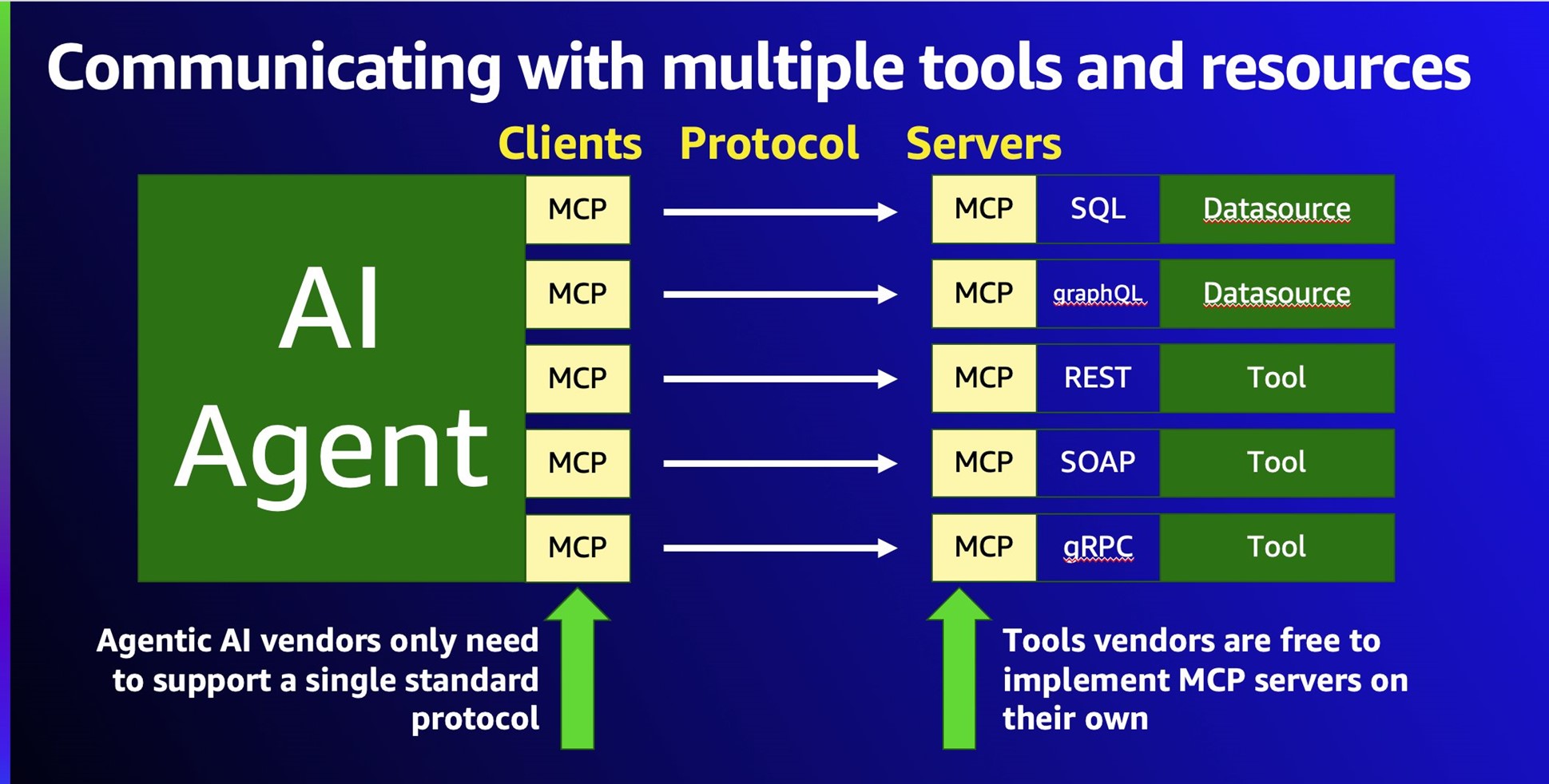
Before MCP, connecting LLMs to external systems required custom code per model per tool — the N×M problem: N models × M tools = N×M custom integrations. MCP acts like a USB-C port — one standard, any device. Developers can switch LLM providers or add new tools without rewriting integration code.
在 MCP 出现之前,将 LLM 连接到外部系统需要为每个模型、每个工具编写定制代码——即 N×M 问题:N 个模型 × M 个工具 = N×M 套定制集成。MCP 就像 USB-C 接口——一种标准,适配所有设备。开发者无需重写集成代码即可切换 LLM 提供商或添加新工具。
Standardization & Universality 标准化与通用性
MCP 是一种开放标准,提供了统一的协议规范,如同 AI 应用程序的 “USB-C 接口”——使 AI 模型连接不同数据源和工具时遵循相同标准,而无需为每种数据源和模型单独处理。
- 统一规范 / Unified standard: Any LLM connects to any tool via the same protocol. Alternative approaches (custom code, plugin systems, API adapters) each require separate implementations per data source and model pair. / 任何 LLM 通过同一协议连接任何工具;其他方式(定制代码、插件系统、API 接口)通常需针对每个数据源和模型组合单独处理。
- 跨系统兼容 / Cross-system compatibility: Seamlessly connects local resources (databases, files) and remote APIs (Slack, GitHub) through the same unified protocol layer. / 无论本地资源(数据库、文件)还是远程 API(Slack、GitHub),均通过同一协议层无缝接入。
Development Efficiency 开发效率与便捷性
- 简化开发流程 / Streamlined development: Developers no longer write bespoke interface code for each data type or service. MCP’s SDK enables rapid integration — e.g., a smart-home system can manage all device data through a single MCP server instead of N separate adapters. / 开发者无需为每种数据类型或服务编写专门接口代码。利用 MCP SDK 可快速实现连接——例如智能家居系统可通过单一 MCP 服务器统一管理所有设备数据。
- 预构建服务器 / Pre-built servers:
- Anthropic ships official MCP servers for popular platforms — Google Drive, Slack, GitHub, Postgres
- ready to use without building from scratch. 开箱即用。
Context Management & Interaction 上下文管理与交互能力
- 分布式上下文管理 / Distributed context:
- MCP abstracts “context state” so it can be passed via the protocol rather than packed into the prompt itself
- context is no longer limited to what fits in the prompt window, making interactions more lightweight.
- MCP 对”上下文状态”进行抽象化处理,使其可通过协议标准化传递,不再局限于 prompt 本身,使交互更轻量化。
- 双向通信 / Bidirectional communication: Data flows both ways — data sources push information to the LLM, and the LLM can write output back to the data source, forming an efficient interaction loop. / 数据双向流动——数据源向 AI 模型传输信息,AI 模型也能将输出反馈给数据源,形成高效的交互闭环。
Security & Scalability 安全性与可扩展性
- 安全机制完善 / Built-in security controls: MCP provides strong access control, fine-grained permissions, audit trails, and built-in monitoring tools that reduce data breach risk and protect sensitive data. / MCP 提供强访问控制、细粒度权限设置、审计跟踪和内置安全监测工具,降低数据泄露风险,保障敏感数据安全。
- 灵活扩展 / Flexible extensibility: Developers can add new plugins or modules at any time, easily incorporate new data sources or capabilities, and rapidly adapt to changing business requirements. / 开发者可随时为应用构建新的插件或模块,方便添加新数据源或功能,快速适应不同业务需求。
Security Principles 安全原则
Full attack taxonomy → see MCPSecurity. This section covers defensive principles only. / 完整攻击分类见安全分析笔记,本节仅覆盖防御原则。
Because MCP can access any data and potentially execute code through connected tools, security cannot be an afterthought.
由于 MCP 可以访问任意数据并通过连接工具潜在地执行代码,安全性不能事后补救。
| Principle / 原则 | What it means / 含义 |
|---|---|
| User consent & control / 用户同意与控制 | Users must explicitly approve all data access and actions the LLM takes. / 用户必须明确批准 LLM 的所有数据访问和操作。 |
| Data privacy / 数据隐私 | Encrypt sensitive data; enforce access controls; get consent before exposing data to MCP servers. / 加密敏感数据;强制访问控制;在向 MCP 服务器暴露数据前获得同意。 |
| Tool safety / 工具安全 | Don’t trust tool descriptions from unverified servers. Require user approval before tool execution. / 不信任未经验证服务器的工具描述,执行前需用户批准。 |
| Secure output handling / 安全输出处理 | Sanitize LLM outputs before rendering — prevent XSS and injection attacks. / 渲染前对 LLM 输出进行清理,防止 XSS 和注入攻击。 |
| Supply chain security / 供应链安全 | Vet all MCP servers and their dependencies. A compromised server poisons all LLM responses. / 审查所有 MCP 服务器及其依赖。一个被攻陷的服务器会污染所有 LLM 响应。 |
| Monitoring & auditing / 监控与审计 | Log all MCP interactions. Audit data movement and tool usage. Detect anomalies early. / 记录所有 MCP 交互,审计数据流动和工具使用,及早发现异常。 |
Authentication Challenge: Personal Access Tokens 认证挑战:个人访问令牌
MCP introduces a unique authentication problem: users cannot go through a traditional login flow (username/password, email/OTP) when accessing external systems via an AI tool. The MCP server acts as a representative for the user — it needs to authenticate on their behalf without an interactive session. Additionally, the access control system of the underlying service must still apply: a user accessing their CRM through an AI tool should see exactly the same data they’d see logging in directly.
MCP 带来了一个独特的认证问题:用户通过 AI 工具访问外部系统时,无法走传统登录流程(用户名/密码、邮箱/验证码)。MCP 服务器充当用户的代表——需要在没有交互式会话的情况下代表用户完成认证。同时,底层服务的访问控制规则必须依然生效:通过 AI 工具访问 CRM 的用户,应该看到与直接登录完全相同的数据。
This breaks down into two distinct challenges: (1) authentication — how does the user prove identity without an interactive login flow; and (2) authorization for MCP server requests — the user accessing the system through an AI tool is the same user who would log in directly, so redesigning the entire access-control model just to accommodate the MCP server would be costly and unnecessary. / 这拆分为两个独立挑战:(1)认证——用户如何在没有交互式登录流程的情况下证明身份;(2)MCP 服务器请求的授权——通过 AI 工具访问系统的用户与直接登录的用户是同一人,为了迁就 MCP 服务器而重新设计整个访问控制机制成本高昂且没有必要。
The recommended pattern / 推荐方案:
- Personal Access Tokens (PATs) / 个人访问令牌: Users generate a PAT from the service they want to connect, then provide it to the MCP server configuration. The PAT carries the user’s identity and permissions without requiring an interactive session. Existing backend services keep their auth mechanism unchanged. / 用户从目标服务生成 PAT,再提供给 MCP 服务器配置。PAT 携带用户身份和权限,无需交互式会话。现有后端服务无需改动认证机制。
- RBAC integration / RBAC 集成: Combine PATs with Role-Based Access Control so the MCP server can only access resources the user is authorized for — not everything the server process can reach. / PAT 结合基于角色的访问控制,确保 MCP 服务器只能访问用户有权限的资源,而非服务器进程可以触达的全部内容。
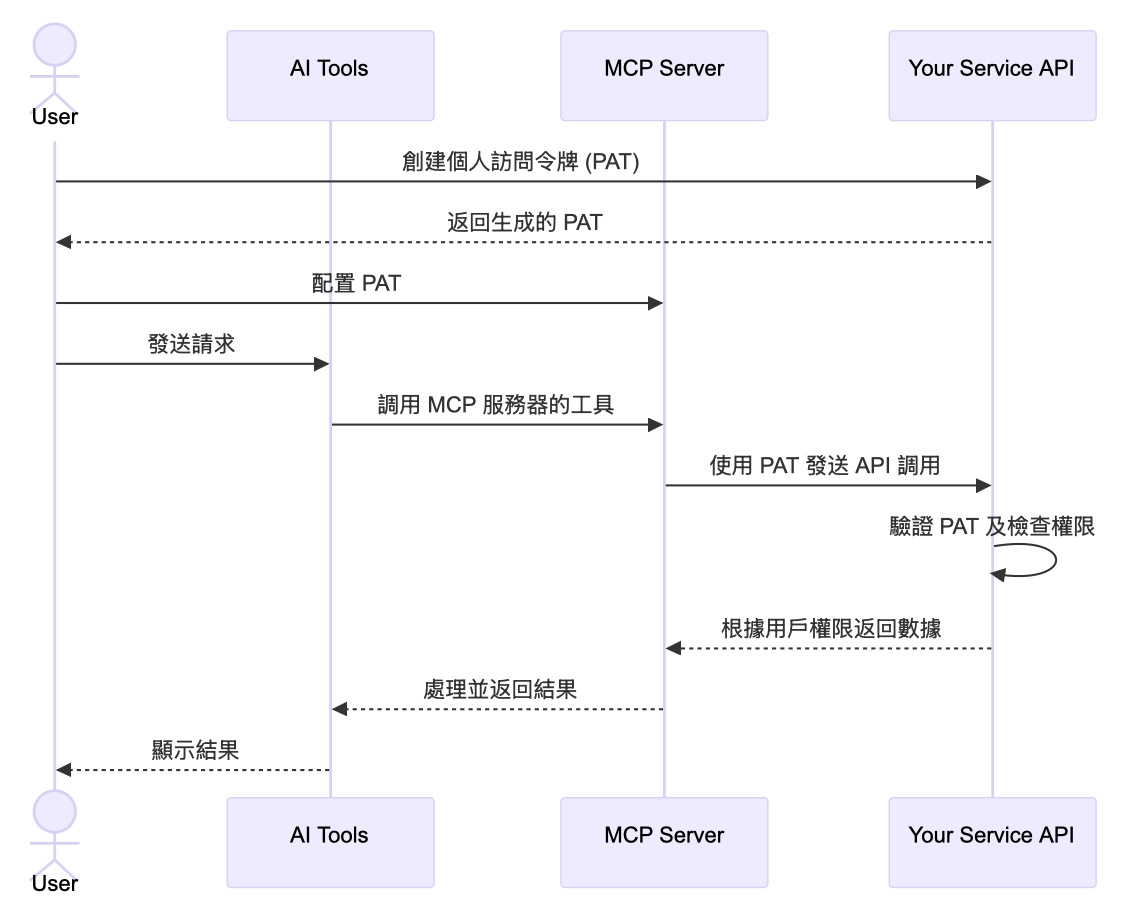
PAT flow in detail / PAT 流程细节: (1) user generates a PAT from the target service and configures it in the MCP server; (2) the AI tool sends a request that triggers the MCP server; (3) the MCP server calls the service’s API, attaching the PAT; (4) the service validates the PAT and checks the associated permissions; (5) the service returns only the data within the user’s authorized scope. This keeps the backend service’s existing auth mechanism untouched while letting it securely serve an AI-tool-driven request. / PAT 流程细节:(1)用户从目标服务生成 PAT 并配置到 MCP 服务器;(2)AI 工具发出请求触发 MCP 服务器;(3)MCP 服务器携带 PAT 调用服务 API;(4)服务验证 PAT 并检查关联权限;(5)服务仅返回用户授权范围内的数据。该方案让后端服务的现有认证机制保持不变,同时安全地响应由 AI 工具发起的请求。
Off-the-shelf auth for MCP servers / MCP 服务器的现成认证方案: Building PAT issuance, validation, and RBAC enforcement from scratch is nontrivial. Identity providers are starting to ship plug-and-play auth specifically for MCP servers — e.g. Logto’s MCP Auth — so a server can add production-ready authentication without reading the full authorization spec or wiring up token issuance manually. / 从零构建 PAT 签发、校验和 RBAC 强制执行并不简单。身份提供商已开始为 MCP 服务器提供开箱即用的认证方案——例如 Logto 的 MCP Auth——使服务器无需通读完整授权规范或手动搭建令牌签发流程即可获得生产级认证能力。
Deployment Options 部署选择
Local vs Remote Servers 本地 vs 远程服务器
| Local Server / 本地服务器 | Remote Server / 远程服务器 | |
|---|---|---|
| Transport | stdio | Streamable HTTP |
| Best for / 适用场景 | IDE context, private file systems, offline / IDE 上下文、私有文件系统、离线 | Public APIs, shared enterprise services, real-time data / 公共 API、共享企业服务、实时数据 |
| Speed / 速度 | High — no network hop / 高,无网络跳转 | Lower — network latency / 较低,有网络延迟 |
| Security / 安全 | Higher — data stays local / 更高,数据不离机 | Requires encryption in transit / 需要传输加密 |
| Scalability / 扩展性 | Limited to one machine / 限于单机 | Multiple AI apps can share one server / 多个 AI 应用可共享 |
Local deployment suits development and offline-only scenarios but faces four production challenges / 本地部署适合开发和纯离线场景,但在生产环境面临四大挑战:
| Challenge / 挑战 | Detail / 说明 |
|---|---|
| Version drift / 版本漂移 | Package managers (npm, uv) use cached versions and do not auto-update. Users must manually check and update each MCP server — unmanageable at scale. / npm、uv 等包管理器使用缓存版本,不自动更新,用户必须手动检查每个 MCP 服务器的更新,规模大时无法维护。 |
| Same-namespace privilege / 同命名空间权限 | Local MCP servers run with the same OS permissions as the current user — they can access any file or resource the user can, with no sandbox boundary. / 本地 MCP 服务器以当前用户权限运行,可访问该用户能访问的所有文件和资源,没有沙盒边界。 |
| Credential exposure / 凭证暴露 | Credentials (API keys, passwords) are stored locally in config files. If misconfigured, other local applications can also read them. / 凭证(API Key、密码)存储在本地配置文件中,配置不当时其他本地应用也可读取,存在横向泄露风险。 |
| Per-process resource cost / 逐进程资源消耗 | Each MCP server is a separate OS process that starts with the client. Running many servers simultaneously significantly degrades local machine performance. / 每个 MCP 服务器都是独立进程并随客户端启动,同时运行大量服务器会显著影响本机性能。 |
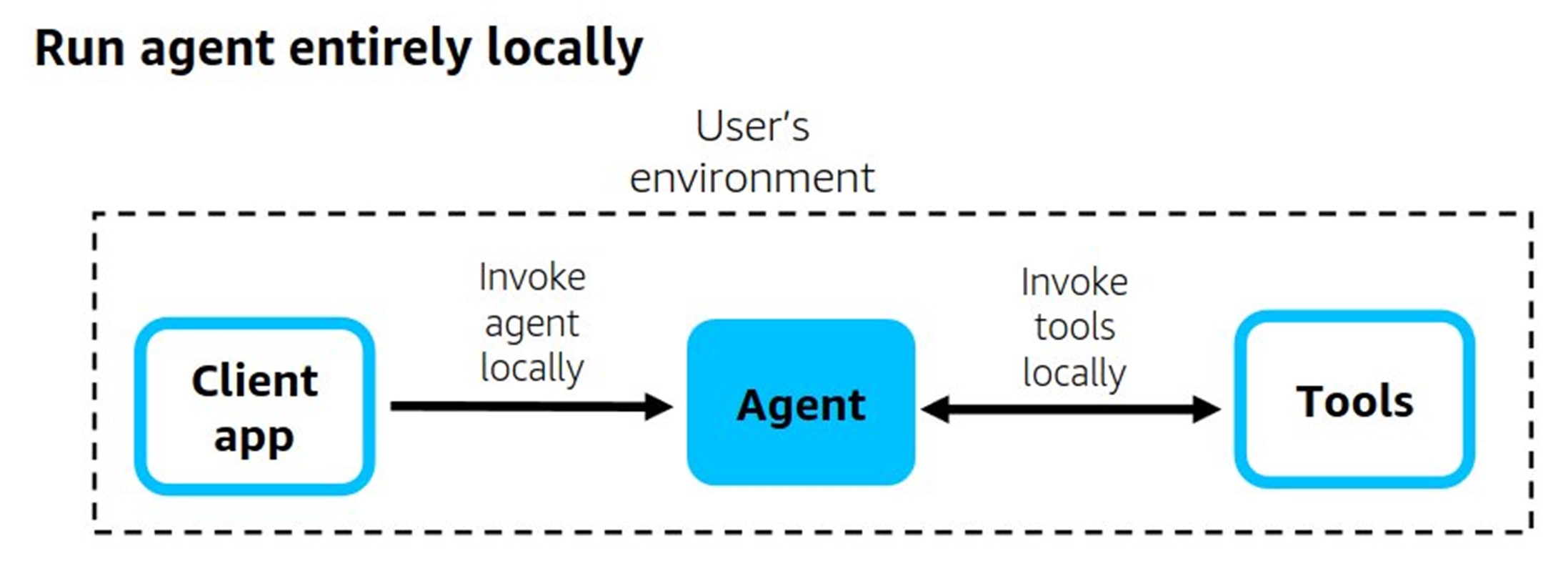
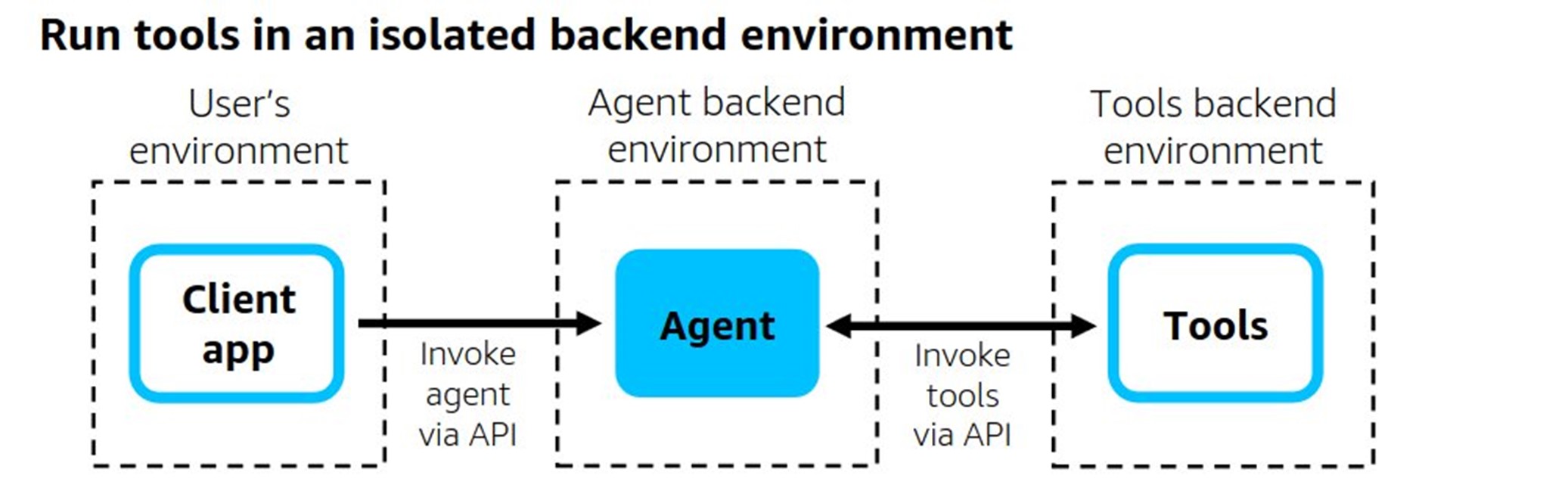
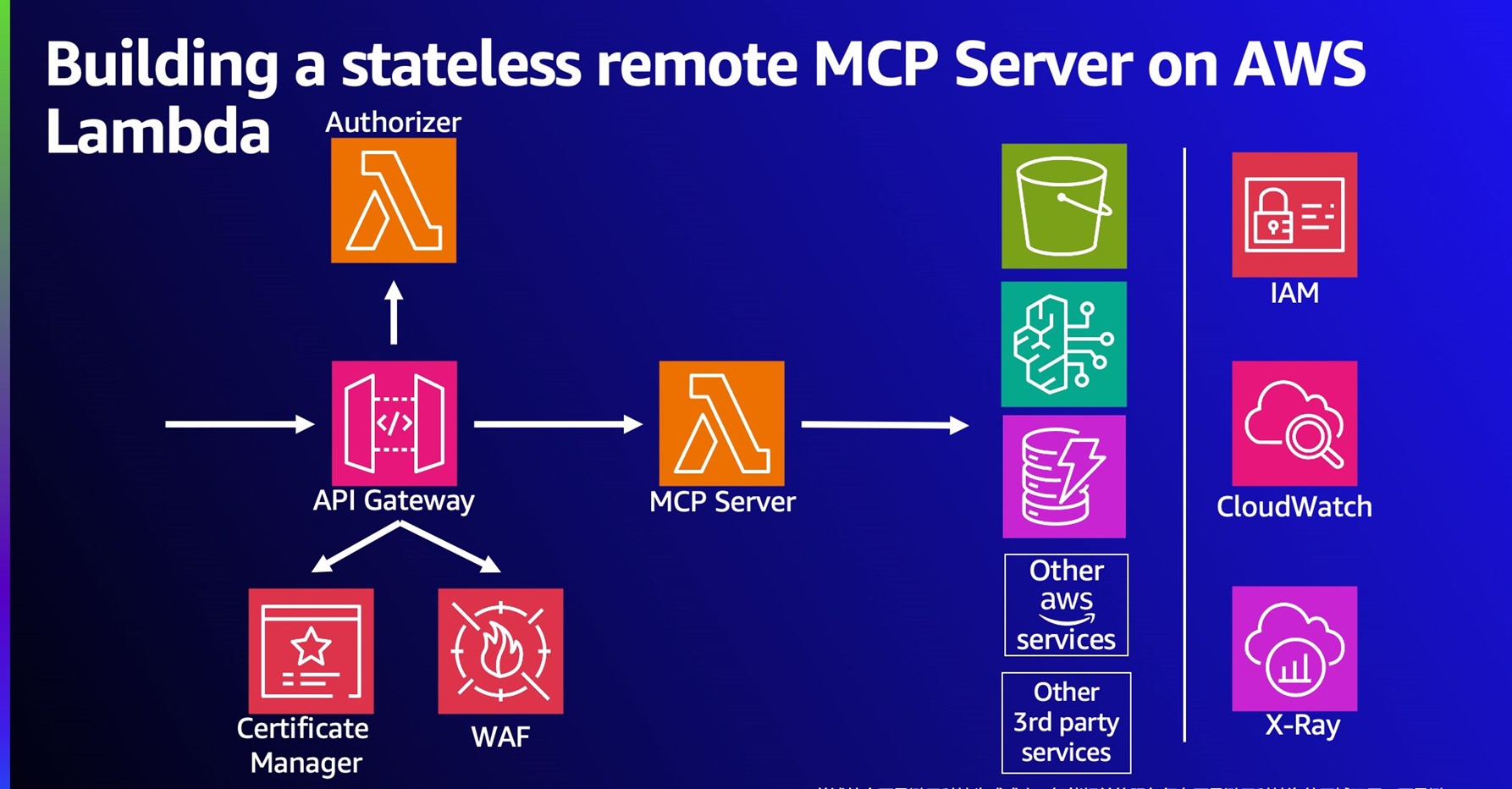
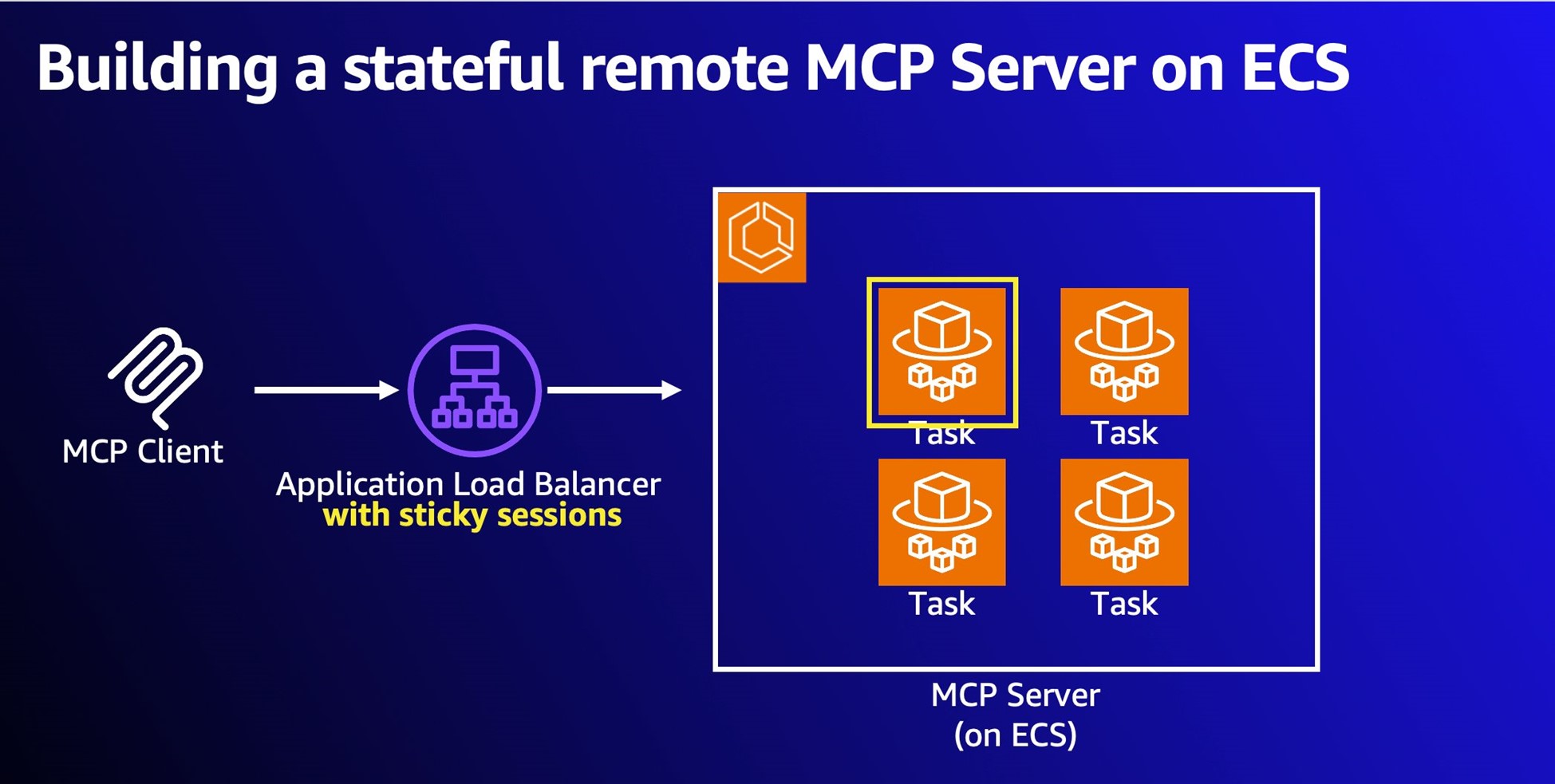
For remote deployment, server design determines the right compute platform / 对于远程部署,服务器的状态特性决定合适的计算平台:
| Type / 类型 | Characteristics / 特点 | AWS Platform / AWS 平台 |
|---|---|---|
| Stateless / 无状态 | No session state, short request-response cycle (web search, API calls) / 无会话状态,请求-响应周期短(网络搜索、API 调用) | AWS Lambda + API Gateway |
| Stateful / 有状态 | Maintains session context across multiple interactions (long conversations, multi-step workflows) / 跨多次交互保持会话上下文(长对话、多步骤工作流) | Amazon ECS Fargate + ALB Sticky Sessions |
Advantages of remote deployment / 远程部署的优势:
| Advantage / 优势 | Detail / 说明 |
|---|---|
| Automated version management / 自动版本管理 | CI/CD pipelines update the server in one controlled environment. Users reconnect and automatically receive the latest version — no manual npm update or uv pip install required. / CI/CD 流水线在单一可控环境更新服务器,用户重新连接即获得最新版本,无需手动更新。 |
| Centralized auth / 集中式认证 | Remote servers authenticate via OAuth or similar standard protocols. Credentials never distribute to local machines — revocation, rotation, and audit all happen centrally. / 通过 OAuth 等标准协议认证,凭证无需分发到本地,撤销、轮换、审计均在中心统一管理。 |
| LLMOps observability / 可观测性 | Cloud deployments support unified monitoring: request volume, response times, error rates, resource usage. Compliance audit logs record every tool call — capabilities that are difficult or impossible to replicate locally. / 支持统一监控(请求量、响应时间、错误率、资源使用),合规审计日志记录每次工具调用,本地环境难以实现。 |
| Resource efficiency / 资源效率 | Clients maintain a simple HTTP connection; all compute runs server-side. On-demand billing (e.g., Lambda pay-per-ms) means cost scales directly to actual usage. / 客户端只维护简单 HTTP 连接,所有计算在服务端完成,按需计费,成本随实际使用量弹性变化。 |
| Enterprise centralization / 企业集中管理 | IT teams deploy a shared MCP server cluster for all departments, enabling unified permission management, audit, and performance optimization across the organization. / IT 团队可部署统一的 MCP 服务器集群供各部门共享,实现权限管理、审计追踪和性能优化的集中治理。 |
Limitations of remote deployment / 远程部署的局限性:
| Limitation / 局限性 | Detail / 说明 |
|---|---|
| Network latency / 网络延迟 | HTTP round-trip overhead is inherent — higher than local subprocess pipe communication. Can noticeably affect user experience in high-frequency interactive scenarios (e.g., real-time code analysis). / HTTP 往返开销不可避免,比本地管道通信延迟更高,在高频交互场景中对体验影响明显。 |
| Larger attack surface / 更大攻击面 | Exposing HTTP endpoints to the Internet creates more attack vectors than local-only deployments. Requires additional security investment: auth, encryption, WAF, rate limiting. / 将 HTTP 端点暴露到网络比仅本地部署攻击面更大,需要额外安全投入(认证、加密、WAF、限流)。 |
| Streamable HTTP compatibility / 协议兼容性 | Streamable HTTP is a newer spec; some clients have incomplete support. Compatibility shims (e.g., mcp-proxy) can bridge to stdio format for older or local-only clients. / Streamable HTTP 规范较新,部分客户端支持不完善,可通过 mcp-proxy 等工具转换为 stdio 格式以兼容老旧客户端。 |
Managed vs Self-hosted 托管 vs 自托管
Managed / 托管 (e.g., Cloud Run, GKE): Auto-scaling, high availability, built-in security. Recommended for enterprise-grade apps. Developers focus on tool logic, not infra. / 自动扩缩容、高可用、内置安全。适合企业级应用。开发者专注于工具逻辑,无需管理基础设施。
Self-hosted / 自托管 (on-prem or custom VM): Maximum control. Required when compliance, legacy system integration, or data sovereignty rules out managed environments. / 最高控制权。当合规要求、遗留系统集成或数据主权限制托管方案时选用。
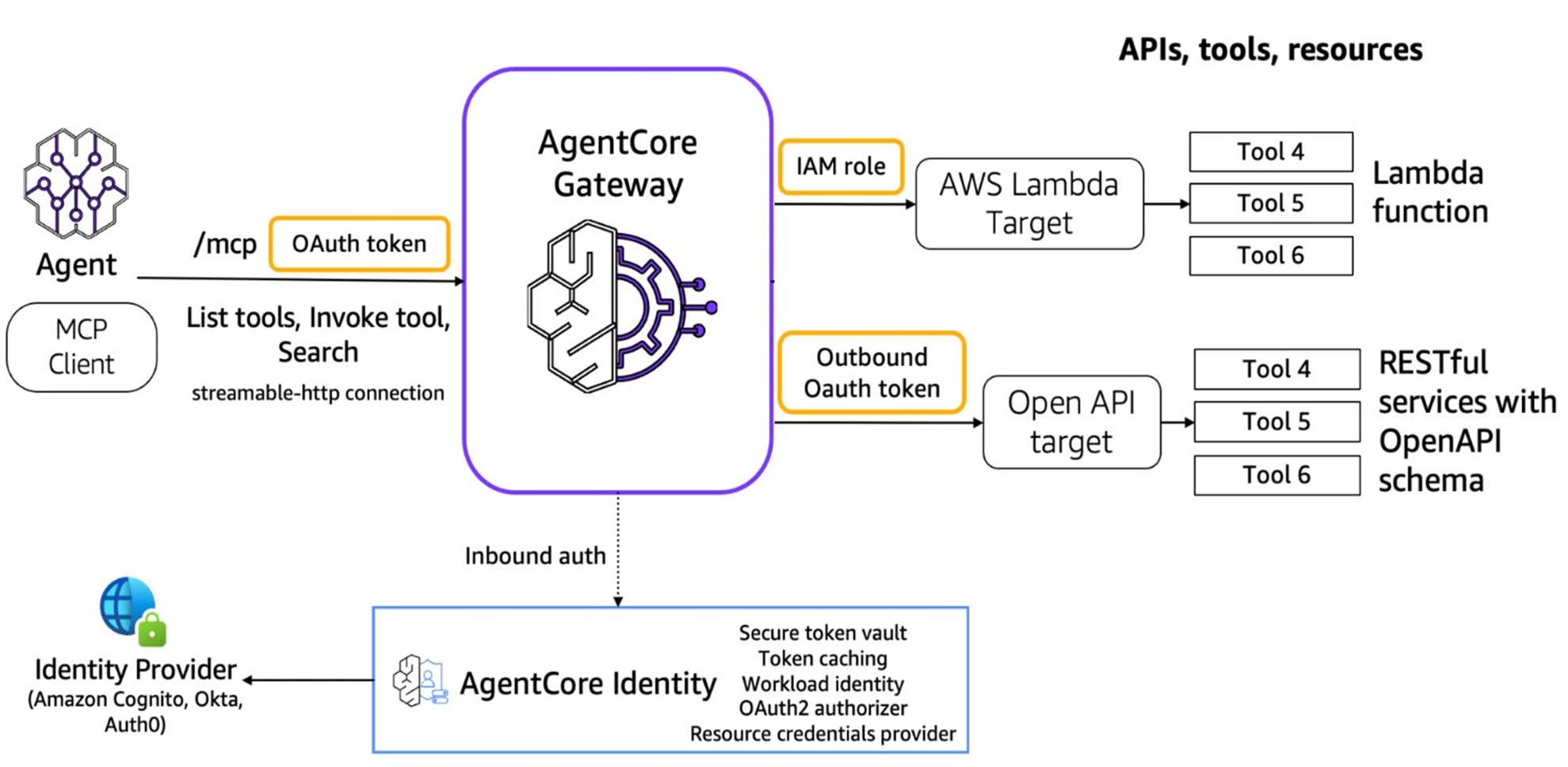
Amazon Bedrock AgentCore Suite / Amazon Bedrock AgentCore 套件
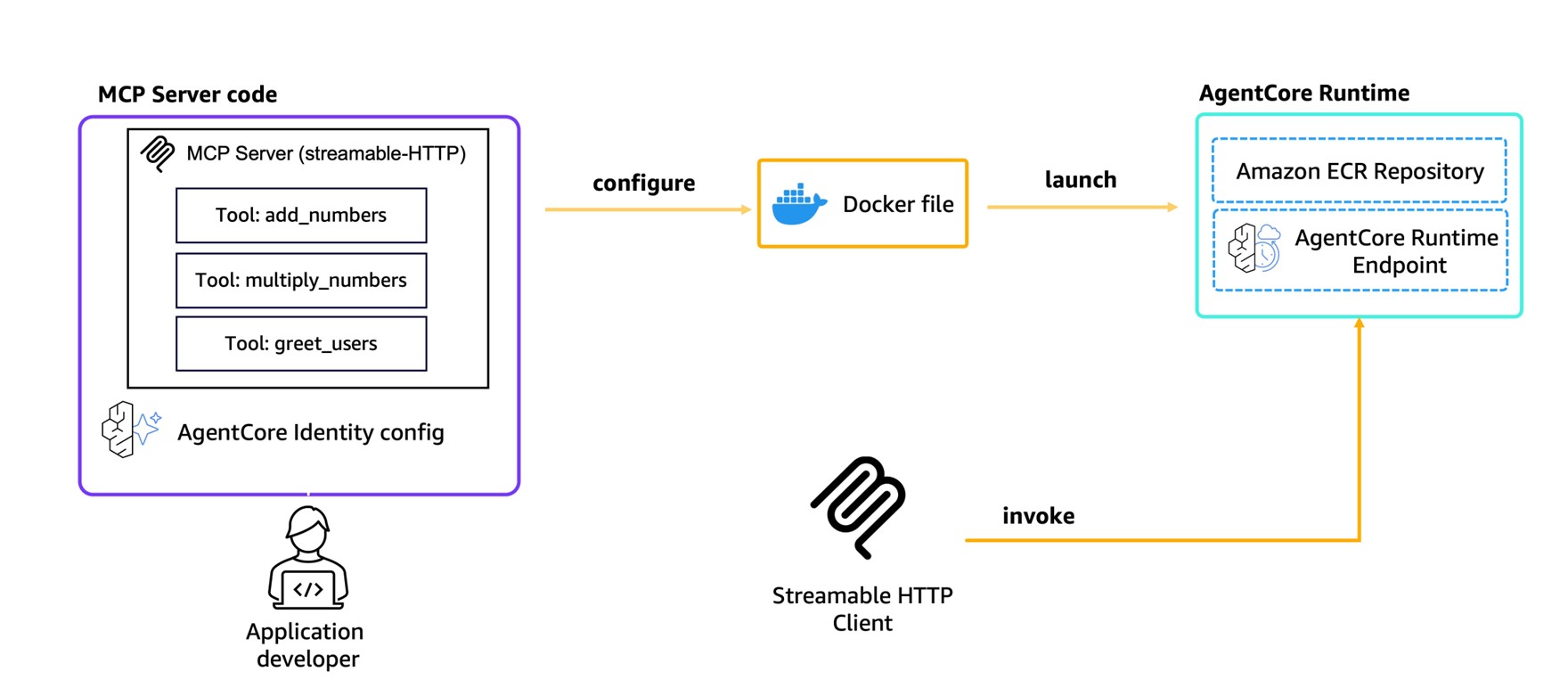
Amazon Bedrock AgentCore is AWS’s fully managed platform for Agentic AI workloads, providing an integrated set of infrastructure components so developers focus on tool logic rather than infrastructure:
Amazon Bedrock AgentCore 是 AWS 为 Agentic AI 工作负载提供的全托管平台,集成一套基础设施组件,让开发者专注于工具逻辑:
| Component / 组件 | Role / 职责 |
|---|---|
| Runtime | Session-isolated serverless environment for MCP servers and Agents. Deploy with two commands: agentcore configure + agentcore launch — automatically builds a container image via CodeBuild, configures Cognito-based auth, and creates a Streamable HTTP endpoint. / 会话隔离的无服务器环境。两条命令完成部署:自动通过 CodeBuild 构建容器镜像、配置 Cognito 认证、创建 Streamable HTTP 端点。 |
| Gateway | Converts existing Lambda functions, OpenAPI-spec APIs, and Smithy model APIs into MCP-compatible endpoints with built-in auth. Multiple APIs share one endpoint. Supports semantic tool discovery — when hundreds or thousands of tools are registered, the Gateway’s semantic search retrieves the most relevant tools for each Agent request, dramatically reducing input token consumption and latency. / 将 Lambda 函数、OpenAPI 规范 API、Smithy 模型 API 转换为 MCP 端点,内置认证鉴权,多个 API 共享一个端点。支持语义工具检索:工具多达数百至数千时,自动找出与当前任务最相关的工具子集注入给 Agent,大幅减少 Token 消耗。 |
| Memory / Code Interpreter / Browser | Persistent session memory, secure sandboxed code execution, and browser automation — bundled capabilities for complex multi-step Agent workflows. / 持久会话记忆、安全代码执行沙箱、浏览器自动化——面向复杂多步骤 Agent 工作流的内置能力。 |
| Identity / Observability | Centralized identity management backed by Cognito, Okta, or Auth0, plus a full observability stack: metrics, distributed traces, and audit logs for every Agent and MCP interaction. / 集中式身份管理(支持 Cognito/Okta/Auth0)+ 完整可观测性栈(指标、分布式链路追踪、每次 Agent 交互的审计日志)。 |
mcp-proxy: Migrating stdio Servers to the Cloud / mcp-proxy:将 stdio 服务器迁移至云端
For teams with existing stdio-based local MCP servers, mcp-proxy provides a protocol bridge that enables cloud migration without modifying source code:
对于已有 stdio 本地 MCP 服务器的团队,mcp-proxy 提供协议桥接,可无需修改源代码地迁移至云端:
- Provide the MCP server’s run command or GitHub repo URL. / 提供 MCP 服务器的运行命令或 GitHub 仓库地址。
- Tool auto-generates a Dockerfile with all runtime dependencies. / 工具自动生成包含所有依赖项的 Dockerfile。
- Builds container image and deploys to ECS via CloudFormation, exposing an ALB endpoint. / 构建容器镜像,通过 CloudFormation + ALB 部署到 ECS,对外暴露 HTTP 端点。
mcp-proxy acts as an HTTP server that forwards incoming Streamable HTTP requests to the MCP server subprocess, completing the Streamable HTTP → stdio conversion — the same bridge shown in the transport layer diagram above.
mcp-proxy 本质上是一个 HTTP 服务器,将收到的 Streamable HTTP 请求转发至 MCP 服务器进程,完成协议转换——与传输层图示中的代理桥接架构相同。
Open Source Role 开源生态
MCP is an open standard — pre-built server frameworks and libraries exist in multiple programming languages, accelerating development. Key benefits:
MCP 是开放标准,多种编程语言均有现成的服务器框架和库,大幅加速开发。主要优势:
- Interoperability / 互操作性: Different AI models and services work together without vendor lock-in. / 不同 AI 模型和服务可协同工作,避免厂商锁定。
- Community innovation / 社区创新: Benefit from shared improvements, bug fixes, and new tool integrations. / 受益于共享的改进、漏洞修复和新工具集成。
- Accelerated development / 加速开发: Reuse existing MCP server components rather than building from scratch. / 复用现有 MCP 服务器组件,无需从零构建。
MCP Ecosystem Roles / MCP 生态体系角色
MCP is evolving from a protocol spec into a full developer ecosystem with three distinct infrastructure roles — analogous to the CNCF Landscape for cloud native. Each role addresses a different layer of the tooling stack:
MCP 正从协议规范演进为包含三类基础设施角色的开发者生态——类似云原生领域的 CNCF Landscape,每个角色覆盖工具栈的不同层次:
| Role / 角色 | Function / 职能 | Examples / 代表产品 |
|---|---|---|
| MCP Marketplace | Aggregates and distributes MCP clients and server tools — the “App Store” layer. Developers publish; users discover, evaluate, and install. / 聚合与分发 MCP 客户端和服务器工具——”应用商店”层,开发者发布,用户发现、评估和安装。 | Cline MCP Marketplace, Alibaba Bailian MCP Market (50+ servers at launch), awesome-mcp-servers, MCP Directory |
| MCP Server Hosting | Provides runtime environment for MCP servers: deployment, auto-scaling, security hardening, and ops. Removes infrastructure burden from tool developers. / 为 MCP 服务器提供运行环境:部署、自动扩缩容、安全加固和运维,解放工具开发者。 | Amazon Bedrock AgentCore Runtime, Alibaba Cloud API Gateway MCP Hosting, Cloudflare Workers MCP |
| MCP Registry | Control-plane layer that manages tool metadata. Advanced registries can also dynamically convert existing APIs to MCP protocol without code changes in the upstream service. / 管控面层,管理工具元数据。高级注册中心还可以动态将现有 API 转换为 MCP 协议,上游服务无需修改代码。 | Alibaba MSE Nacos (converts existing service invocations to MCP protocol live), Bedrock AgentCore Gateway |
Current State & Limitations 现状与不足
Ecosystem 生态现状
MCP has grown from initial skepticism (Claude Desktop only) to broad adoption across AI editors including Cursor, Windsurf, and Cline. It is exhibiting the potential to become the de-facto standard. Community resources now exist to discover available servers:
MCP 已从最初仅 Claude Desktop 支持、市场反响平平,发展为 Cursor、Windsurf、Cline 等众多 AI 编辑器相继加入,逐渐呈现出成为事实标准的潜力。社区已形成丰富的资源体系:
- awesome-mcp-servers: Community-curated registry of available MCP servers. / 社区维护的 MCP 服务器精选列表。
- MCP Directory: Searchable index of MCP servers by category. / 可按类别搜索的 MCP 服务器目录。
- Cline MCP Marketplace: One-click server deployment from within the IDE. / 在 IDE 内一键部署 MCP 服务器。
Security vs Usability Tension 安全性与易用性的张力
MCP’s original design restricts servers to local execution to protect user data, avoiding sensitive information being sent to an LLM. In practice this creates tradeoffs:
MCP 最初将服务器限制在本地运行以保护用户数据,避免敏感信息发送给 LLM。但在实践中,这带来了一系列权衡:
| Concern / 问题 | Detail / 说明 |
|---|---|
| Unsandboxed local access / 本地无沙盒访问 | Local MCP servers can access the filesystem without sandboxing constraints, creating a potential attack surface even within a “local-only” model. / 本地 MCP 服务器可无沙盒限制地访问文件系统,即使在”仅本地”模式下也存在潜在攻击面。 |
| Immature auth & access control / 认证与访问控制不成熟 | Current MCP lacks detailed specifications and enforcement for authentication and authorization. Ordinary users cannot easily assess whether a server is safe. / 当前 MCP 对认证和授权缺乏详细规范和强制要求,普通用户难以评估服务器的安全性。 |
| One-click deployment risk / 一键部署风险 | Tools like Cline’s MCP Marketplace lower the barrier with app-store-style one-click installs, but users may run servers without understanding their capabilities or origin — a double-edged sword. / Cline 等工具提供应用商店式一键安装,降低了门槛,但用户可能在不了解服务器功能或来源的情况下运行它,便利性与安全风险并存。 |
| Remote deployment roadmap / 远程部署路线图 | Anthropic originally planned official remote server support for H1 2025. Cloudflare has already launched remote MCP server hosting ahead of this, paving the way for cloud integrations — but also expanding the attack surface. / Anthropic 原计划于 2025 年上半年支持远程服务器,Cloudflare 已率先推出远程 MCP 托管,为云端集成铺路,但同时也扩大了攻击面。 |
Open Standard vs AI Competition 开放标准 vs AI 竞争
Several structural tensions affect MCP’s trajectory as an ecosystem standard:
若干结构性张力影响着 MCP 成为生态标准的前景:
- Limited client adoption / 客户端采用有限: Most LLM chat apps and web interfaces do not yet support MCP. Broader adoption would significantly amplify LLM capabilities across the ecosystem. / 大多数 LLM 聊天应用和 Web 界面尚未支持 MCP,更广泛的采用将大幅提升整个生态的 LLM 能力。
- Vendor conflict of interest / 厂商利益冲突: Anthropic both defines MCP and competes as a model vendor. Other model providers have little incentive to support a protocol that primarily benefits a competitor’s ecosystem. / Anthropic 既定义 MCP 又作为模型厂商参与竞争,其他模型提供商缺乏采用竞争对手主导协议的动力。
- Fragmentation risk / 碎片化风险: If each major vendor creates proprietary alternatives, the ecosystem fragments and the N×M benefit MCP was designed to solve is lost. / 若各大厂商推出专有替代方案,生态将碎片化,MCP 所解决的 N×M 集成优势将不复存在。
- Governance risk / 治理风险: As an open protocol governed primarily by a closed-source company, MCP’s long-term viability depends heavily on Anthropic’s sustained commitment and community trust. / 作为主要由闭源公司主导的开放协议,MCP 的长期可持续性高度依赖 Anthropic 的持续投入和社区信任。
Future Vision
From Structured APIs to AI-Friendly Layers 从结构化 API 到 AI 友好层
Traditional software integration has always relied on structured data formats and predefined API contracts — both caller and provider manually maintain stable interface agreements specifying parameter types, formats, and invocation patterns.
传统软件集成始终依赖结构化数据格式和预定义的 API 契约——调用方和提供方都需要人工维护稳定的接口协议,规定参数类型、格式和调用方式。
MCP represents an incremental improvement: it adds an AI-friendly layer on top of existing APIs (natural language agent endpoints). Callers describe what they need in natural language; the LLM generates the structured call. This simplifies the consumption side — but MCP servers themselves still require human development.
MCP 代表着一种渐进式改进:在现有 API 之上添加 AI 友好层(自然语言代理端点)。调用方用自然语言描述需求,由 LLM 生成结构化调用,从而简化了 API 消费侧的负担。但 MCP 服务器本身仍需人工开发。
AI Native API Vision AI 原生 API 愿景
The predicted next revolution happens on the supply side: if LLMs themselves can be trained to possess the capabilities that MCP servers currently provide, why require structured calls at all? Models could communicate directly with other models to complete tasks.
预测中的下一场革命将发生在供给侧:如果 LLM 本身就能具备当前 MCP 服务器所提供的能力,为什么还需要结构化调用?模型可以直接与其他模型对话来完成任务。
This future form — “AI Native API” — envisions: / 这种未来形态——“AI 原生 API”——设想的是:
- Each model understands its own capability domain. / 每个模型了解自身的能力边界。
- A general model receives a user query, selects a specialist model best suited for the task, and exchanges tokens directly — without structured API calls. / 通用模型接收用户查询,选择最适合该任务的专用模型,直接进行 Token 交换,无需结构化 API 调用。
- Parts of the system autonomously negotiate how to exchange data, and can delegate to more suitable agents as needed. / 系统各部分自主协商数据交换方式,并可按需委托更合适的 Agent 完成子任务。
- Multiple agents autonomously compose service chains, providing results to other agents or LLMs. / 多个 Agent 自主组合服务链,将结果提供给其他 Agent 或 LLM 使用。
AI Native API vs MoE AI 原生 API 与 MoE 的区别
This vision superficially resembles Mixture of Experts (MoE), but the distinction is significant:
这一愿景表面上与混合专家(MoE)相似,但两者存在本质区别:
| AI Native API | Mixture of Experts (MoE) | |
|---|---|---|
| “Experts” are / “专家”是 | Independent external models (cloud or local) / 独立外部模型(云端或本地) | Parameters within the same LLM / 同一 LLM 内部的参数 |
| Communication / 通信 | Cross-model, potentially cross-network / 跨模型,可能跨网络 | Internal routing within a single model / 单模型内部路由 |
| Specialization / 专业化 | Fully separate, independently trained models / 完全独立、分别训练的模型 | Gated subnetworks within one model / 一个模型内的门控子网络 |
Where MCP Fits MCP 的定位
MCP Server already approximates this vision — but current servers are fixed code with side effects, not models. MCP server communication and discovery are also currently unidirectional.
MCP 服务器在某种程度上已接近这个设想——但当前的服务器是带有副作用的固定代码,并非模型本身。此外,MCP 服务器的通信和发现目前均为单向的。
MCP may be just the first small step on the journey toward AI Native APIs — but looking back years from now, it may prove to have been a significant one. / MCP 可能只是通往 AI 原生 API 旅途中最初的一小步,但多年后回望,这一步可能相当重要。
Building MCP Servers 构建 MCP 服务器
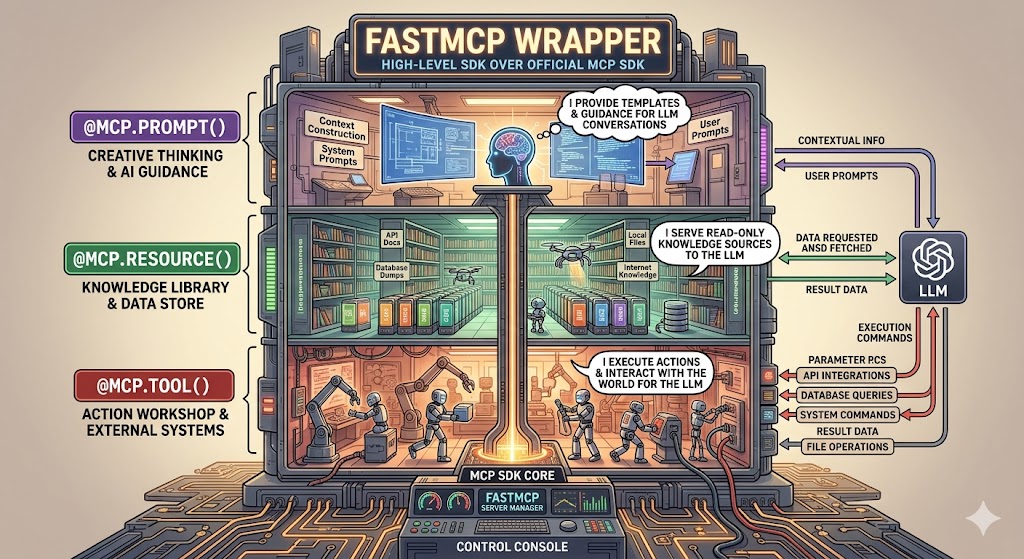
The MCP server is the most critical component in the MCP system — it defines what tools the LLM can use and what data it can access. Tools are defined via server.tool() and registered during server startup. The LLM selects tools at runtime based on their descriptions and the user’s query.
MCP 服务器是 MCP 系统中最关键的环节——它定义 LLM 可以使用哪些工具、访问哪些数据。工具通过 server.tool() 定义并在服务器启动时注册,LLM 在运行时根据工具描述和用户查询来选择调用哪个工具。
1
2
3
4
5
6
7
8
9
10
11
12
13
14
15
// Node.js example: define a tool that queries a knowledge base
server.tool(
  "search-documents",
  "Search for documents in the company knowledge base",
  {
    query: z.string().describe("Search keywords or question"),
    max_results: z.number().default(5).describe("Maximum number of results")
  },
  async ({ query, max_results }) => {
    const results = await knowledgeBase.search(query, max_results);
    return {
      content: [{ type: "text", text: formatResults(results) }]
    };
  }
);
Best practices for tool definition / 工具定义最佳实践:
| Practice / 实践 | Why it matters / 为什么重要 |
|---|---|
| Clear descriptions / 清晰描述 | The LLM selects tools based on their description — vague descriptions lead to wrong tool selection or missed invocations. / LLM 依据描述选择工具,描述模糊会导致选错工具或漏调用。 |
| Input validation / 输入验证 | Use Zod or equivalent to validate parameters before they reach backend systems — prevents errors from propagating and improves stability. / 使用 Zod 等库在参数到达后端前进行校验,防止错误传播,提升系统稳定性。 |
| Comprehensive error handling / 完善错误处理 | Return user-friendly error messages so the LLM can respond meaningfully instead of failing silently. / 返回用户友好的错误消息,让 LLM 能给出有意义的响应而非静默失败。 |
| Data access control / 数据访问控制 | The backend API must have proper auth and authorization. Design permission scopes carefully — the MCP server should only return data the user is authorized to see. / 后端 API 须有完善的身份验证和授权,仔细设计权限范围,MCP 服务器只应返回用户有权查看的数据。 |
Structured tool results / 结构化工具结果:
Tools return content in the content array. The five supported content types are:
工具在 content 数组中返回内容。支持五种内容类型:
| Content type / 内容类型 | When to use / 使用场景 |
|---|---|
text | Plain text or formatted strings / 纯文本或格式化字符串 |
image | Base64-encoded image data + MIME type / Base64 编码图像数据 + MIME 类型 |
audio | Base64-encoded audio data + MIME type / Base64 编码音频数据 + MIME 类型 |
resource_link | Reference to an MCP resource by URI (lazy load) / 通过 URI 引用 MCP 资源(延迟加载) |
embedded resource | Inline resource content embedded directly in the response / 直接嵌入响应中的资源内容 |
For tools that produce machine-readable structured output, declare an outputSchema field (JSON Schema) in the tool definition alongside inputSchema. Clients that understand outputSchema can then access the result via the structuredContent field in the tool response in addition to the human-readable content array — enabling downstream automation without parsing free-form text.
对于产生机器可读结构化输出的工具,在工具定义中与 inputSchema 并列声明 outputSchema 字段(JSON Schema)。理解 outputSchema 的客户端可通过工具响应中的 structuredContent 字段访问结果(除人类可读的 content 数组外),从而无需解析自由格式文本即可实现下游自动化。
Key Takeaways 要点总结
- MCP
= standardized protocol for LLM ↔ external tool communication / LLM 与外部工具通信的标准协议
- Three components: Host (AI app) → Client (inside Host) → Server (external) / 三层组件:宿主(AI 应用)→ 客户端(宿主内部)→ 服务器(外部)
- Transport: stdio for local (fast), SSE for remote (streaming) / 传输:本地用 stdio(快速),远程用 SSE(流式)
- MCP ≠ RAG: MCP acts, RAG retrieves / MCP ≠ RAG:MCP 执行操作,RAG 检索信息
- Solves the N×M integration problem — one standard replaces N×M custom connectors / 解决 N×M 集成问题,一个标准替代 N×M 套定制连接器
- Open ecosystem — anyone can build and publish an MCP server / 开放生态 — 任何人都可以构建并发布 MCP 服务器
- Tool list is bundled with the user query when sent to the LLM — LLM decides whether to invoke tools / 工具列表与用户查询一同发给 LLM,由 LLM 决定是否调用工具
- Current limitation: local-only servers can still access filesystem unsandboxed; auth/access control immature / 当前限制:本地服务器可无沙盒访问文件系统,认证与访问控制尚不成熟
- Ecosystem risk: Anthropic as both protocol owner and model vendor creates governance tension / 生态风险:Anthropic 同时担任协议定义者和模型厂商,存在治理张力
- Future direction: AI Native API — models talking to models directly, no structured API calls required / 未来方向:AI 原生 API——模型间直接对话,无需结构化 API 调用
- Security implications are significant → see MCPSecurity / 安全影响不容忽视 → 参见安全分析笔记
- Authentication in MCP
: PAT + RBAC pattern lets existing backend services keep their auth unchanged while MCP servers act securely on behalf of users / 认证:PAT + RBAC 方案让现有后端服务无需改动,MCP 服务器安全地代表用户行事
- Remote server design: stateless servers (Lambda + API Gateway) for short request-response; stateful servers (ECS Fargate + ALB Sticky Sessions) for multi-turn session workflows / 远程服务器设计:无状态服务器用于短请求-响应,有状态服务器用于多轮会话工作流
- Building MCP servers: tool descriptions are the LLM’s selection signal — clear, accurate descriptions are the highest-leverage investment in a reliable MCP server / 构建 MCP 服务器:工具描述是 LLM 的选择信号,清晰准确的描述是构建可靠 MCP 服务器的最高杠杆投入
- Tool descriptions = System Prompt
: MCP Server/Tool definitions sent to the LLM are effectively the System Prompt. After tool execution, the client sends the original question + result back to the LLM for a final formatting pass — two-phase: select → execute → reformat / 工具描述即 System Prompt:发给 LLM 的服务器和工具定义本质上是 System Prompt;工具执行后,客户端将原始问题 + 执行结果再次发给 LLM 进行格式化——两阶段:选工具 → 执行 → 重新格式化
- Pre-MCP integrations (LangChain, LlamaIndex, Dify, vendor plugins) all suffer N×M explosion or vendor lock-in — MCP breaks the coupling with a neutral open protocol / 出现之前的集成方式(LangChain、LlamaIndex、Dify、厂商插件)均存在 N×M 爆炸或厂商锁定问题,MCP 以中立开放协议打破耦合
- Remote deployment advantage: CI/CD auto-versioning + OAuth centralized auth + LLMOps observability + compliance audit logs — benefits that local deployment cannot replicate at scale / 远程部署优势:CI/CD 自动版本管理 + OAuth 集中式认证 + LLMOps 可观测性 + 合规审计日志,规模化时本地部署无法复制
- Remote deployment limitation: network latency + larger HTTP attack surface + Streamable HTTP compatibility gaps in some clients / 远程部署局限:网络延迟 + HTTP 端点攻击面更大 + 部分客户端对 Streamable HTTP 支持不完善
- Bedrock AgentCore
Runtime deploys MCP servers with two commands (
agentcore configure+agentcore launch); Gateway converts existing Lambda/OpenAPI APIs to MCP with built-in semantic tool discovery for 100s–1000s of registered tools / AgentCore Runtime 两条命令部署 MCP 服务器;Gateway 将现有 Lambda/OpenAPI API 转换为 MCP,支持语义工具检索,适应注册工具数百至数千的场景 mcp-proxymigrates stdio-based local MCP servers to cloud without source code changes — auto-generates Dockerfile + CloudFormation and deploys to ECS / mcp-proxy 无需修改源代码即可将 stdio 本地服务器迁移至云端- MCP ecosystem has three infrastructure roles: Marketplace (App Store layer), Server Hosting (runtime), Registry (control plane + API-to-MCP conversion) / MCP 生态有三类基础设施角色:市场(应用商店层)、服务托管(运行时)、注册中心(管控面 + API 转 MCP)
- Six MCP primitives: server exposes Tools (model-controlled), Resources (app-controlled), Prompts (user-controlled); client exposes Sampling, Elicitation, Roots (all server-controlled) / 六类原语:服务器暴露工具(模型控制)、资源(应用控制)、提示词(用户控制);客户端暴露采样、引出、根目录(均为服务器控制)
- Resources carry optional annotations:
audience(user/assistant),priority(0.0–1.0),lastModified/ 资源可携带可选注解:消费者、优先级、最后修改时间 - Elicitation
(added 2025-06-18): server requests structured user input via
elicitation/create+requestedSchema; three user responses:accept/decline/cancel/ 引出(2025-06-18 新增):服务器通过elicitation/create请求结构化用户输入 - Roots: advisory
file://filesystem boundaries advertised by client — not protocol-enforced; server implementation must honor them voluntarily / 根目录:客户端广播的建议性文件系统边界,非协议强制,服务器实现须自觉遵守 - Protocol lifecycle:
initialize(capability negotiation) →notifications/initialized→ normal operation → transport close / 协议生命周期:初始化(能力协商)→ initialized 通知 → 正常操作 → 传输关闭 - Protocol versions use YYYY-MM-DD format; current = 2025-11-25; 2024-11-05 HTTP+SSE transport deprecated and removed / 协议版本用 YYYY-MM-DD 格式,当前为 2025-11-25,2024-11-05 HTTP+SSE 传输已弃用并移除
- Streamable HTTP session headers:
Mcp-Session-Id(session binding),Last-Event-ID(SSE resumability),MCP-Protocol-Version(version routing); servers MUST validateOriginheader to block DNS rebinding attacks / Streamable HTTP 会话头:会话绑定、SSE 可恢复性、版本路由;服务器必须验证 Origin 头以阻止 DNS 重绑定攻击 - Tool
outputSchema+structuredContent: declare a JSON Schema alongsideinputSchemato expose machine-readable results; five content types: text, image, audio, resource_link, embedded resource / 工具 outputSchema + structuredContent:声明 JSON Schema 暴露机器可读结果;五种内容类型
Comments powered by Disqus.