Meow's Web Security - Web Application Penetration Testing Fundamentals
Web Application Penetration Testing Fundamentals Web 应用渗透测试基础
Source: Pluralsight — Web Application Penetration Testing Fundamentals
Overview 概述
Web application penetration testing applies attacker techniques against a target application to discover security flaws before real attackers do. The methodology follows a structured path: understand the application, map attack surfaces, exercise controls, test inputs, and report findings. This note covers the full methodology from pre-engagement through reporting, along with the core attack categories (authentication, session, access control, injection, logic flaws) and the Security+ concepts of reconnaissance, privilege escalation, pivoting, and persistence.
1. Structure of Web Applications Web 应用结构
1.1 HTTP Methods HTTP 方法
HTTP methodsdefine the action a client requests from a server:
| Method | Purpose |
|---|---|
GET | Retrieve a resource; parameters passed in the URL |
POST | Submit data in the request body; not stored in logs or browser history |
PUT | Create or replace a resource at a given URI |
DELETE | Remove a resource |
HEAD | Same as GET but returns headers only |
OPTIONS | List methods supported by the server |
PATCH | Partial modification of a resource |
1.2 HTTP Request and Response Structure
An HTTP request consists of:
- Request line: method, URL, protocol version
- Headers:
Host,User-Agent,Accept,Cookie,Content-Type, etc. - Body (for POST/PUT): form data, JSON, etc.
An HTTP response consists of:
- Status line: protocol version + status code (
200 OK,301 Moved Permanently,404 Not Found,500 Internal Server Error) - Headers:
Server,Set-Cookie,Content-Type,Content-Length, etc. - Body: HTML, JSON, binary content, etc.
The Server response header leaks fingerprinting information and should be suppressed or obfuscated in production:

1.3 URL Structure URL 结构
URL (Uniform Resource Locator)specifies the location and protocol for retrieving a web resource.
1
protocol://domain-name.top-level-domain/path?query=value#fragment
Components:
| Part | Example | Notes |
|---|---|---|
| Protocol | https:// | Scheme (http, https, ftp) |
| Domain | www.example.com | Resolved via DNS |
| Port | :443 | Optional; default 80 (HTTP) / 443 (HTTPS) |
| Path | /products/list | Resource path on server |
| Query string | ?id=102&cat=5 | Key-value pairs; attack surface for injection |
| Fragment | #section2 | Client-side anchor; not sent to server |
1.4 URL and HTML Encoding 编码
Browsers and servers encode special characters to ensure safe transmission. A penetration tester must be fluent in both to craft and recognize encoded payloads.
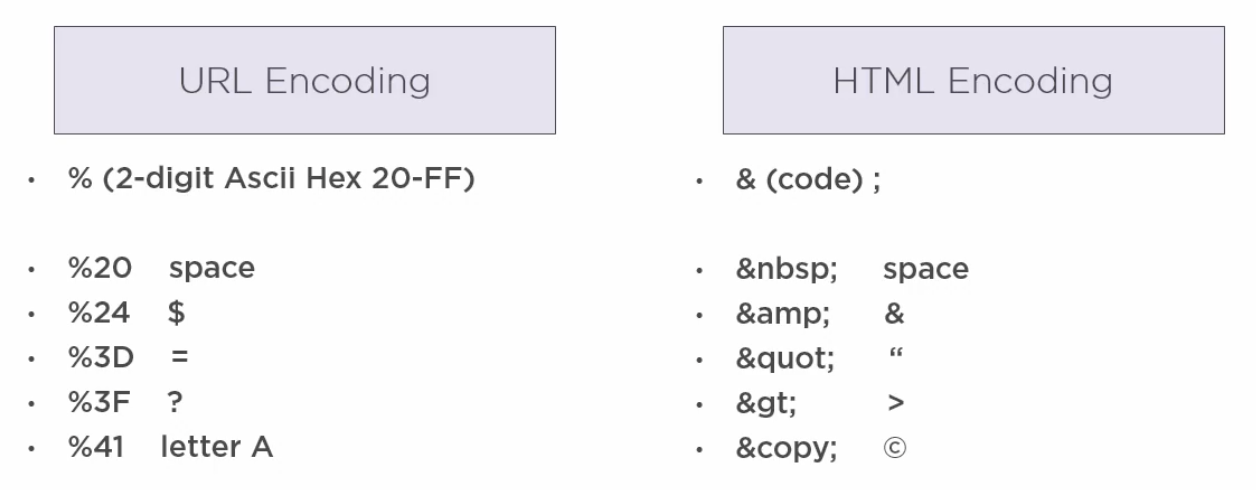
URL encoding: replaces unsafe characters with % followed by the 2-digit ASCII hex value.
1
%20  space       %24  $       %3D  =       %3F  ?       %41  A
HTML encoding: uses named or numeric entities.
1
    space       &   &       "   "       >   >       ©  ©
Bypassing input validation often requires double-encoding or mixed-case encoding. If a WAF blocks <script>, try %3Cscript%3E or <script>.
1.5 Forms and Hidden Inputs
HTML forms are the primary mechanism for accepting user input. Attributes worth examining:
action— the URL receiving the submitted datamethod—GET(parameters in URL) orPOST(parameters in body)hiddeninput fields — not displayed on screen but transmitted with the form; can store state, session data, prices, or access flagsdisabledattribute — prevents submission or editing client-side, but can be removed via a proxy before the request leaves the browsermaxlengthattribute — limits input length on the client, but has no effect if a proxy intercepts and modifies the value
Burp Suite’s proxy options include “Unhide hidden form fields” and “Prominently highlight them” — enabling this reveals all hidden inputs in the browser view.
1.6 Cookies 会话 Cookie
Cookiesare small pieces of data the server sends to the client, which the browser automatically includes in subsequent requests to the same origin.
Key security attributes:
| Attribute | Effect | Absence risk |
|---|---|---|
Secure | Transmit cookie over HTTPS only | Cookie sent over plain HTTP; sniffable |
HttpOnly | JavaScript cannot read the cookie | XSS can steal the cookie via document.cookie |
SameSite=Strict/Lax | Blocks cross-origin requests from including the cookie | CSRF vulnerability |
Path | Restrict cookie to a URL subtree | Cookie exposed to unintended endpoints |
Expires/Max-Age | Persistent vs session cookie | Stale tokens remain valid after logout |
Insecure cookie example — access_level stored as Base64 without encryption:
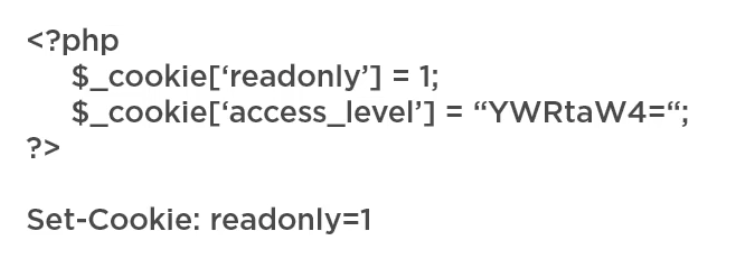
A tester who observes YWRtaW4= (Base64 for admin) in a cookie can simply change it to Z3Vlc3Q= (guest) or vice versa to test for privilege escalation via cookie manipulation.
Examine cookies for:
- Credentials or tokens stored in clear text or weakly encoded
- Discount rates, prices, or access levels stored client-side
- Whether the cookie value is reflected in SQL queries, HTML, or other inputs (injection risk)
1.7 Sessions 会话管理
HTTP is stateless— each request is independent. Sessions solve this by maintaining server-side state, with a single session token stored in a cookie pointing to that state.
Why sessions are preferable to cookie-stored state: if access level were stored in a cookie (e.g., guest), a user could simply change it to admin. Moving state to the server means the cookie only points to a record, not containing the record itself.
2. Pre-Engagement 前期准备
2.1 Engagement Types 测试类型
| Type | Tester knowledge | Realism |
|---|---|---|
| Black box | Zero prior knowledge of the application | Mimics an external attacker |
| Gray box | Partial knowledge (e.g., credentials, documentation) | Mimics a malicious insider or partner |
| White box | Full source code, architecture, credentials | Most thorough; finds deepest issues |
2.2 Rules of Engagement 交战规则
The Rules of Engagement (ROE) document defines what is permitted during the test. It must be agreed upon and signed before any testing begins.
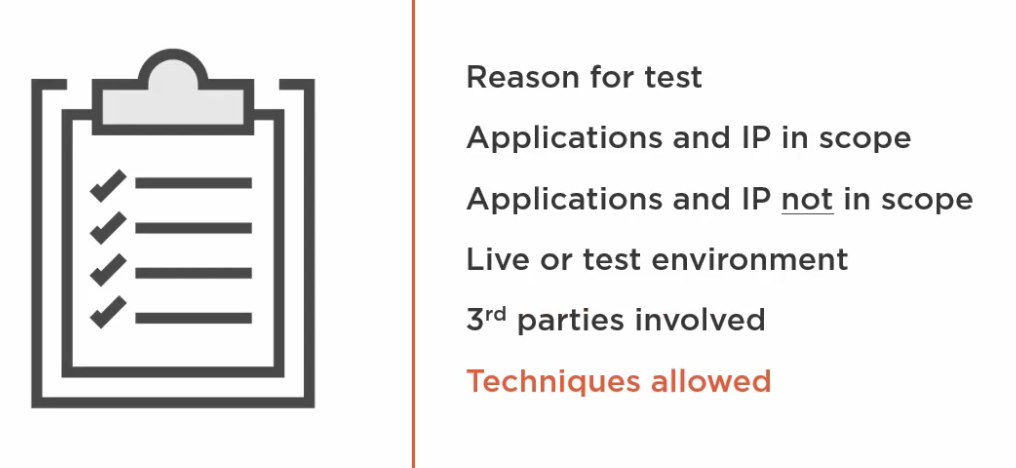
ROE items include:
- Reason for the test
- Applications and IP ranges in scope
- Applications and IP ranges out of scope
- Whether the test is against a live or test environment
- Third-party services involved (SaaS, CDNs, payment processors)
- Techniques allowed (brute force, social engineering, DoS-style tests)
2.3 Scoping 范围确定
The scoping document provides the operational details for the engagement:
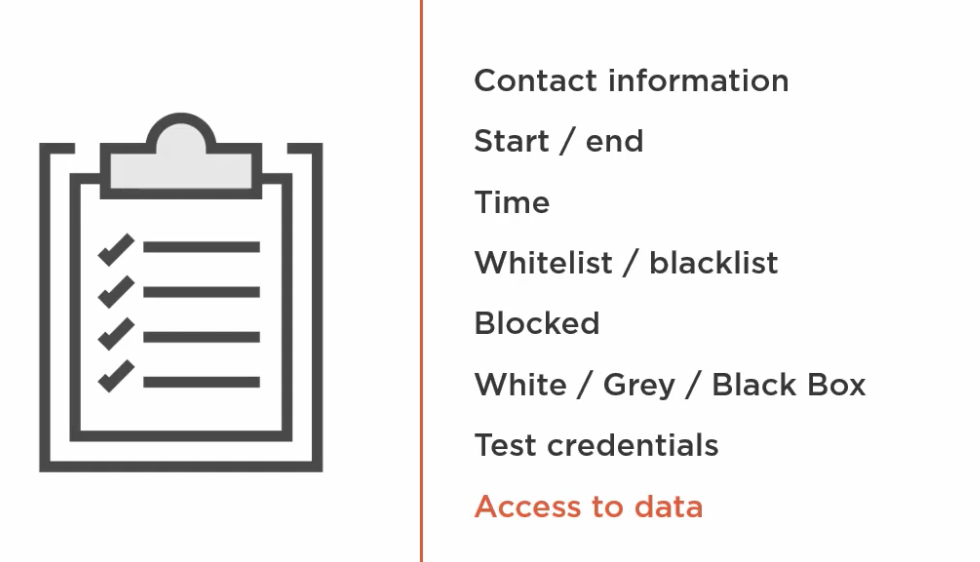
Scoping details include:
- Contact information and escalation path
- Start and end dates / time windows
- Whitelist (allowed source IPs) and blacklist (off-limits systems)
- Whether testing is blocked by WAF/IDS and if bypass is authorized
- Test credentials for each access level required
- Access to data (read-only, write, admin)
2.4 Passive vs Active Reconnaissance 被动 vs 主动侦察
Passive reconnaissancecollects information without directly interacting with the target system:
- Advantages: leaves no trail; can be conducted at any time without disrupting the target
- Limitations: incomplete; cannot detect applications not currently sending traffic; cannot distinguish deliberate obfuscation
- Sources: public databases (WHOIS, DNS, certificate transparency logs), social media, job postings, dumpster diving, social engineering, listening on network traffic
- Perform first to understand a legacy system before touching it
directly focuses on the target system:
- Port scans,
traceroute, network mapping - Spidering, forced browsing, fingerprinting
- Social engineering to obtain passwords or gain access
- Leaves traces in server logs and may trigger alerts
3. Footprinting 信息收集
3.1 Spidering 爬站
A spider (also called a crawler) automatically follows every link found on the site, building a site map. Tools: OWASP ZAP spider, Burp Suite crawler.
The spider builds a site map exposing:
- All page names and URL paths
- GET and POST parameters on each page
- The HTTP methods used per page
This site map becomes the attack surface inventory — every parameter is an entry point to test.
3.2 Server Fingerprinting 服务器指纹识别
Fingerprintingidentifies the technology stack powering the application. Sources:
- HTTP response headers:
Server: Apache/2.4.6 (Red Hat Enterprise Linux) OpenSSL/1.0.1freveals OS, web server version, and SSL library - Error pages: framework-specific stack traces (PHP, .NET, Java)
- File extensions:
.php,.aspx,.jspreveal server-side language - Cookie names:
JSESSIONID→ Java;PHPSESSID→ PHP;ASP.NET_SessionId→ ASP.NET - Browser extensions: Wappalyzer auto-detects CMS, frameworks, analytics, and CDN vendors including version numbers
Tools: httprint, FOCA, Wappalyzer.
3.3 Discovering Hidden Content 发现隐藏内容
Several techniques uncover pages and files not linked from the main navigation:
| Technique | Description |
|---|---|
robots.txt | Lists paths the site owner wants search engines to ignore — often discloses admin paths, backup files, sensitive directories |
| Directory brute force | Tries common path names (/admin, /backup, /api, /config) using wordlists (DirBuster, Gobuster) |
| Google dorking / OSINT | site:example.com filetype:sql reveals publicly indexed sensitive files |
| FOCA | Extracts metadata from publicly indexed documents (PDF, DOCX) revealing usernames, OS, software versions, internal paths |
| Wayback Machine | Historical snapshots may reveal old endpoints, parameters, or technologies no longer served |
3.4 Automated Scans 自动扫描
Before manual testing, run automated scanners to find low-hanging fruit — missing security headers, weak cipher suites, common misconfigurations, and known CVEs:
- OWASP ZAP — free, open-source; active scan available by right-clicking a site tree node
- Burp Suite (PortSwigger) — industry-standard commercial tool; active scan on any branch
- Nikto — web server scanner
- Nessus / Nexpose / IBM AppScan — enterprise vulnerability scanners
- CMSmap / WPscan / Joomscan — CMS-specific scanners for WordPress, Joomla, Drupal
- Sqlmap — SQL injection automation with DBMS enumeration
- SSLscan / ssllabs.com — analyze certificate, cipher suites, and TLS configuration
Important: automated scanner results must be reviewed and validated manually before inclusion in a report. Never dump raw scanner output into a client report.
3.5 Analyzing Results 分析结果
After spidering and scanning, build a parameter inventory spreadsheet:
| Column | Contents |
|---|---|
| Page name | URL path (e.g., /basket.jsp) |
| HTTP method | GET or POST |
| Parameters | All query/body parameters (price, productId, quantity) |
| Cookies | Cookie names set or read on this page |
| HTTP/HTTPS | Protocol in use |
| Referrer | Originating page (relevant when parameters differ by referrer) |
This spreadsheet drives the manual testing phase — every row is an entry point to exercise.
4. Attacking User Controls 攻击用户控制
4.1 Authentication 身份认证
Authenticationverifies who the user is. The primary risk areas are credential transit, default credentials, password policy, and lockout.
Credential transit
| Scenario | Risk | Severity |
|---|---|---|
| POST over HTTPS | Credentials protected in transit and not in URL/logs | Secure |
| Clear text HTTP (no HTTPS) | Susceptible to man-in-the-middle | Medium |
| HTTP page POST to HTTPS page | SSL strip attack | Medium–High |
| GET over HTTPS | Credentials stored in URL, browser history, and server logs | Medium–High |
Default credentials
- Try:
admin,administrator,root,system,sa,super,user,guest,test, company name - Search for CMS/framework default passwords online
- Mark any successful login with default credentials as High
Password policy
A strong policy requires:
- Minimum 8 characters (no low upper limit, ideally 20+)
- Mix of uppercase, lowercase, number, and special character
- No restrictions on special character types
Find the policy on the registration or password reset page. Test by attempting to set a weak password like 123 or password.
Account lockout
A secure lockout policy:
- Locks after 5–8 failed attempts
- Enforces a cooldown period (typically 15 minutes)
- Alternatively requires phone/email unlock or help desk intervention
To test: attempt 20+ logins. If the account does not lock, there is likely no lockout policy. If locked, try every 5 minutes to detect the waiting period.
Password reset flow
A complete secure reset flow:
- User provides email or username
- Server always returns a positive response — never reveals whether the address exists (prevents username enumeration)
- Account is locked from accepting the old password after reset is initiated
- A one-time token is emailed; token expires in 5–20 minutes
- Token is single-use and invalidated after use
- On the reset page, user is required to enter old password before setting new one
Test by: starting a reset at end of day and clicking the link next morning — if it still works, it is a finding.
Security questions
- If questions have a fixed answer set (e.g., favorite NBA team = 30 options), check whether account lockout applies to question guesses
- If not limited, brute force is feasible
Username enumeration
If the application reveals whether a username or email exists (via error messages like “username not found”), an attacker can:
- Run a list of the top 1,000 common usernames through the login or reset endpoint
- Identify which ones return a different response
- Use confirmed usernames as the target list for a password attack
This is a High finding. All endpoints (login, reset, registration) must return identical generic responses for both valid and invalid usernames.
4.2 Session Management 会话管理
Any weakness in session management is a High or Critical finding.
Session token analysis — 5-step process
- Generate multiple tokens — log in and out repeatedly; generate 20+ tokens across different users and times; if the same token repeats, that is a critical issue
- Modify small pieces — change 1–2 characters at a time; if a segment can be modified without killing the session, it is not part of the verification — narrow the effective entropy
- Compare across users — create accounts at different access levels; identical token segments across users may indicate hard-coded access-level fields that can be swapped
- Look for static segments — a 14-character token with 6 always-identical characters means only 8 characters need to be brute-forced
- Check for encoded meaningful content — decode with Base64, hex, or common ciphers; if
username + timestampis encoded and used as the token, the session can be forged
Protecting the session token
- Token must never appear in the URL — it will be stored in server logs, browser history, and referrer headers
- Cookie must have
SecureandHttpOnlyattributes - Session should be destroyed on logout, browser close, and inactivity timeout
- Each login should either terminate existing sessions or terminate the new session if one is already active
Reference: The Web Application Hacker’s Handbook, Chapter 7 — Attacking Session Management.
4.3 Access Controls 访问控制
Access controlsdefine what an authenticated user is authorized to do.
Vertical escalation (privilege escalation)
Can a lower-privileged user access pages or functions reserved for admins?
- Compare admin vs user sitemaps via Burp Suite’s Analyze Target
- Attempt to navigate to admin-only URLs while authenticated as a regular user
- Look for parameters like
admin=trueorrole=adminin URL or cookies — test if setting them as a standard user grants elevated access
Horizontal access (IDOR — Insecure Direct Object Reference)
Can User A access User B’s data by changing an identifier?
Insecure Direct Object Reference (IDOR)occurs when an object identifier (customer ID, transaction ID, file path) is directly exposed and no server-side authorization check verifies ownership:
1
2
3
GET /customer?id=831   → works for the current user
GET /customer?id=832   → should return 403 — but often returns another user's data
GET /transactions?txid=4198  → may expose another user's order and credit card info
IDOR was in the OWASP Top 10 as a standalone item until 2017, where it was merged into Broken Access Control. It is both an access control failure and a sensitive data exposure.
Other access control tests
- Unauthenticated access: log out, then navigate directly to previously visited authenticated pages — check whether the server re-validates the session
- Remember me cookie: log in with “remember me”, log out, and check whether the cookie persists and can be reused
- Comments in source: developers sometimes leave access control TODOs in HTML comments; Burp Suite’s scanner surfaces all comments
- Proxy login / help desk login-as: admin functions that log in as a customer should be restricted to internal IP addresses only and require strong authentication
- Parameter-based access: if an admin button exists on a shared page, test whether POSTing that button as a standard user executes the function
- File/media access: protected documents stored in a folder accessible by direct URL without authentication
5. Attacking Application Inputs 攻击应用输入
5.1 Attack Proxies 攻击代理
Attack proxiessit between the browser and server, intercepting all HTTP/HTTPS traffic for observation and manipulation.
Tools:
- Burp Suite (PortSwigger) — industry-standard commercial proxy; scanner, intruder, repeater, sequencer
- OWASP ZAP — free open-source alternative
How they handle HTTPS: the proxy installs its own CA certificate; it terminates the TLS connection from the browser, reads and optionally modifies the plaintext, re-encrypts it with the server’s certificate, and forwards it — effectively a legitimate MITM.
A proxy removes all client-side controls:
maxlengthHTML attributes are bypassed- JavaScript validation is bypassed
disabledform fields can be re-enabled- Hidden form fields are visible and editable
- Prices returned from the server can be rewritten before the browser processes them
5.2 Input Channels (Vehicles of Data Transfer) 数据传输载体
All of the following transmit data between client and server and are attack surfaces:
| Channel | Notes |
|---|---|
| URL query parameters | Visible in address bar; stored in logs and browser history |
| POST body parameters | Not in URL, but readable via proxy |
| HTTP headers | User-Agent, Referer, X-Forwarded-For — often trusted incorrectly |
| Cookies | May store encoded state, prices, access levels |
| Hidden form fields | Invisible to users but transmitted with forms |
| JavaScript variables | May be manipulated via browser devtools |
The OWASP Testing Guide principle: “The most common web application security weakness is the failure to properly validate input from the client or from the server before using it.”
Michael Howard (Writing Secure Code): “All input is evil.”
5.3 Input Validation 输入验证
Input validation can be performed:
- Client-side only — JavaScript, HTML attributes (
maxlength,pattern,disabled): trivially bypassed via proxy. If this is the only control, it is a High finding. - Server-side — the only trustworthy layer; must always be present regardless of client-side controls
- Both — best practice; client-side for UX, server-side for security
Validation approaches:
- Reject known bad (blacklist): fragile; encoding bypasses are common
- Accept known good (whitelist): preferred; only allow expected character sets and lengths
- Sanitize/encode input before use in queries or output
6. Common Attack Methods 常见攻击方法
6.1 Fuzzing 模糊测试
Fuzzingis the automated injection of unexpected or malformed data into all input channels to observe abnormal server responses.
Observation indicators:
- HTTP status codes: unexpected
200(when400or403expected) or500(server error revealing vulnerability) - Response length: significantly different length suggests the server processed input differently
- Response time: longer time may indicate time-based SQL injection or CPU-intensive processing
- Reflection: does the payload appear in the response body? (XSS surface)
In ZAP: right-click a request in the site tree → Attack → Fuzz → select the parameter to fuzz → add payloads manually or from built-in File Fuzzers lists.
Example finding: fuzzing a quantity field with -1 returns HTTP 200 and a negative total — the application accepted a negative quantity, potentially allowing a customer to receive a refund without returning items.
6.2 Cross-Site Scripting (XSS) 跨站脚本
XSSinjects a script into an application parameter that executes in the browser of another user.
Reflected XSS
Input is immediately reflected back in the response. The attack requires the victim to click a crafted link containing the payload in the URL:
1
https://example.com/search?q=<script>document.cookie</script>
If the application embeds the q parameter directly in the HTML response without encoding, the script executes.
Stored XSS
The payload is stored in the database (e.g., a comment or profile field) and served to every subsequent visitor:
1
Blog comment input: <script>alert('XSS')</script>
Any user who views the comment page executes the script. This is a Critical finding when it can steal session tokens.
DOM-based XSS
The attack never reaches the server — client-side JavaScript reads the payload from the URL/DOM and writes it back to the page:
1
2
// Vulnerable: takes URL fragment and writes to innerHTML without encoding
document.getElementById('output').innerHTML = location.hash.slice(1);
Payload: https://example.com/page#<img src=x onerror=alert(1)> — the onerror fires when the image fails to load.
To test DOM XSS in WebGoat: if <script>alert(1)</script> is blocked, try <img src=x onerror=alert(1)>.
6.3 SQL Injection SQL 注入
SQL injectioninserts SQL syntax into an input that is used to construct a database query, manipulating the query to return unauthorized data or bypass authentication.
Probe: enter a single quote ' or semicolon ; in input fields. A database error message reveals the DBMS in use (e.g., You have an error in your SQL syntax... MySQL).
Basic injection — the OR 1=1 technique:
1
2
3
4
5
6
-- Intended query:
SELECT * FROM users WHERE userid = 102;

-- Injected:
SELECT * FROM users WHERE userid = 102 OR 1=1;
-- 1=1 is always true → returns every row in the table
String context injection:
1
2
3
Input: ' or '1'='1
Resulting query: SELECT * FROM users WHERE username = '' or '1'='1'
-- Always true → returns all users
Key notes:
- Each DBMS has its own SQL syntax — understanding the backend DBMS (from fingerprinting) is necessary
- Tools: Sqlmap automates injection and DBMS enumeration
- SQL injection is “solved for” in modern stacks using parameterized queries / prepared statements, but it still appears in legacy or poorly maintained applications
6.4 Cross-Site Request Forgery (CSRF) 跨站请求伪造
CSRFtricks an authenticated user into unknowingly executing an action on a web application where they are currently logged in.
Attack mechanism:
- The attacker crafts a URL or HTML page that makes a state-changing request (e.g., transfer money, change email)
- The victim is social-engineered into clicking the link while their session is active
- The browser automatically includes the session cookie, so the server processes the request as legitimate
Test: create an HTML page outside the target site with a link that triggers an authenticated action (e.g., transfer.aspx?to=attacker&amount=1000). Log in, then click the link from the external page. If the transaction executes, CSRF protection is absent.
Mitigation: CSRF tokens — unique, unpredictable, per-transaction tokens that the attacker cannot obtain from a cross-origin page. The server rejects requests lacking a valid token.
6.5 Insecure Direct Object Reference (IDOR) 不安全的直接对象引用
See Section 4.3 (Horizontal Access). Key points:
- Change numeric IDs in URL parameters and POST bodies incrementally to access other users’ data
- Check transaction IDs, customer IDs, file names, document IDs
- Verify that server-side authorization (not just page-level authentication) checks ownership of every object before returning data
6.6 Other Injection Types 其他注入类型
| Injection type | Trigger | Example |
|---|---|---|
| HTML injection | Input reflected into HTML without encoding | <h1>You searched for: [input]</h1> |
| LDAP injection | Input used in LDAP query | (&(uid=admin)(password=*)) bypass |
| Code injection | Input passed to eval() or exec() | PHP eval($_GET['code']) |
| Command injection | Input passed to OS shell | ;cat /etc/passwd appended to a ping command |
| XML/XPath injection | Input embedded in XML queries | ' or '1'='1 in XPath expressions |
7. Logic Flaws 逻辑漏洞
7.1 Circumvention of Workflow 流程绕过
Workflow circumventionexploits the assumption that users will follow the intended step-by-step process of an application.
Example — eCommerce checkout bypass:
1
Browse → Add to Cart → Apply Discount → Shipping → Payment → Confirm
Tests to run:
- Navigate directly from step 1 to step 7 (skip payment entirely)
- After earning loyalty points at step 6, force-browse back to step 2, reduce quantity, then jump to step 7 — do you keep the discount?
- Intercept the payment confirmation token — is it a simple
paid=1flag that can be spoofed?
Patterns to look for:
- Step stored in a cookie, hidden field, or URL parameter
- Referrer-based access control (
page6checks that referrer ispage5— trivially bypassed) - Process steps that can be replayed to earn double rewards
7.2 Beating Limits 突破限制
Tests for limit bypass:
- Upper/lower bounds: if the maximum quantity is 10, what happens with -1 or 0?
- Financial thresholds: negative amounts to reverse a transfer direction and fall under a reporting limit
- Input length:
maxlength=5attribute is client-side — inject 1,000 characters via proxy - Rate limits: test whether API calls are rate-limited or can be made without restriction
Example: transferring a negative amount (-$11,000) to effectively send $11,000 to an account while bypassing the $10,000 BSA reporting threshold check.
7.3 Process Timing 时序分析
Process timingexploits measurable differences in response time between valid and invalid inputs.
Example — username enumeration via timing:
- Request with bad username + bad password: returns in ~2,000ms
- Request with valid username + bad password: returns in ~115ms (server found the user and checked the password)
By submitting the top 1,000 common usernames and measuring response times, valid accounts can be identified without relying on different error messages. This is username enumeration through a timing side-channel.
7.4 Spilling the Secrets 解密泄露
If one cookie is encrypted and another is encrypted in the same way but gets decrypted and reflected on the page, an attacker can use the application’s own decrypter to decrypt arbitrary encrypted values:
- Observe that
usernamecookie is encrypted and later reflected as the username on the page - Copy the encrypted value of another cookie (e.g.,
part_number) into theusernamecookie field - Submit — the application decrypts and displays the value of the part number
This demonstrates that security through obscurity (encrypting data without access controls on the decryption path) is not a valid security control.
7.5 Parameter Manipulation 参数操纵
Tests:
- Submit admin-only buttons as a lower-privileged user: POST the button’s parameter and check if the server authorizes by session or only by UI state
- Add parameters seen only in admin sessions: take cookies and parameters from an admin sitemap, inject them while authenticated as a standard user
- Look for feature-flag parameters:
admin=true,role=admin,debug=1— test whether the server trusts these client-submitted values
8. Reconnaissance Concepts (Security+) 侦察概念
8.1 Passive Reconnaissance 被动侦察
Passive reconnaissance collects information from sources that do not involve directly communicating with the target:
- Does not leave a trail that alerts administrators
- Can be sustained over a long period without risk of disruption
- Sources: public databases, OSINT, network traffic monitoring, dumpster diving, social engineering
- Perform first when assessing a legacy system:
**recommended to perform first to determine the vulnerability of a legacy system** - Limitation: may miss applications not actively sending traffic; cannot verify obfuscated information
8.2 Active Reconnaissance 主动侦察
Active reconnaissance interacts directly with the target:
- Port scans,
traceroute, network mapping, spidering, fingerprinting - Leaves entries in server logs; may trigger IDS/IPS alerts
- Includes social engineering to obtain passwords or gain unauthorized access to network shares
8.3 Escalation of Privilege 权限提升
Privilege escalationgains higher system privileges than originally granted:
- How it works: a hole created when code is executed with higher privileges than those of the user running it. Breaking out of the executing code leaves the attacker with elevated privileges.
- Example: exploiting an interactive process to access otherwise restricted areas of the OS
- Web equivalent: changing a cookie value from
guesttoadmin; modifying aroleparameter; exploiting a IDOR to access admin functions
8.4 Pivoting (Island Hopping) 横向移动
Pivotinguses a compromised system to attack other systems on the same network:
- A compromised host becomes a platform for launching further attacks deeper into the network
- Example: a third-party pen tester uses ARP cache poisoning to gain root access on a server, then moves laterally to another server not in the original target scope
- Also known as island hopping — each compromised system is a stepping stone to the next target
8.5 Persistence 持久化
Persistenceseparates the time of compromise from the time of the attack:
- A backdoor, implant, or scheduled task is installed during an initial compromise and activated later
- Example: an employee’s laptop is infected at a hotel; the company’s network is compromised only when the employee connects the laptop back to the internal network
- In web application context: a stored XSS payload persists in the database and attacks every future visitor
9. Reporting 报告
9.1 Report Structure 报告结构
A penetration test report serves both technical and non-technical readers. Structure:
1. Executive Summary (1–2 pages)
- High-level findings count by severity (Critical / High / Medium / Low)
- Overall risk posture
- Audience: management, legal, clients
- No technical detail; no exploitation specifics
- Mark as Private / Confidential
2. Scope of Work
- Target systems and URL paths tested
- Systems explicitly out of scope
- Testing dates, window, contacts
- Limitations imposed on the tester
3. Findings Summary
- Count of findings by severity
- Findings grouped by page or by vulnerability type
- Summary table linking finding to severity and affected pages
4. Technical Findings Detail
- One entry per finding per location
- Include: vulnerability name, severity, affected URL/parameter, description, proof-of-concept screenshots, remediation guidance
- Audience: developers implementing fixes
9.2 CVSS Scoring CVSS 评分
The Common Vulnerability Scoring System (CVSS) provides a standardized severity metric from the Forum of Incident Response and Security Teams (FIRST).
Base score factors:
| Factor | Options |
|---|---|
| Attack Vector | Network / Adjacent / Local / Physical |
| Attack Complexity | Low / High |
| Privileges Required | None / Low / High |
| User Interaction | None / Required |
| Scope | Unchanged / Changed |
| Confidentiality Impact | None / Low / High |
| Integrity Impact | None / Low / High |
| Availability Impact | None / Low / High |
For web application pen testing, the base score is typically sufficient. The CVSS 3.0 calculator is available at first.org.
Note on scanner findings: automated scanners assign default CVSS scores without context. Always validate scanner results before reporting — a finding rated Critical by the scanner may have Low impact given the specific application’s data sensitivity and exposure.
10. Tools Reference 工具参考
| Tool | Category | Notes |
|---|---|---|
| Burp Suite | Proxy, scanner, intruder | Industry standard; commercial; use for intercept, fuzz, session analysis |
| OWASP ZAP | Proxy, scanner, spider | Free, open-source; equivalent to Burp for most tasks |
| Nikto | Web server scanner | Quick scan for common misconfigurations |
| Sqlmap | SQL injection | Automated detection and exploitation; DBMS enumeration |
| CMSmap / WPscan / Joomscan | CMS scanner | WordPress, Joomla, Drupal-specific vulnerability scanning |
| DirBuster / Gobuster | Directory brute force | Discovers hidden paths using wordlists |
| Wappalyzer | Fingerprinting | Browser extension; identifies technologies and versions |
| Firebug / DevTools | Client-side debugging | Real-time JavaScript/DOM editing for XSS/CSRF bypass testing |
| FoxyProxy | Proxy toggle | Browser extension to route traffic through Burp or ZAP |
| SSLscan / ssllabs.com | TLS analysis | Cipher suites, certificate validation, protocol support |
| FOCA | OSINT | Metadata extraction from publicly indexed documents |
| Kali Linux | Platform | Pre-loaded distro containing Nmap, Sqlmap, CMSmap, and more |
Practice Lab Environments 练习环境
| Lab | Contents |
|---|---|
| OWASP BWA (Broken Web Apps) | All-in-one VM: bWAPP, WebGoat, SecurityShepherd, DVWA, BodgeIt, Mutillidae, broken WordPress/Joomla |
| WebGoat | OWASP Java-based training app with lessons for each vulnerability |
| bWAPP | PHP-based vulnerable app; covers OWASP Top 10 |
| DVWA | Damn Vulnerable Web App; adjustable security levels |
| SecurityShepherd | CTF-style web security training platform |
Key Takeaways 关键要点
- The pen test lifecycle: Scope → Footprint → Map entry points → Attack controls (auth, session, access) → Test inputs (injection, XSS, CSRF, logic) → Report
- Every input that reaches the server is an attack surface — URL params, POST body, headers, cookies, hidden fields
- Client-side controls (JavaScript, HTML attributes) provide zero security — a proxy bypasses them all
- Passive reconnaissance leaves no trail and should be conducted first; active reconnaissance directly engages the target and leaves traces
- Privilege escalation, pivoting, and persistence are the three critical post-exploitation concepts for Security+ exam context
- CVSS base score is the standard for rating web vulnerability severity; validate all scanner findings before reporting
- The report is the deliverable — a vulnerability not clearly communicated with severity, evidence, and remediation guidance will not get fixed
References 参考资料
- OWASP Testing Guide: https://owasp.org/www-project-web-security-testing-guide/
- OWASP Top 10: https://owasp.org/www-project-top-ten/
- Stuttard & Pinto — The Web Application Hacker’s Handbook, 2nd Edition
- Howard & LeBlanc — Writing Secure Code
- CVSS Calculator (FIRST): https://www.first.org/cvss/calculator/3.0
- Pluralsight: Web Application Penetration Testing Fundamentals
Comments powered by Disqus.