Meow's DefendSec - Security Hardening: OS, Network, Database & Enterprise
Security Hardening: OS, Network, Database & Enterprise
- Security Hardening: OS, Network, Database \& Enterprise
- Overview 概述
- OS Hardening 操作系统加固
- 1. Preparation and Installation 准备与安装
- 2. Security Settings 安全配置
- 3. Patches and Patch Management 补丁与补丁管理
- 4. Process Security 进程安全
- 5. User Account Policies and Access Control 用户账户策略与访问控制
- 6. Audit Policy and Change Management 审计策略与变更管理
- 7. Additional Controls 其他控制
- 8. Physical Security 物理安全
- 9. Attacks Mitigated by OS Hardening
- Enterprise Security 企业安全
- Network Controls 网络控制
- Database Hardening 数据库加固
- 1. Physical Database Server Security 物理安全
- 2. Firewalls for Database Servers 防火墙
- 3. Database Software 数据库软件
- 4. Application / Web Servers / Application Code
- 5. Accounts, Permissions, and Passwords 账户与权限
- 6. Protected Data 数据保护
- 7. Change Management 变更管理
- 8. Database Auditing 数据库审计
- 9. Database Backup and Recovery 备份与恢复
- 10. Database Encryption and Key Management 加密与密钥管理
- 11. Attack: SQL Injection SQL注入攻击
- Meow’s Security Considerations 安全注意事项
- 1. Kerberos KDC Compromise — Golden Ticket 黄金票据攻击 — Critical
- 2. Incomplete Patch Management 补丁管理不完整 — High
- 3. SQL Injection via Missing Parameterized Queries SQL注入 — High
- 4. RBAC Misconfiguration — Privilege Escalation 权限配置错误 — High
- 5. BIOS/Firmware Password Bypass 固件密码绕过 — Medium
- 6. Audit Log Tampering 审计日志篡改 — Medium
- 7. RADIUS Password-Only Encryption RADIUS仅加密密码 — Medium
- Summary Table 汇总表
- Key Takeaways
- References
Overview 概述
Security hardening reduces the attack surface of systems by removing unnecessary services, enforcing access controls, applying patches, and implementing monitoring. This note covers four hardening domains: operating systems, enterprise security governance, network controls, and database servers. Together they form a layered defense aligned with the CIA triad and OSI model.
安全加固通过删除不必要的服务、强制访问控制、应用补丁和实施监控来减少系统的攻击面。本文涵盖四个加固领域:操作系统、企业安全治理、网络控制和数据库服务器,共同构建与CIA三要素和OSI模型对齐的纵深防御体系。
OS Hardening 操作系统加固
1. Preparation and Installation 准备与安装
- Use master images to deploy a consistent, pre-hardened baseline across all systems.
- Complete a programs clean-up — remove all unnecessary programs. Attackers look for backdoors and security holes; minimizing installed software reduces their entry points.
- Disable or uninstall unused services and unused user accounts.
- Example: disable ICMP if not required — prevents Ping of Death attacks.
2. Security Settings 安全配置
- Establish configuration baselines and measure compliance on a schedule. Use the CIS Benchmark as the baseline standard.
- Make a system image of each OS using tools like GHOST or Clonezilla to simplify further installation and re-hardening after incidents.
3. Patches and Patch Management 补丁与补丁管理
- Planning, testing, implementing, and auditing patch management should be part of a regular security regimen.
- Keep the OS and all installed programs patched regularly.
- Use sandbox and container environments to test patches before production deployment.
- 0-day exploits
represent attacks for which no patch exists — layered defenses (network segmentation, monitoring) are the primary mitigation.
4. Process Security 进程安全
- Set a BIOS/firmware password to prevent unauthorized changes to system startup settings.
- Configure Secure Boot settings and set the device boot order to prevent unauthorized booting from alternate media.
- Enable TPM (Trusted Platform Module) to provide hardware-based integrity measurements and key storage.
5. User Account Policies and Access Control 用户账户策略与访问控制
- Enforce strong passwords and account lockout policies via Group Policy.
- Apply Advanced File Permissions and Access Control to classify user rights precisely.
Access Control Models 访问控制模型:
| Model | Description |
|---|---|
| RBAC (Role-Based) | Access based on role membership; uses Group → User → Matrix assignment |
| Rule-Based Access Control | Access governed by ACL rules applied to resources |
| ABAC (Attribute-Based) | Access rules expressed in natural language using subject/object attributes |
| DAC (Discretionary) | Resource owner determines access — least restrictive |
| MAC (Mandatory) | Sensitivity labels matched to user clearance levels — most restrictive |
- Configure Least Privilege — every account receives only the permissions required for its function.
- Backdoors and privilege escalation
are the primary threats mitigated by strict account control.
6. Audit Policy and Change Management 审计策略与变更管理
- Configure audit policy settings and event log retention to capture all security-relevant events.
- Implement a change management process to track all configuration changes with approval and rollback capability.
7. Additional Controls 其他控制
- Disallow remote registry access if not required.
- Install and enable anti-virus software — provides detection against Trojans, worms, adware, spyware, and rootkits.
- Use virtualization and containers to isolate workloads and limit the blast radius of a compromise.
8. Physical Security 物理安全
- Control physical access to servers and networking equipment. Physical access bypasses most software-enforced controls.
- Use locked racks, access logs, and camera monitoring for all server rooms.
9. Attacks Mitigated by OS Hardening
Many attack classes are directly mitigated by OS hardening:
| Attack | Mitigation |
|---|---|
| Logic bomb | Application whitelisting, change management |
| Rootkit | Secure Boot, TPM integrity checks, anti-virus |
| Ping of Death | Disable ICMP, firewall rules |
| Privilege escalation | Least privilege, RBAC, auditing |
Enterprise Security 企业安全
1. Risk Assessment 风险评估
| Type | Description |
|---|---|
| Qualitative 定性 | Opinion-based and subjective; uses judgment and experience to prioritize risk |
| Quantitative 定量 | Cost-based and objective; uses metrics and models |
Quantitative formula 定量公式:
SLE × ARO = ALE
- SLE (Single Loss Expectancy): cost of a single incident
- ARO (Annual Rate of Occurrence): estimated frequency per year
- ALE (Annual Loss Expectancy): expected annual financial impact
2. Risk Management 风险管理
Five standard risk responses:
| Response | Description |
|---|---|
| Risk Avoidance | Stop the activity that creates the risk |
| Risk Transference | Transfer financial impact to a third party (e.g., insurance) |
| Risk Acceptance | Accept the risk when cost of mitigation exceeds impact |
| Risk Mitigation | Reduce likelihood or impact through controls |
| Risk Deterrence | Implement controls that discourage attackers (e.g., legal warnings) |
3. Policies, Standards, and Guidelines 策略、标准与指南
| Document | Purpose |
|---|---|
| Policy | Provides people in an organization with guidance about expected behavior — privacy policy, acceptable use policy, mandatory vacations, job rotation, separation of duties, least privilege |
| Standard | Provides enough detail that an audit can determine whether it is being met |
| Guideline | Helps implement and maintain standards by describing how to accomplish policies |
- Social engineering and malicious insider threats
are the primary policy violations to guard against.
4. Disaster Recovery and Incident Response 灾难恢复与事件响应
Key components: different backup types, backup plans, and recovery site tiers.| Site Type | RTO | Cost |
|---|---|---|
| Hot site | Minutes | High — fully operational duplicate |
| Warm site | Hours | Medium — partially ready infrastructure |
| Cold site | Days | Low — space and power, no pre-loaded systems |
- Plan, test, and document backup and recovery procedures. An untested backup is not a backup.
Network Controls 网络控制
OSI Model Mapping OSI模型控制映射
Harden the network following the CIA (Confidentiality, Integrity, Availability) concept, applied at each OSI layer.
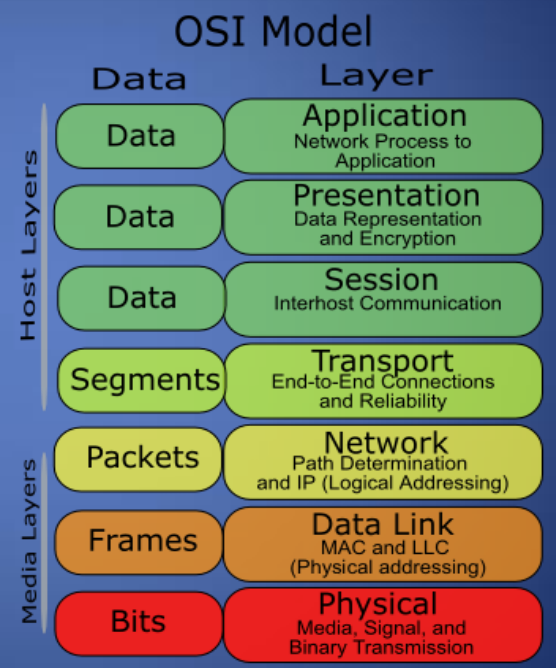
| OSI Layer | Controls |
|---|---|
| Layer 1 — Physical | Physical access controls, cable security, hardware locks |
| Layer 2 — Data Link | Switch port security, MAC filtering, 802.1X, VLAN segmentation |
| Layer 3 — Network | Firewall, VPN, IDS/IPS, Honeypots, NAT/PAT, SSL/TLS, port blocking, routing control |
| Layer 4 — Transport | TCP/UDP session control, flow control, congestion control |
| Layer 5 — Session | SSH, RPC, NFS authentication |
| Layer 6 — Presentation | Encryption/decryption, data format validation |
| Layer 7 — Application | Application-layer firewalls, WAF, content filtering |
Analyze which ports must be open and restrict all others.
Remove file and print sharing from network settingsunless explicitly required — file/print sharing can allow connection to a server without credentials.
Confidentiality Controls 机密性控制
Cryptography and Encryption 加密
Network-security mechanisms include firewalls, access control lists (ACL), and encryption protocols such as SSL/TLS— which provide encryption for many protocols (HTTPS, FTPS, LDAPS).
Authentication Protocols 认证协议
Kerberos
Kerberosis a network authentication protocol using symmetric key cryptography and a trusted third party — the Key Distribution Center (KDC).
Ticket exchange flow:
- Client authenticates to the Authentication Service (AS) and receives a Ticket Granting Ticket (TGT).
- Client presents the TGT to the Ticket Granting Service (TGS) to obtain a Service Ticket.
- Client presents the Service Ticket to the target service to establish a session.
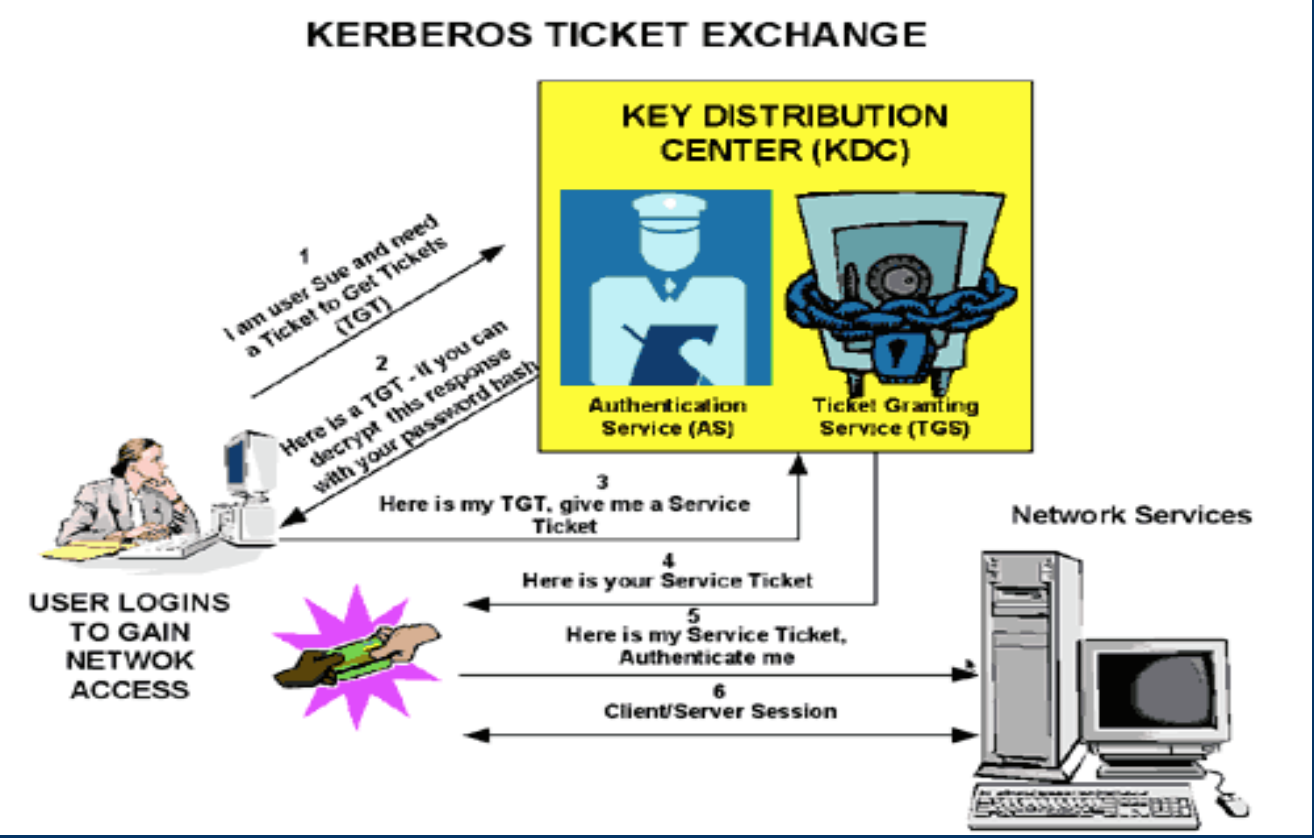
- Port: TCP/UDP 88
- Provides mutual authentication — both client and server verify identity.
RADIUS
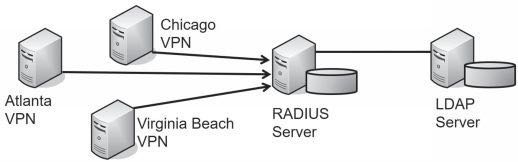
RADIUS (Remote Authentication Dial-In User Service)centralizes authentication for remote connections.
| Property | Value |
|---|---|
| Transport | UDP |
| Primary use | Network access authentication |
| AAA model | Combines authentication and authorization |
| Encryption | Encrypts only the password field |
TACACS+
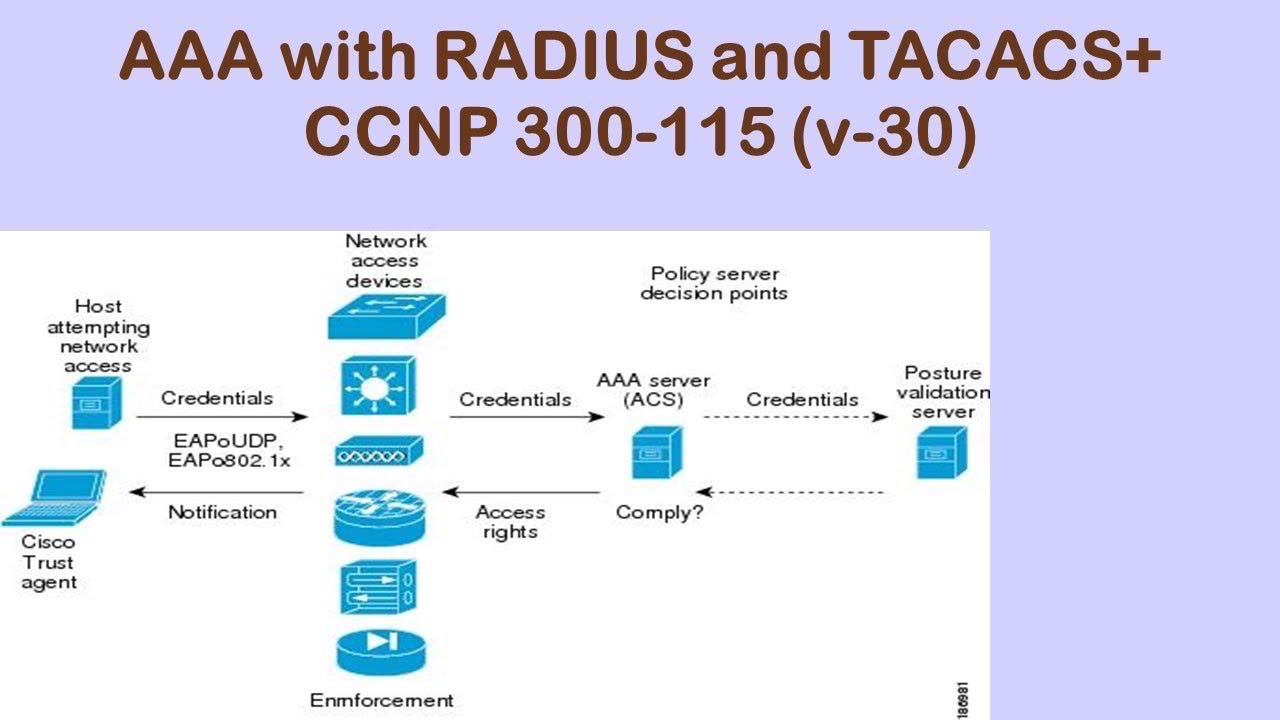
TACACS+ (Terminal Access Controller Access-Control System Plus)is a Cisco-developed replacement for RADIUS with stronger separation of AAA functions.
| Property | RADIUS | TACACS+ |
|---|---|---|
| Transport | UDP | TCP (port 49) |
| Encryption | Password only | Full packet encryption |
| AAA model | Combined auth + authz | Separate authentication, authorization, accounting |
| Use case | Network access | Device administration |
, making it more secure than RADIUS for device management.
Integrity Controls 完整性控制
- Backups
: maintain regular, tested backups to restore data integrity after incidents.
- Checksums
: verify file and transfer integrity using cryptographic hashes (SHA-256).
- Data correcting codes
: small changes can be detected and automatically corrected in storage systems.
Availability Controls 可用性控制
- Physical protections
: infrastructure (UPS, redundant power, climate control) to keep systems available during physical challenges.
- Computational redundancies
: redundant hardware and tested backup systems for critical services.
- Use firewalls and routers to detect and prevent DoS/DDoS attacks.
Database Hardening 数据库加固
1. Physical Database Server Security 物理安全
- House the database server in a secured, locked, and monitored environment to prevent unauthorized entry, access, or theft.
- Application/web servers must not be hosted on the same machine as the database server.
2. Firewalls for Database Servers 防火墙
- The database server sits behind a firewall with default-deny rules.
- Firewall rules allow access only from specific application or web servers. Direct client access to the database port is never permitted.
3. Database Software 数据库软件
- Keep database software patched to the latest supported version.
- Disable all unused database features, stored procedures, and remote access options.
- Review and restrict the permissions of the database service account (principle of least privilege).
4. Application / Web Servers / Application Code
- No spyware or unauthorized software is permitted on application, web, or database servers.
- Application code must enforce server-side input validation before any data reaches the database.
5. Accounts, Permissions, and Passwords 账户与权限
- Rename or disable default administrator accounts.
- Create dedicated, least-privilege database accounts for each application.
- Enforce strong password policies for all database accounts.
- Regularly audit account permissions and remove unused accounts.
6. Protected Data 数据保护
- Keep only the data required for the business function within the database — data minimization.
- Apply hashing functions to protected data elements (passwords, PINs) before storage when the data is only required for matching.
- Dictionary attacks
against password hashes are the primary threat — use salted, slow hashing algorithms (bcrypt, Argon2).
7. Change Management 变更管理
- Document all changes to the database schema, stored procedures, and configuration.
- Change management procedures must meet the data proprietor’s requirements and include rollback capability.
8. Database Auditing 数据库审计
- Log all logins to OS and database servers — both successful and unsuccessful.
- Retain logs for at least one year.
- Store audit logs on a separate, protected system — not on the database server itself.
9. Database Backup and Recovery 备份与恢复
- Implement regular automated backups with tested restore procedures.
- Store backup copies off-site or in a separate security zone.
- Verify backup integrity after each backup cycle.
10. Database Encryption and Key Management 加密与密钥管理
- Encrypt data at rest for all tables containing sensitive or regulated data.
- Encrypt data in transit between the application server and the database (TLS).
- Store encryption keys in a dedicated key management system — not alongside the encrypted data.
11. Attack: SQL Injection SQL注入攻击
SQL injectionis the primary application-layer threat to database servers. An attacker injects malicious SQL syntax through unvalidated input fields to manipulate the database.
Mitigations:
| Control | Description |
|---|---|
| Parameterized queries / stored procedures | Separate SQL logic from user-supplied data — the most effective defense |
| Server-side input validation | Filter and validate all input on the server, never trust client-side validation alone |
| Proper error handling | Return generic error pages — never expose SQL error details, table names, or stack traces to the user |
| Least-privilege DB accounts | Application account cannot DROP, ALTER, or access tables outside its scope |
Meow’s Security Considerations 安全注意事项
实施安全加固会创建新的配置状态和依赖关系,这些本身也可能成为攻击目标。以下涵盖加固过程中密钥管理、权限配置、认证协议和审计日志的核心安全风险。
Applying hardening creates new configuration state and trust dependencies that can themselves be targeted. The concerns below cover credential management, access control misconfiguration, authentication protocol weaknesses, and audit log integrity arising from the hardening procedures described in this note.
| Severity 严重程度 | Concern 问题 |
|---|---|
| Critical 严重 | Kerberos KDC compromise — Golden Ticket grants unlimited access to all services |
| High 高 | Incomplete or untested patch management leaves 0-day exposure |
| High 高 | SQL injection via missing parameterized queries bypasses all DB access controls |
| High 高 | RBAC misconfiguration grants excessive privileges — enables lateral movement |
| Medium 中 | BIOS/firmware password bypass via physical access (cold boot, flash reset) |
| Medium 中 | Audit log tampering — locally stored logs can be cleared by a compromised admin |
| Medium 中 | RADIUS password-only encryption exposes session tokens on the wire |
| Low 低 | Default LDAP/AD service accounts with weak passwords expose directory services |
1. Kerberos KDC Compromise — Golden Ticket 黄金票据攻击 — Critical
攻击者一旦控制Kerberos密钥分发中心(KDC),即可伪造任意用户的票据授予票据(TGT),即”黄金票据”。由于所有Kerberos票据均由KDC签发,黄金票据可绕过所有基于票据的认证,在整个域内横向移动,且难以被检测。
If an attacker compromises the Kerberos KDC — typically the Domain Controller — they can forge arbitrary Ticket Granting Tickets (TGTs) for any user. These “Golden Tickets” bypass all Kerberos-based authentication across the entire domain and are valid until the krbtgt account password is rotated.
攻击向量 Attack Vectors:
- KDC服务器遭受远程代码执行攻击,攻击者提取krbtgt账户的NTLM哈希 / Remote code execution on the KDC server; attacker extracts the krbtgt account NTLM hash
- 利用黄金票据在整个Active Directory域内横向移动,无需知道真实用户密码 / Golden Ticket used to move laterally across the entire AD domain without knowing real user passwords
缓解措施 Mitigation: 将KDC与其他服务器隔离,限制域控制器的管理访问,定期(至少每180天)轮换krbtgt账户密码,并监控异常票据请求(如非工作时间、非正常主机)。 Isolate the KDC from other workloads, restrict administrative access to Domain Controllers, rotate the krbtgt account password regularly (at minimum every 180 days), and monitor for anomalous ticket requests (unusual hours, unknown hosts). MITRE ATT&CK T1558.001.
2. Incomplete Patch Management 补丁管理不完整 — High
未及时应用的补丁使系统暴露于已知的CVE漏洞中。攻击者优先针对已发布补丁但尚未部署的漏洞——这类漏洞同时拥有公开的漏洞利用代码和大量未打补丁的目标。
Unpatched systems remain exposed to known CVE vulnerabilities. Attackers prioritize vulnerabilities for which a public patch exists but deployment is lagging — these have both published exploit code and a large pool of unpatched targets.
攻击向量 Attack Vectors:
- 利用公开的CVE漏洞对未打补丁的OS或应用发起远程代码执行攻击 / Exploiting public CVEs against unpatched OS or application components for remote code execution
- 0-day漏洞在补丁发布前无法通过补丁管理修复,需依赖网络分段和行为监控 / 0-day exploits cannot be addressed by patch management before a patch exists — rely on network segmentation and behavioral monitoring
缓解措施 Mitigation: 建立自动化补丁管理流程,在受控的沙盒环境中测试补丁后快速部署。对关键漏洞(CVSS ≥ 9.0)设置72小时内修补的SLA。 Establish automated patch management with sandbox testing before production deployment. Set an SLA of 72 hours for critical vulnerabilities (CVSS ≥ 9.0). CWE-1329.
3. SQL Injection via Missing Parameterized Queries SQL注入 — High
若应用程序代码未使用参数化查询或存储过程,用户输入会被直接拼接进SQL语句,攻击者可操控查询逻辑,绕过认证、提取数据,甚至执行OS命令。
If application code concatenates user-supplied input directly into SQL statements instead of using parameterized queries or stored procedures, attackers can manipulate query logic to bypass authentication, extract data, or execute OS-level commands via the database engine.
攻击向量 Attack Vectors:
- 在登录表单或搜索字段注入
' OR '1'='1绕过认证 / Injecting' OR '1'='1into login forms or search fields to bypass authentication - 使用
UNION SELECT从其他表提取数据,或使用xp_cmdshell执行系统命令 / UsingUNION SELECTto extract data from other tables, orxp_cmdshellto run OS commands
缓解措施 Mitigation: 所有数据库查询必须使用参数化查询或存储过程;服务器端验证所有输入;错误消息不得暴露数据库结构;定期进行代码审查和渗透测试。 All database queries must use parameterized queries or stored procedures; validate all input server-side; error messages must never expose database structure; conduct regular code review and penetration testing. CWE-89 / MITRE T1190.
4. RBAC Misconfiguration — Privilege Escalation 权限配置错误 — High
角色配置错误(权限过宽、遗留权限未清理、DAC所有者误操作)会使攻击者或恶意内部人员获得超出其职能所需的访问权限,进而进行横向移动或数据泄露。
Misconfigured roles — overly broad permissions, stale accounts with residual access, or DAC owners granting rights without oversight — allow attackers or malicious insiders to access resources beyond their function, enabling lateral movement or data exfiltration.
攻击向量 Attack Vectors:
- 利用残留的遗留账户(如已离职员工)进行未授权访问 / Exploiting residual legacy accounts (e.g., departed employees) for unauthorized access
- 向非特权账户授予过宽的共享角色权限 / Overly broad shared roles granting non-privileged accounts elevated access
缓解措施 Mitigation: 定期审计所有账户权限,实施职责分离,定期执行访问权限复查(每季度一次),并对特权账户操作启用审计日志。 Audit all account permissions regularly, enforce separation of duties, run quarterly access reviews, and enable audit logging for all privileged account actions. CWE-269 / MITRE T1078.
5. BIOS/Firmware Password Bypass 固件密码绕过 — Medium
设置BIOS密码后,拥有物理访问权限的攻击者仍可通过拆除CMOS电池重置密码,或通过外部启动介质绕过操作系统安全控制。固件级后门(如UEFI植入)比OS层检测更难发现。
A BIOS password prevents casual unauthorized changes, but an attacker with physical access can reset it by removing the CMOS battery or using manufacturer reset jumpers. External boot media bypasses OS-level access controls entirely. Firmware-level backdoors (UEFI implants) are harder to detect than OS-layer threats.
缓解措施 Mitigation: 将服务器置于上锁的机架和受监控的机房中;启用Secure Boot并验证固件签名;使用TPM进行启动完整性测量;记录并审计对物理基础设施的访问。 Place servers in locked racks and monitored rooms; enable Secure Boot and verify firmware signatures; use TPM for boot integrity measurements; log and audit all physical infrastructure access. MITRE T1542.
6. Audit Log Tampering 审计日志篡改 — Medium
若审计日志存储在被攻击的主机本地,具有管理员权限的攻击者可清除、修改或停用日志,抹去入侵痕迹。这直接破坏了事件响应和取证调查能力。
If audit logs are stored locally on the compromised host, an attacker with administrator access can clear, modify, or disable logging — erasing evidence of the intrusion. This directly undermines incident response and forensic investigation.
缓解措施 Mitigation: 将日志实时转发到集中式、只写的SIEM或日志服务器;对日志存储应用只追加权限;对日志完整性使用加密哈希链(如 syslog over TLS)。 Forward logs in real time to a centralized, append-only SIEM or log server; apply write-only permissions to log storage; use cryptographic hash chaining for log integrity (e.g., syslog over TLS). MITRE T1070.001.
7. RADIUS Password-Only Encryption RADIUS仅加密密码 — Medium
RADIUS仅加密认证数据包中的密码字段,其他属性(用户名、授权数据)以明文传输。在可以监听UDP流量的网络环境中,攻击者可通过流量分析获取用户名及会话元数据。
RADIUS encrypts only the password field in authentication packets; all other attributes — username, authorization data — are transmitted in cleartext over UDP. On networks where UDP traffic can be intercepted, an attacker can perform traffic analysis to harvest usernames and session metadata.
缓解措施 Mitigation: 在RADIUS和网络设备之间使用RadSec(RADIUS over TLS/DTLS)或将RADIUS迁移到TACACS+(对设备管理场景);对所有认证流量强制执行网络分段和加密隧道。 Use RadSec (RADIUS over TLS/DTLS) between RADIUS and network devices, or migrate to TACACS+ for device administration; enforce network segmentation and encrypted tunnels for all authentication traffic. CWE-311.
Summary Table 汇总表
| # | 问题 Concern | MITRE / CWE | 状态 Status |
|---|---|---|---|
| 1 | Kerberos KDC Compromise — Golden Ticket | MITRE T1558.001 | Mitigate: isolate KDC, rotate krbtgt |
| 2 | Incomplete Patch Management | CWE-1329 | Mitigate: automated patching, SLA |
| 3 | SQL Injection — Missing Parameterized Queries | CWE-89 / T1190 | Mitigate: parameterized queries |
| 4 | RBAC Misconfiguration — Privilege Escalation | CWE-269 / T1078 | Mitigate: access reviews, auditing |
| 5 | BIOS/Firmware Password Bypass | MITRE T1542 | Mitigate: physical controls, Secure Boot |
| 6 | Audit Log Tampering | MITRE T1070.001 | Mitigate: centralized SIEM, append-only |
| 7 | RADIUS Password-Only Encryption | CWE-311 | Mitigate: RadSec or TACACS+ |
Key Takeaways
- OS hardening starts at installation
: master images, service minimization, BIOS/Secure Boot/TPM, and least-privilege accounts — established before the system is connected to a network
- CIS Benchmarks
provide measurable, auditable baselines for OS and application hardening
- Access control models
range from most restrictive (MAC) to least restrictive (DAC) — choose based on the classification level of data handled
- Quantitative risk: SLE × ARO = ALE
— use ALE to justify the cost of security controls
- TACACS+ vs RADIUS
: TACACS+ encrypts the full packet and separates AAA — preferred for network device administration; RADIUS is lighter-weight and common for network access
- Kerberos Golden Ticket
is the primary threat to Kerberos-based environments — KDC isolation and krbtgt rotation are the key mitigations
- Database hardening
: database server must sit behind a firewall with default-deny rules, no direct client access, parameterized queries, and encrypted data at rest and in transit
- Audit logs stored locally are untrustworthy
— forward to a centralized SIEM immediately
References
- CompTIA Security+ objectives — OS hardening, risk management, access control models
- CISSP Chapter 13 — security controls and hardening
- CIS Benchmarks — configuration baselines for OS and application hardening
- MITRE ATT&CK — T1558 (Kerberos), T1078 (Valid Accounts), T1190 (Exploit Public-Facing App), T1542 (Pre-OS Boot), T1070 (Indicator Removal)
- CWE-89 (SQL Injection), CWE-269 (Privilege Management), CWE-311 (Missing Encryption), CWE-1329 (Reliance on Component Without Maintenance)
- CCNP 300-115 — AAA with RADIUS and TACACS+
Comments powered by Disqus.