Meow's 536OS - 2. Operating System Services, Interfaces, and Structure
2. Operating System Services, Interfaces, and Structure
Source: CS 536 Operating Systems — Chapter 2: Operating-System Structures
Overview
Chapter 2 covers the services an OS provides, how users and programs interact with it through interfaces and system calls, how programs are compiled and loaded, and how the OS kernel itself is structured — from monolithic to microkernel to hybrid designs.
2.1 Operating-System Services 操作系统服务
An operating system provides an environment for the execution of programs. It makes certain services available to programs and to the users of those programs. Figure 2.1 shows the common classes of OS services and how they interrelate.
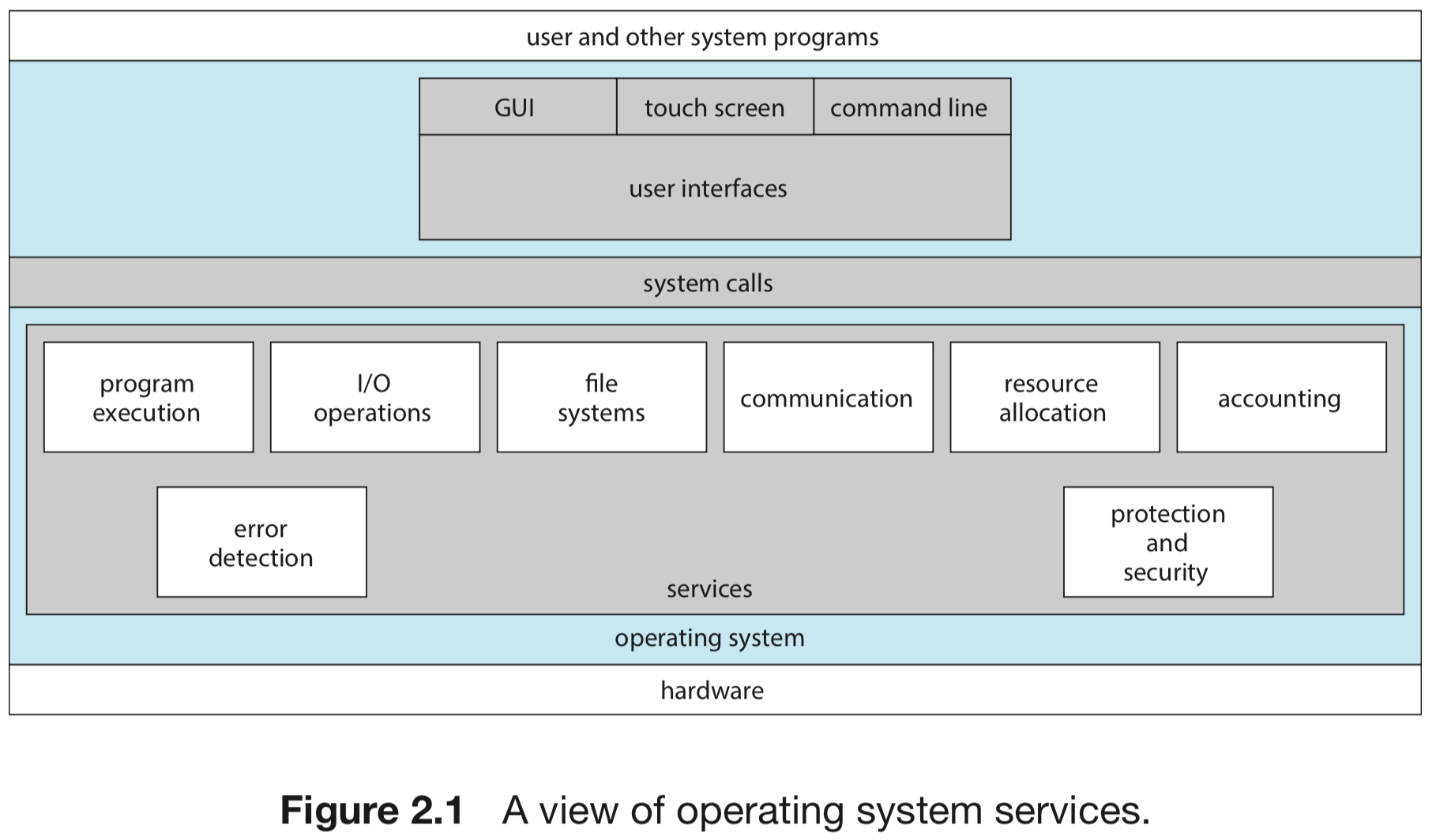
Services Helpful to the User 面向用户的服务
| Service | Description |
|---|---|
| User Interface (UI) | Almost all OSes provide a UI — GUI, touch-screen, or CLI |
| Program execution | Load a program into memory and run it; end normally or abnormally |
| I/O operations | Mediate all I/O on behalf of user programs; users cannot control devices directly |
| File-system manipulation | Read, write, create, delete, search, list files/directories; permissions management |
| Communication | Exchange information between processes on the same machine or across a network, via shared memory or message passing |
| Error detection | Detect and correct errors in CPU, memory, I/O devices, and user programs; take appropriate action (halt, terminate process, return error code) |
Services for Efficient System Operation 面向系统效率的服务
| Service | Description |
|---|---|
| Resource allocation | Allocate CPU cycles, memory, storage, and I/O devices across multiple concurrent processes |
| Logging / Accounting | Track which programs use how much of which resources; used for billing or performance analysis |
| Protection and security | Ensure all access to system resources is controlled; require user authentication; defend against invalid external access |
Protection vs Security:
- Protection
: ensures all access to system resources is controlled
- Security
: defends against external threats — authentication, I/O device defense, break-in detection
- “A chain is only as strong as its weakest link” — both must be applied throughout the system
2.2 User and Operating-System Interface 用户与操作系统接口
Three fundamental interfaces exist between the user and the OS:
| Interface | Description |
|---|---|
| Command-Line Interface (CLI) | Text commands; preferred by system administrators and power users |
| Graphical User Interface (GUI) | Mouse-and-window system; desktop metaphor |
| Touch-Screen Interface | Gesture-based; used by smartphones and tablets |
2.2.1 Command Interpreters 命令解释器
Most OSes treat the command interpreter as a special program that runs when a process is initiated or when a user logs on. On systems with multiple interpreters, they are called shells.
- UNIX/Linux shells: C shell, Bourne-Again shell (bash), Korn shell, and others
- The main function of the command interpreter: get and execute the next user-specified command
Two implementation approaches:
- Interpreter contains the code — the command interpreter itself executes each command; each command requires its own implementing code, making the interpreter large
- Commands are system programs (used by UNIX) — the interpreter uses the command name to identify a file to load into memory and execute; adding new commands only requires creating new files; the interpreter stays small
1
2
3
# UNIX approach: the command interpreter finds and runs the "rm" program
rm file.txt
# equivalent to: load /bin/rm into memory, execute with argument file.txt
2.2.2 Graphical User Interface 图形用户界面
A GUI uses a desktop metaphor: icons represent programs, files, directories, and functions; mouse clicks invoke programs or pull down menus.
- First GUI appeared on the Xerox Alto (1973); popularized by Apple Macintosh (1980s)
- macOS uses the Aqua interface; Windows added GUI to MS-DOS in version 1.0
- UNIX traditionally CLI-dominant; KDE and GNOME are open-source GUIs for Linux/UNIX
2.2.3 Touch-Screen Interface 触摸屏界面
Smartphones and tablets use touch-screen interfaces.
- Users interact via gestures (press, swipe)
- Physical keyboard or simulated keyboard on screen
- iPad and iPhone use the Springboard touch-screen interface
2.2.4 Choice of Interface 接口选择
| Interface | Best for |
|---|---|
| CLI | System administrators, power users — faster, scriptable, repeatable tasks |
| GUI | General users — intuitive, visual, easier to learn |
| Touch | Mobile users — no physical keyboard required |
Shell scripts: CLI commands recorded in a file and run as a program (not compiled); very common on UNIX/Linux.
macOS now provides both the Aqua GUI and a CLI. Windows recent versions provide both standard GUI (desktop/laptop) and touch-screen (tablets). Mobile iOS/Android users almost exclusively use touch.
2.3 System Calls 系统调用
System callsprovide an interface to the services made available by an operating system. Written in C/C++; low-level tasks may require assembly.
2.3.1 Example — File Copy Sequence
A simple cp in.txt out.txt operation requires many system calls:
- Acquire input/output file names (write prompt, read input)
- Open input file (error if not found)
- Create/open output file (handle conflicts)
- Loop: read from input, write to output (handle errors)
- Close both files
- Write completion message
- Terminate normally
1
2
3
4
5
6
7
8
Acquire input file name    → write prompt to screen, accept input
Acquire output file name   → write prompt to screen, accept input
Open the input file        → if file doesn't exist, abort
Create output file         → if file exists, abort
Loop: read from input file, write to output file (until read fails)
Close output file
Write completion message
Terminate normally
2.3.2 Application Programming Interface (API) 应用程序编程接口
Most programmers design programs according to an API rather than invoking system calls directly. The API specifies functions, parameters, and return values.
Common APIs:
- Windows API — for Windows systems
- POSIX API — for POSIX-based systems (UNIX, Linux, macOS)
- Java API — for programs running on the Java virtual machine
The run-time environment (RTE) provides a system-call interface that intercepts API function calls and invokes the appropriate system calls. A number is associated with each system call; the system-call interface maintains a table indexed by those numbers.
Why use an API instead of direct system calls?
- Portability: code compiles and runs on any system supporting the same API
- Simplicity: actual system calls are more complex and detailed
Example — read() system call (POSIX):
1
2
3
4
5
6
#include <unistd.h>
ssize_t read(int fd, void *buf, size_t count);
// fd: file descriptor to read
// buf: buffer to read into
// count: max bytes to read
// returns: bytes read; 0 = EOF; -1 = error
Parameter-passing methods:
| Method | Description |
|---|---|
| Registers | Simplest; limited by number of registers (Linux: <= 5 params) |
| Block/table in memory | Address of block passed in a register (Linux: > 5 params) |
| Stack | Parameters pushed; OS pops them; no limit on count or size |
2.3.3 Types of System Calls 系统调用类型
| Category | Examples |
|---|---|
| Process control | fork(), exit(), wait(), exec(), create_process(), terminate_process(), get/set_process_attributes(), acquire/release_lock() |
| File management | create(), delete(), open(), close(), read(), write(), reposition(), get/set_file_attributes() |
| Device management | request(), release(), read(), write(), reposition(), get/set_device_attributes() |
| Information maintenance | time(), date(), dump(), get/set_process_attributes(), strace (Linux) |
| Communications | open/close_connection(), send/receive_messages(), shared_memory_create/attach() |
| Protection | set/get_permission(), allow/deny_user() |
Windows vs UNIX equivalents:
| Category | Windows | UNIX |
|---|---|---|
| Process | CreateProcess(), ExitProcess(), WaitForSingleObject() | fork(), exit(), wait() |
| File | CreateFile(), ReadFile(), WriteFile(), CloseHandle() | open(), read(), write(), close() |
| IPC | CreatePipe(), CreateFileMapping(), MapViewOfFile() | pipe(), shm_open(), mmap() |
| Protection | SetFileSecurity(), InitializeSecurityDescriptor() | chmod(), umask(), chown() |
Two IPC models:
| Model | Mechanism | Best for |
|---|---|---|
| Message passing | Processes exchange packets via OS; connection required | Smaller data; easier for cross-computer IPC |
| Shared memory | Two or more processes read/write a shared memory region | Maximum speed; memory-transfer rates; requires synchronization |
FreeBSD multitasking example:
1
2
3
4
# fork() creates a new process
# exec() loads the program into memory
# exit() terminates and returns status code
./program &   # run in background; shell continues
2.4 System Services 系统服务
System services(also called system utilities) provide a convenient environment for program development and execution. Categories:
| Category | Description |
|---|---|
| File management | Create, delete, copy, rename, print, list files and directories |
| Status information | Date/time, memory/disk space, number of users; some systems support a registry |
| File modification | Text editors; commands to search or transform file contents |
| Programming-language support | Compilers, assemblers, debuggers, interpreters (C, C++, Java, Python) |
| Program loading and execution | Absolute/relocatable loaders, linkage editors, overlay loaders, debuggers |
| Communications | Virtual connections among processes, users, computers (web browser, email, remote login, file transfer) |
| Background services (daemons) | Launched at boot; run until system halted (network daemons, process schedulers, print servers, error monitors) |
The view of the OS seen by most users is defined by application and system programs, not the underlying system calls.
2.5 Linkers and Loaders 链接器与加载器
A program resides on disk as a binary executable. To run, it must be loaded into memory within a process context.
Compilation pipeline:
1
2
3
4
5
6
7
main.c
  ↓  gcc -c main.c          (compiler)
main.o                       (relocatable object file)
  ↓  gcc -o main main.o -lm  (linker)
main                         (executable)
  ↓  ./main                  (loader)
program in memory
| Step | Tool | Description |
|---|---|---|
| Compile | Compiler | Source → relocatable object file (can be loaded at any physical address) |
| Link | Linker | Combine relocatable object files into a single binary executable; include libraries |
| Load | Loader | Load binary into memory within the address space of a new process; perform relocation (assign final addresses) |
On UNIX: fork() creates the process, exec() invokes the loader.
Dynamic linking: Most systems allow libraries to be linked at load/run time (DLLs on Windows). Advantages: avoids loading unused libraries; multiple processes can share the same dynamically linked library.
Executable formats:
- UNIX/Linux: ELF (Executable and Linkable Format) — separate formats for relocatable and executable files
- Windows: PE (Portable Executable)
- macOS: Mach-O
1
2
3
file main.o   # ELF relocatable file
file main     # ELF executable
readelf main  # inspect ELF sections
2.6 Why Applications Are Operating-System Specific 应用程序的操作系统特异性
Applications compiled on one OS are generally not executable on other OSes, due to:
- Binary format — each OS defines the layout of headers, instructions, and variables in executable files
- CPU instruction sets — only applications with the appropriate instructions can execute correctly
- System calls — OSes differ in system-call names, numbering, operands, ordering, and return values
Three ways to achieve portability:
| Approach | Mechanism | Tradeoff |
|---|---|---|
| Interpreted language | Interpreter (Python, Ruby) runs on multiple OSes | Slower; subset of OS features |
| Virtual machine | Java RTE/JVM runs bytecode on any platform where RTE is available | Slower; complex deployment |
| Standard API + porting | POSIX API; compile natively for each OS | Best performance; requires porting effort per OS |
ABI vs API:
- API
: application-level interface (functions, parameters, return values)
- ABI (Application Binary Interface)
: architecture-level interface — address width, parameter passing, stack organization, binary format, data type sizes; specific to a CPU architecture + OS pair (e.g., ARMv8 ABI)
2.7 Operating-System Design and Implementation 操作系统的设计与实现
2.7.1 Design Goals 设计目标
Requirements split into two groups:
| Group | Concerns |
|---|---|
| User goals | Convenient to use, easy to learn, reliable, safe, fast |
| System goals | Easy to design/implement/maintain; flexible, reliable, error-free, efficient |
There is no unique solution — different requirements lead to vastly different systems (e.g., VxWorks RTOS vs Windows Server).
2.7.2 Mechanisms and Policies 机制与策略
The most important principle: separate policy from mechanism.
| Concept | Definition | Example |
|---|---|---|
| Mechanism | Determines how to do something | Timer construct ensures CPU protection |
| Policy | Determines what will be done | How long the timer is set for a particular user |
Why separate them? Policies change over time and across environments. A general mechanism flexible enough to work across a range of policies avoids the need to change the mechanism every time the policy changes.
- Microkernel OSes: almost policy-free mechanisms; policies added via user-created modules
- Windows/macOS: mechanism and policy tightly encoded in the system; enforces global look and feel
- Linux: open-source; anyone can modify the scheduler or other policy components
2.7.3 Implementation 实现
Early OSes: assembly language. Modern OSes: mainly C/C++; small amounts of assembly for low-level hardware interaction.
Android layered implementation:
- Kernel: mostly C + some assembly
- System libraries: C or C++
- Application frameworks: mostly Java
Advantages of high-level language:
- Faster to write, more compact, easier to debug
- Compiler improvements benefit the whole OS
- Easier to port to new hardware
Performance note: Major performance improvements come from better data structures and algorithms, not assembly optimization. Critical routines (interrupt handlers, I/O manager, memory manager, CPU scheduler) can be optimized after the system works correctly.
2.8 Operating-System Structure 操作系统结构
2.8.1 Monolithic Structure 单体结构
All OS functionality in a single, static binary running in a single address space. Example: original UNIX, Linux.
1
2
3
4
5
6
7
Users
  ↓
shells / compilers / system libraries
  ↓ (system-call interface)
kernel: file system, CPU scheduling, memory management, I/O, device drivers
  ↓ (kernel interface to hardware)
hardware: terminals, disks, memory
Linux kernel structure (Figure 2.13):
1
2
3
4
5
6
7
applications
  ↓ (glibc standard C library)
system-call interface
  ↓
kernel: file systems, CPU scheduler, networks (TCP/IP), memory manager, block/character devices, device drivers
  ↓
hardware
- Advantages: minimal system-call overhead; fast intra-kernel communication; high performance
- Disadvantages: difficult to implement and extend; changes in one area can affect others (tightly coupled)
Linux is monolithic but modular — the kernel can be modified at run time via loadable kernel modules.
2.8.2 Layered Approach 分层方法
OS divided into layers, each implemented using only operations provided by lower layers.
1
2
3
4
Layer N: user interface
Layer N-1: ...
Layer 1: hardware abstraction
Layer 0: hardware
- Advantage: simplicity of construction and debugging — each layer verified independently
- Disadvantage: poor performance (user programs traverse multiple layers); difficult to define layer boundaries cleanly
- Used in networking (TCP/IP) and web applications; rarely used as the sole OS structure
2.8.3 Microkernels 微内核
Developed by Carnegie Mellon in the mid-1980s (Mach). Removes all nonessential components from the kernel; implements them as user-level programs in separate address spaces.
Minimal kernel provides:
- Basic process and memory management
- Communication (message passing / IPC)
Client programs communicate with services via message passing through the microkernel — never directly.
| Aspect | Detail |
|---|---|
| Advantage | Easier to extend (add services in user space); easier to port; more security/reliability (service failures don’t crash the kernel) |
| Disadvantage | Performance overhead — messages must be copied between separate address spaces; process switches to exchange messages |
Examples: Darwin (macOS/iOS kernel component — combines Mach microkernel + BSD), QNX (real-time embedded OS).
2.8.4 Modules 可加载内核模块
The best current methodology: Loadable Kernel Modules (LKMs). The kernel has core components; additional services are linked in dynamically at boot time or run time.
- Core services (CPU scheduling, memory management) built directly into the kernel
- Support for different file systems, device drivers added via loadable modules
- Similar to layered system (protected interfaces) but more flexible (any module can call any other)
- More efficient than microkernel (no message passing needed between modules)
1
2
3
4
5
# Linux LKM operations
insmod  mymodule.ko   # insert module
rmmod   mymodule.ko   # remove module
lsmod                 # list loaded modules
# USB device plugged in → kernel dynamically loads the driver
2.8.5 Hybrid Systems 混合结构
Most real OSes combine multiple approaches.
| OS | Structure | Notes |
|---|---|---|
| Linux | Monolithic + modular | Single address space (performance) + LKMs (extensibility) |
| Windows | Mostly monolithic + microkernel elements | Operating-system personalities run as user-mode processes; supports dynamically loadable modules |
| macOS/iOS | Hybrid (Darwin = Mach + BSD) | Mach microkernel + BSD kernel in same address space (avoids message-passing overhead) |
| Android | Linux-based + ART VM + HAL | Modified Linux kernel + Bionic C library + ART ahead-of-time compiler |
macOS/iOS architecture layers:
1
2
3
4
User experience (Aqua / Springboard)
Application frameworks (Cocoa / Cocoa Touch)
Core frameworks (QuickTime, OpenGL)
Kernel environment — Darwin (Mach microkernel + BSD)
Darwin provides two system-call interfaces: Mach traps and BSD POSIX system calls. All services run in the same address space — message passing within Mach requires no copying.
Android architecture:
1
2
3
4
5
6
7
8
Applications (Java, compiled to .dex)
Android frameworks
Android RunTime (ART) — AOT compilation (.dex → native machine code)
Native libraries (webkit, SQLite, SSL, OpenGL) via JNI
Bionic (Android's custom C library, smaller than glibc)
Linux kernel (modified for power management, Binder IPC)
HAL (Hardware Abstraction Layer)
Hardware
- ART uses ahead-of-time (AOT) compilation:
.dexfiles compiled to native code at install time (more efficient, less power) - JNI
(Java Native Interface): allows Java programs to access hardware directly; not portable across devices
- HAL
: abstracts all hardware (camera, GPS, sensors) so apps are portable across different hardware platforms
- Bionic
: smaller than glibc; optimized for slower mobile CPUs; avoids GPL licensing
Windows Subsystem for Linux (WSL):
Windows 10 adds WSL, allowing native Linux ELF binaries to run on Windows. bash.exe starts a Linux instance with init and /bin/bash running in a Windows Pico process. LXSS/LXCore translates Linux system calls to Windows equivalents; fork() is handled by combining LXSS work with CreateProcess().
2.9 Building and Booting an Operating System 系统的构建与启动
System Boot Process 系统启动过程
Booting: the process of starting a computer by loading the kernel.
Standard boot sequence:
- Computer powered on → run bootstrap program / boot loader (small code in nonvolatile firmware)
- Bootstrap program locates the kernel
- Kernel is loaded into memory and started
- Kernel initializes hardware
- Root file system is mounted
- Kernel starts the init daemon (Linux:
systemd) which starts other services
Multistage boot process:
| Stage | Component | Role |
|---|---|---|
| 1 | BIOS / UEFI (firmware) | Run on power-on; initial boot loader |
| 2 | Boot block (MBR/GPT) | Located at fixed disk location; loaded by BIOS/UEFI |
| 3 | GRUB (Linux) | Grand Unified Boot Loader; loads the kernel; supports multiple kernels and boot targets |
| 4 | Kernel | Loaded into memory; initializes hardware; mounts root FS; starts init |
| 5 | init / systemd | PID 1; starts all system services |
BIOS vs UEFI:
| BIOS | UEFI | |
|---|---|---|
| Architecture | 16-bit, legacy | 64-bit, modern |
| Boot stages | Multistage (slower) | Single complete boot manager (faster) |
| Disk support | MBR (< 2 TB) | GPT (large disks) |
UEFI’s greatest advantage: it is a single, complete boot manager — faster than the multistage BIOS process.
GRUB configuration example:
1
2
3
# /proc/cmdline — kernel parameters set by GRUB at boot time
BOOT_IMAGE=/boot/vmlinuz-4.4.0-59-generic
root=UUID=5f2e2232-4e47-4fe8-ae94-45ea749a5c92
Linux kernel image boot sequence:
- Boot loader creates initramfs — a temporary RAM file system containing drivers and kernel modules needed to support the real root file system
- Kernel decompresses itself from the compressed image
- Loads necessary drivers from initramfs
- Switches root file system from the temporary RAM location to the real root file system
- Creates
systemd(PID 1), which starts all other services - Presents the user with a login prompt
Android boot differences:
- Does not use GRUB; vendors provide their own boot loader (most common: LK — Little Kernel)
- Android maintains
initramfsas the root file system (unlike Linux, which discards it) - After mounting root FS, starts
initprocess, then displays the home screen
Recovery mode: Most boot loaders support booting into recovery/single-user mode for diagnosing hardware, fixing corrupt file systems, or reinstalling the OS.
2.10 Operating-System Debugging 操作系统调试
Debugging: finding and fixing errors — both hardware and software, including performance problems (performance tuning).
2.10.1 Failure Analysis 故障分析
- Process failure: OS writes error info to a log file; may take a core dump (memory snapshot) for later debugger analysis
- Kernel failure: called a crash; error info saved to a log file; memory state saved to a crash dump
- Crash dump strategy: kernel saves memory to a reserved disk section (no file system) before reboot; a post-reboot process moves it into a file system
2.10.2 Performance Monitoring and Tuning 性能监控与调优
Tools use either counters or tracing.
Counter-based tools (Linux):
| Scope | Tool | Purpose |
|---|---|---|
| Per-process | ps | Reports info for selected processes |
| Per-process | top | Real-time statistics for current processes |
| System-wide | vmstat | Memory usage statistics |
| System-wide | netstat | Network interface statistics |
| System-wide | iostat | Disk I/O usage |
Most Linux counter-based tools read from the /proc pseudo file system (exists only in kernel memory; organized as a directory hierarchy; /proc/<pid> for per-process stats).
Tracing tools (Linux):
| Scope | Tool | Purpose |
|---|---|---|
| Per-process | strace | Traces system calls invoked by a process |
| Per-process | gdb | Source-level debugger |
| System-wide | perf | Collection of Linux performance tools |
| System-wide | tcpdump | Collects network packets |
2.10.3 BCC — BPF Compiler Collection
BCC(BPF Compiler Collection): a rich toolkit providing dynamic, low-impact kernel tracing for Linux.
- Front-end interface to eBPF (extended Berkeley Packet Filter)
- eBPF programs written in C, compiled into eBPF instructions dynamically inserted into the running kernel
- A verifier checks that eBPF instructions do not affect system performance or security before insertion
- BCC provides a Python front-end to make eBPF tools easier to write
- Tools can be used on live production systems without causing harm
1
2
3
4
5
6
7
8
9
# disksnoop.py — trace disk I/O activity
./disksnoop.py
# TIME(s)          T  BYTES  LAT(ms)
# 1946.29186700   R      8    0.27
# 1946.33965000   R      8    0.26
# 1948.34585000   W   8192    0.96

# opensnoop — trace open() calls by a specific process
./opensnoop -p 1225
“Debugging is twice as hard as writing the code in the first place. Therefore, if you write the code as cleverly as possible, you are, by definition, not smart enough to debug it.” — Kernighan’s Law
Key Takeaways
- OS services split
: user-facing (UI, program execution, I/O, file system, communication, error detection) and system-efficiency (resource allocation, logging, protection/security).
- Three UI types
: CLI (text commands, scriptable, power users), GUI (desktop metaphor), touch-screen (gesture-based, mobile). UNIX CLI uses shells; commands are separate programs found by name, not built into the interpreter.
- System calls
: the interface between user programs and OS services; accessed through an API (POSIX, Windows, Java). Parameters passed via registers, memory block, or stack. Six categories: process control, file management, device management, information maintenance, communications, protection.
- IPC models
: message passing (OS-mediated, easier across computers) vs shared memory (memory-speed, requires synchronization). Both commonly provided.
- Linker/Loader pipeline
: source → compiler → relocatable object → linker → executable → loader → program in memory. Dynamic linking avoids loading unused libraries; ELF is the UNIX/Linux binary format.
- Mechanism vs policy separation
: mechanism = how; policy = what. Separating them enables flexible reconfiguration without changing underlying implementation.
- OS structures
: monolithic (single address space, fast, hard to maintain); layered (debuggable, poor performance); microkernel (extensible, secure, slow IPC); loadable modules (best of layered + microkernel, flexible, efficient); hybrid (most real systems).
- Darwin
: macOS/iOS kernel = Mach microkernel + BSD in same address space (avoids IPC copying overhead).
- Android
: Linux kernel + ART (AOT compilation) + HAL + Bionic; maintains initramfs as root FS; Binder IPC.
- Boot process
: firmware (BIOS/UEFI) → boot loader (GRUB) → kernel → initramfs → systemd → login. UEFI faster than BIOS (single complete manager). Linux discards initramfs after loading drivers; Android keeps it.
- Debugging tools
: counters (ps, top, vmstat, netstat, iostat via /proc) vs tracing (strace, gdb, perf, tcpdump). BCC/eBPF enables live production tracing with no system risk.
References
- Operating System Concepts — Silberschatz, Galvin & Gagne, Chapter 2 (Operating-System Structures)
- CS 536 Operating Systems — Lecture notes: Chapter 2
Comments powered by Disqus.