Meow's 536OS - 1. Introduction to Operating Systems
1. Introduction to Operating Systems
Source: CS 536 Operating Systems — Chapter 1: Introduction
Overview
An operating system is software that manages a computer’s hardware, provides a basis for application programs, and acts as an intermediary between the computer user and the computer hardware.
OS goals:
- Execute user programs and make solving user problems easier
- Make the computer system convenient to use
- Use computer hardware in an efficient manner
1.1 What Operating Systems Do 操作系统的作用
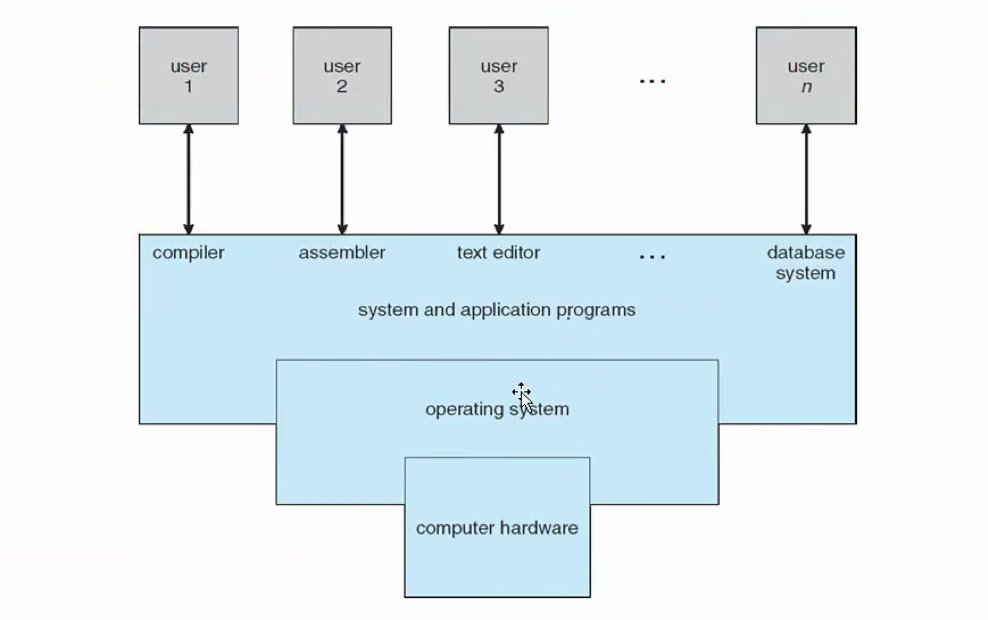
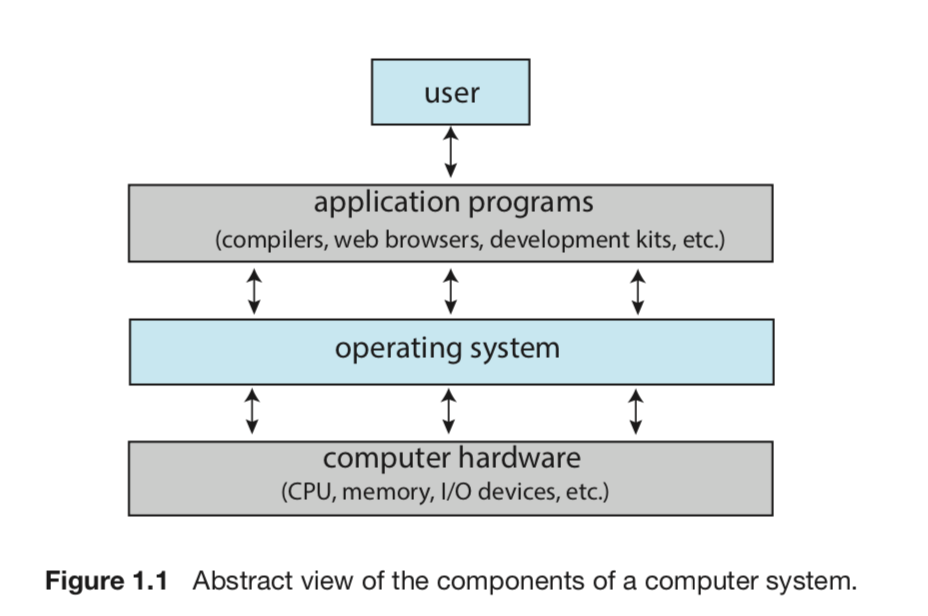
A computer system can be divided into four components:
| Component | Role |
|---|---|
| Hardware | Provides basic computing resources: CPU, memory, I/O devices |
| Operating System | Controls hardware, coordinates its use among applications and users |
| Application Programs | Define how resources solve user problems (compilers, browsers, word processors) |
| User | People, machines, or other computers |
The operating system consists of hardware, software, and data. It provides proper use of these resources and simply provides an environment within which programs can do useful work.
1.1.1 User View 用户视角
The user’s view of the computer varies according to the interface being used.
- Personal workstation: designed for ease of use — performance and security take priority over resource utilization
- Shared computer (mainframe/minicomputer): must keep all users satisfied, resource sharing is important
- Handheld computers: resource-poor, optimized for usability and battery life
- Embedded computers: designed primarily to run without user intervention (home devices, automobiles)
Increasingly, users interact through touch screens, physical keyboards, voice recognition interfaces (like Siri), and cellular/wireless networks.
1.1.2 System View 系统视角
From the computer’s point of view, the operating system is the program most intimately involved with the hardware.
- Resource allocator
: manages all resources (CPU time, memory space, storage space, I/O devices), faces conflicting requests and decides how to allocate them efficiently and fairly
- Control program
: manages the execution of user programs to prevent errors and improper use; especially concerned with I/O device operation and control
1.1.3 Defining Operating Systems 定义
Operating systems have no completely adequate universal definition.
- Computing started with fixed-purpose military/governmental systems; general-purpose mainframes gave birth to operating systems
- In the 1960s, Moore’s Law predicted transistor count doubling every 18 months — computers shrank and gained functionality, leading to a vast variety of operating systems
- The fundamental goal: execute programs and make solving user problems easier
- The common functions of controlling and allocating resources are brought together into one piece of software: the OS
- The one program running at all times on the computer is the kernel; everything else is either a system program or an application program
1.2 Computer-System Organization 计算机系统组织
1.2.0 Hardware Organization 硬件组织
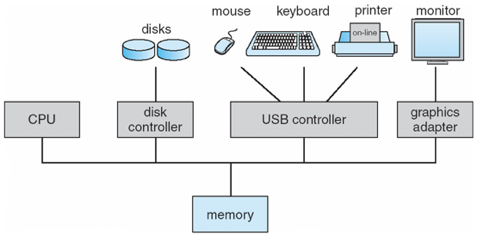
A modern computer system consists of one or more CPUs and a number of device controllers connected through a common bus (provides access between components and shared memory).
- Each device controller maintains a local buffer storage and a set of special-purpose registers
- Device controllers are responsible for moving data between the peripheral devices they control and their local buffer storage
- The CPU moves data between main memory and local buffers
- The CPU and device controllers can execute in parallel, competing for memory cycles — a memory controller synchronizes access to shared memory
The OS has a device driver for each device controller. The device driver understands the controller and provides a uniform interface to the rest of the OS.
Bootstrap program:
- Stored in ROM or EPROM, known as firmware
- Runs at power-up or reboot
- Initializes all aspects of the system (CPU registers, device controllers, memory contents)
- Knows how to load the OS kernel and start executing it
- Locates the OS kernel and loads it into memory
1.2.1 Interrupts 中断
Overview 概述
When the CPU and a peripheral device interact during I/O, two approaches exist for detecting completion:
| Approach | Mechanism | Drawback |
|---|---|---|
| Polling 轮询 | CPU repeatedly queries device for completion | Unnecessary CPU consumption |
| Vectored interrupt system 中断 | Device signals CPU asynchronously on completion | More efficient — CPU executes other processes while waiting |
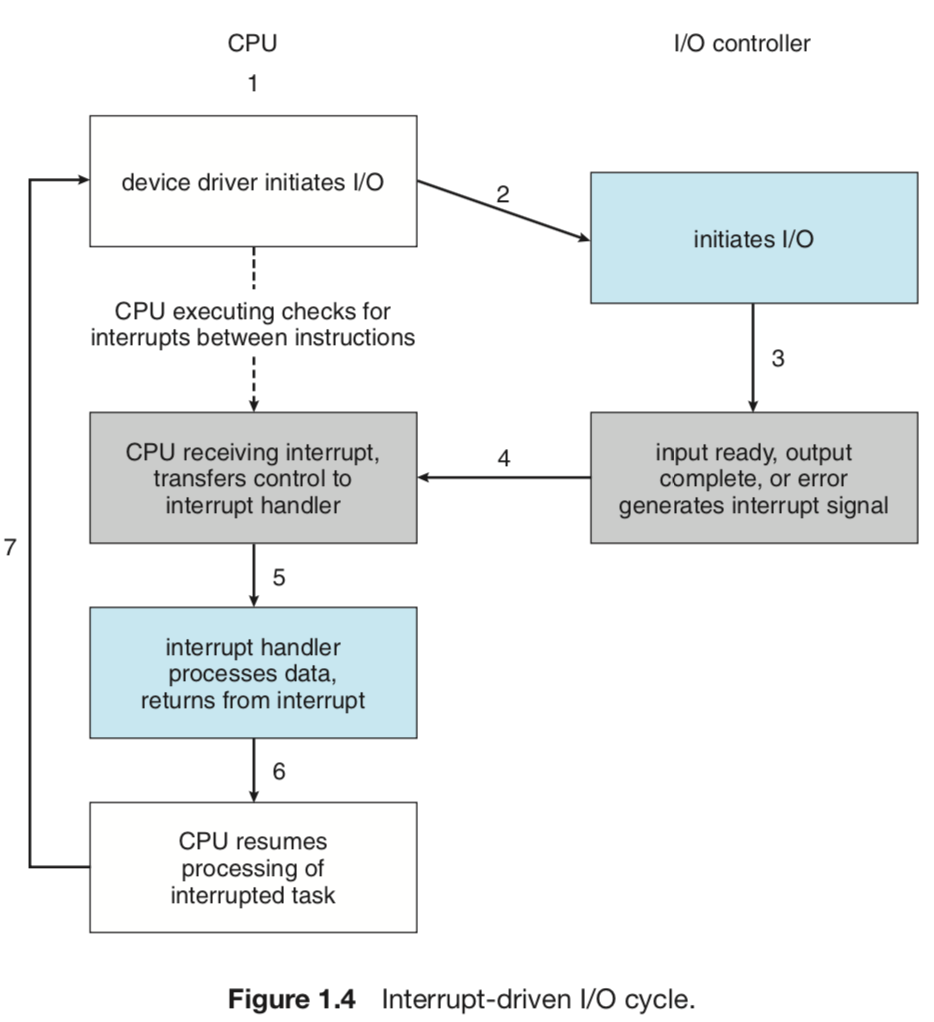
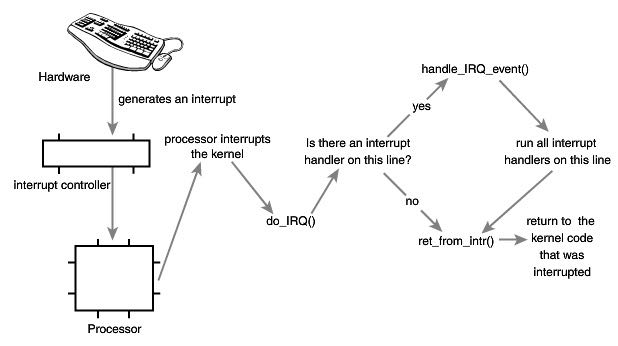
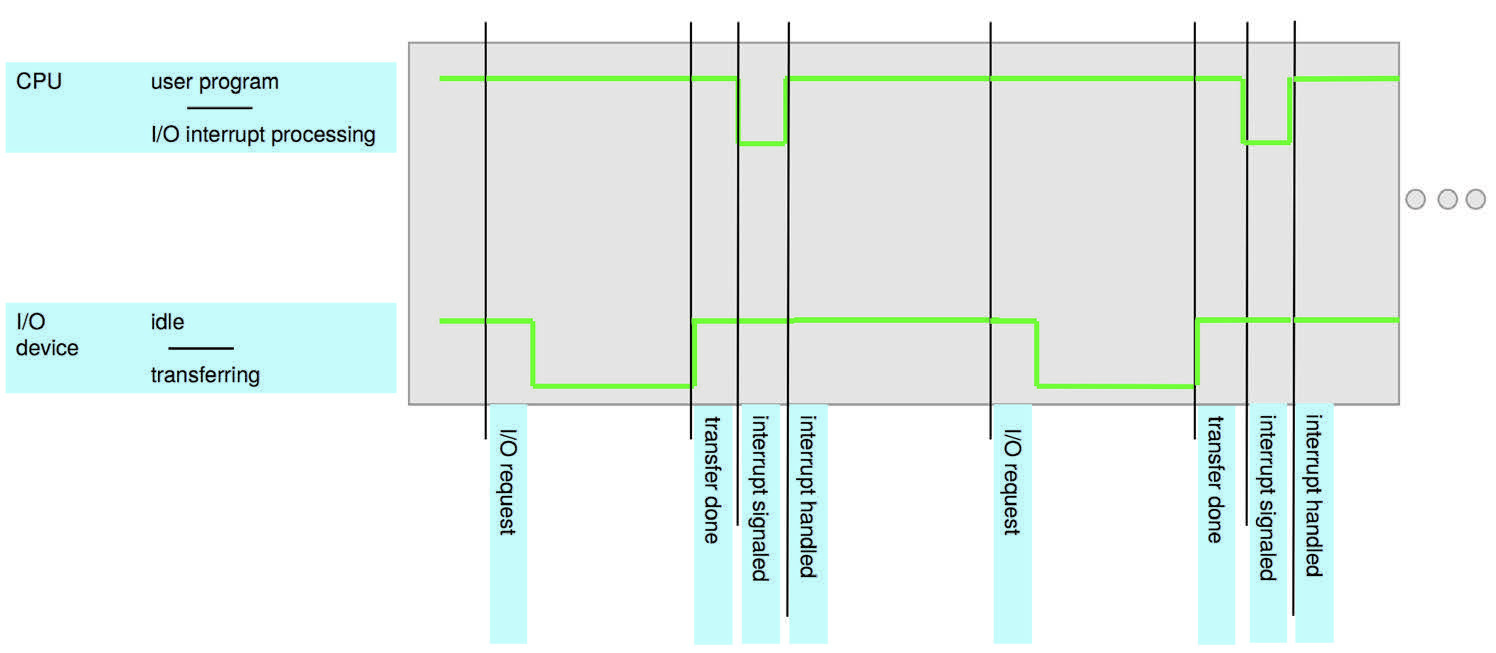
In an interrupt-driven system:
- Device driver loads appropriate registers in the device controller
- Device controller examines the registers and starts data transfer
- On completion, device controller causes an interrupt (sends a signal via the system bus)
- CPU stops current task, saves state, and transfers control to the interrupt handler
- Interrupt handler processes the event and returns control to the interrupted task
Implementation 实现机制
The basic interrupt mechanism:
- The CPU hardware has an interrupt-request line that the CPU senses after executing every instruction
- When a device controller asserts a signal on the interrupt-request line, the CPU reads the interrupt number and jumps to the corresponding interrupt handler via the interrupt vector
- The interrupt handler:
- Saves any state it will change during operation
- Determines the cause of the interrupt
- Performs necessary processing
- Restores state
- Executes a return-from-interrupt instruction
Interrupt types:
- Maskable interrupts
: can be disabled by the CPU when executing a critical, non-interruptible sequence
- Nonmaskable interrupts
: reserved for events like unrecoverable memory errors
- Interrupt chaining
: used when more interrupt handlers exist than elements in the interrupt vector — each element points to the head of a list of handlers
Two I/O Methods 两种I/O方式
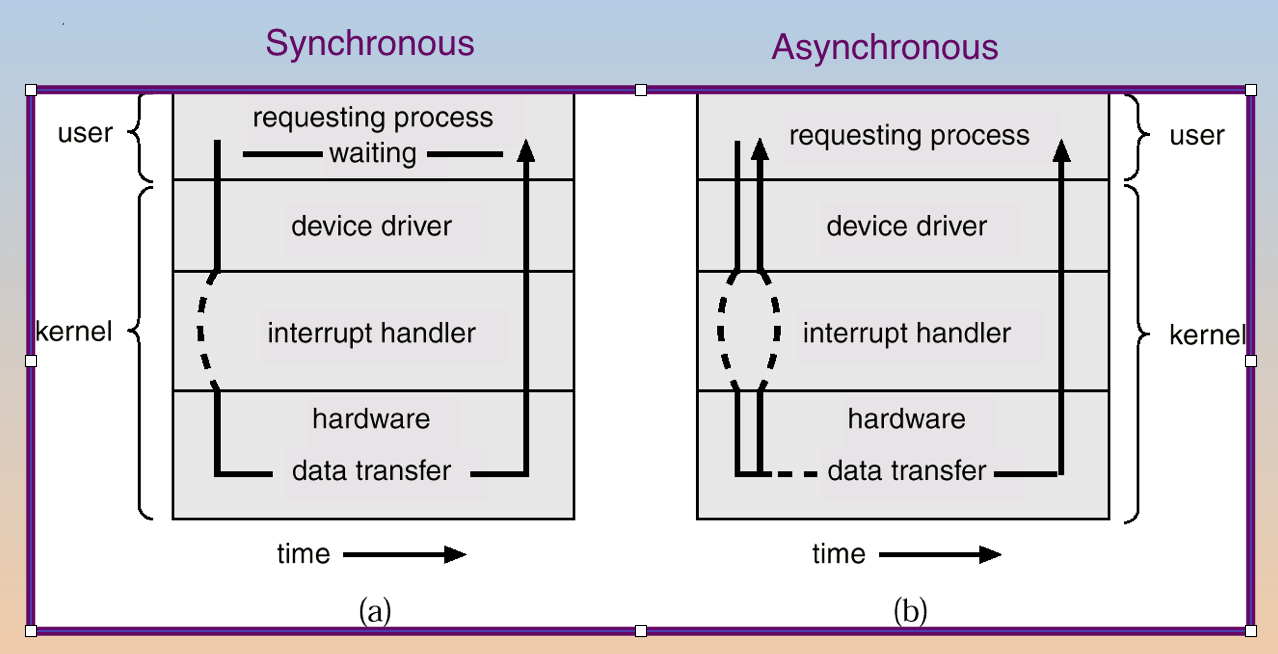
| Method | Behavior |
|---|---|
| Synchronous I/O | Control returns to user program only upon I/O completion; CPU idles waiting |
| Asynchronous I/O | Control returns to user program without waiting; system call allows user to wait for completion; OS maintains a device-status table |
1.2.2 Storage Structure 存储结构
Storage Definitions and Notation 存储定义
| Unit | Definition |
|---|---|
| Bit | Basic unit of computer storage — holds 0 or 1 |
| Byte | 8 bits; smallest convenient chunk of storage for most computers |
| Word | A computer architecture’s native unit of data — one or more bytes (e.g., 64-bit architecture → 8-byte word) |
| KB | 1,024 bytes = 2¹⁰ bytes |
| MB | 1,024² bytes ≈ 1 million bytes |
| GB | 1,024³ bytes ≈ 1 billion bytes |
| TB | 1,024⁴ bytes |
| PB | 1,024⁵ bytes |
Note: Networking measurements are given in bits (networks move data a bit at a time), while computer storage is generally measured in bytes.
Storage Hierarchy 存储层次
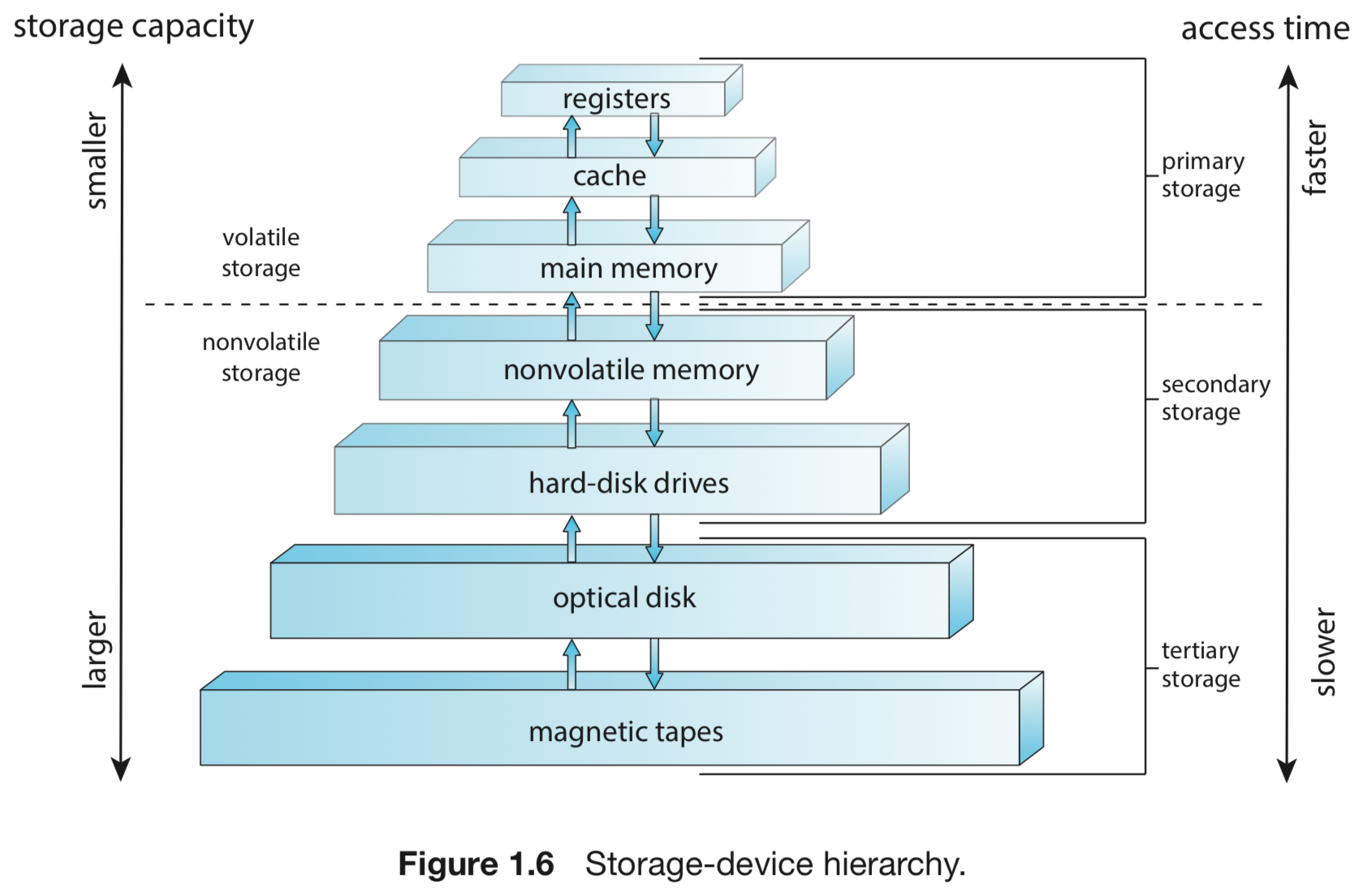
Main memory is the only large storage medium the CPU can access directly.
| Tier | Type | Properties |
|---|---|---|
| Primary | Registers, cache, main memory (DRAM) | Fast, volatile (loses content on power-off) |
| Secondary | Hard disks (HDD), solid-state disks (SSD) | Large, nonvolatile |
| Tertiary | Optical disks, magnetic tapes | Largest capacity, slowest |
Key properties:
- Main memory
: random access, volatile, implemented in DRAM — the only storage a CPU can load instructions from directly
- Bootstrap program
: cannot be stored in RAM (volatile) — stored in ROM/firmware
- Secondary storage
: extends main memory, provides large nonvolatile storage
- Hard disks: rigid platters covered in magnetic recording material; surface divided into tracks subdivided into sectors; disk controller manages logical interaction
- Solid-state disks (SSD): faster than HDD, nonvolatile, increasingly popular
1.2.3 I/O Structure 输入输出结构
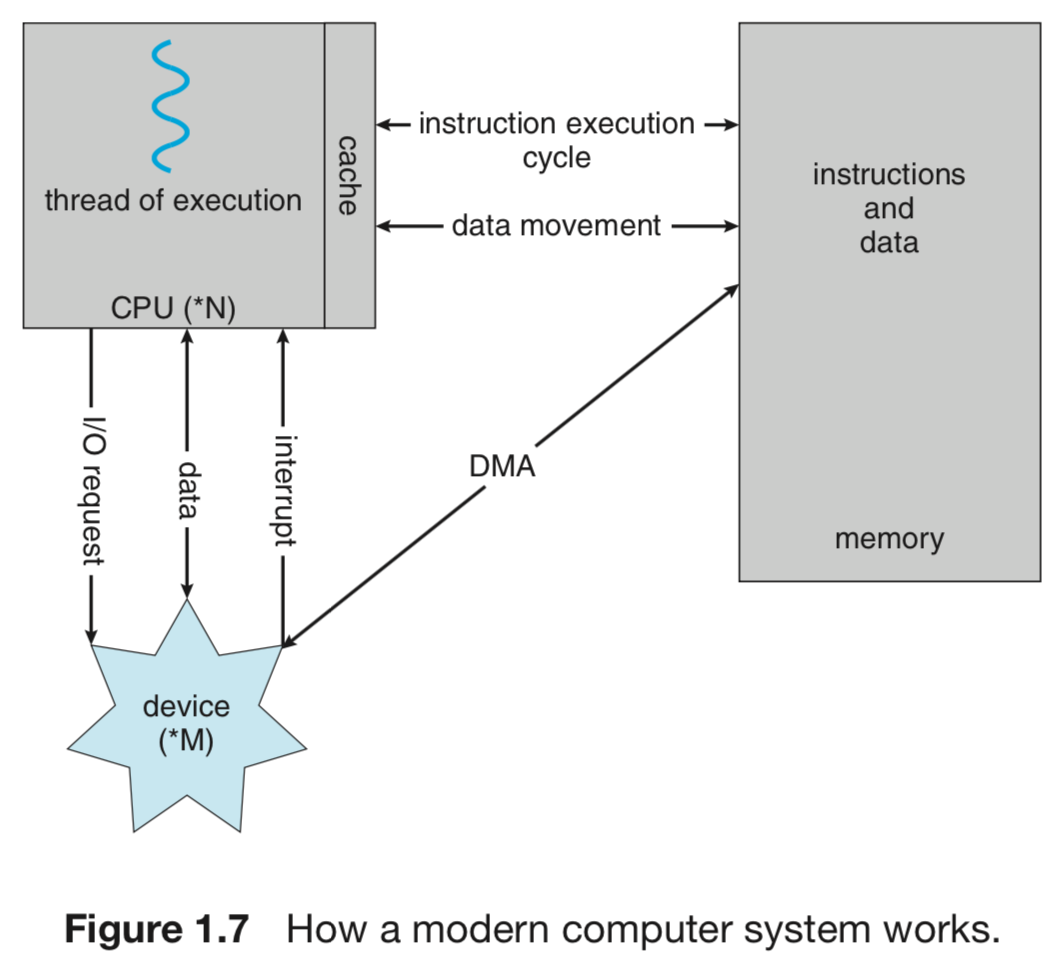
Direct Memory Access (DMA)solves the high-overhead problem of interrupt-driven I/O for bulk data movement:
- Used for high-speed I/O devices able to transmit at near memory speeds
- After the OS sets up buffers, pointers, and counters for the I/O device, the device controller transfers an entire block of data directly between the device buffer and main memory — with no CPU intervention
- Only one interrupt per block (vs. one interrupt per byte for low-speed devices)
- While the device controller performs the transfer, the CPU is available for other tasks
The form of interrupt-driven I/O is fine for small amounts of data, but produces high overhead for bulk data such as NVS I/O. DMA removes that overhead.
1.3 Computer-System Architecture 计算机系统架构
Definitions 定义
| Term | Definition |
|---|---|
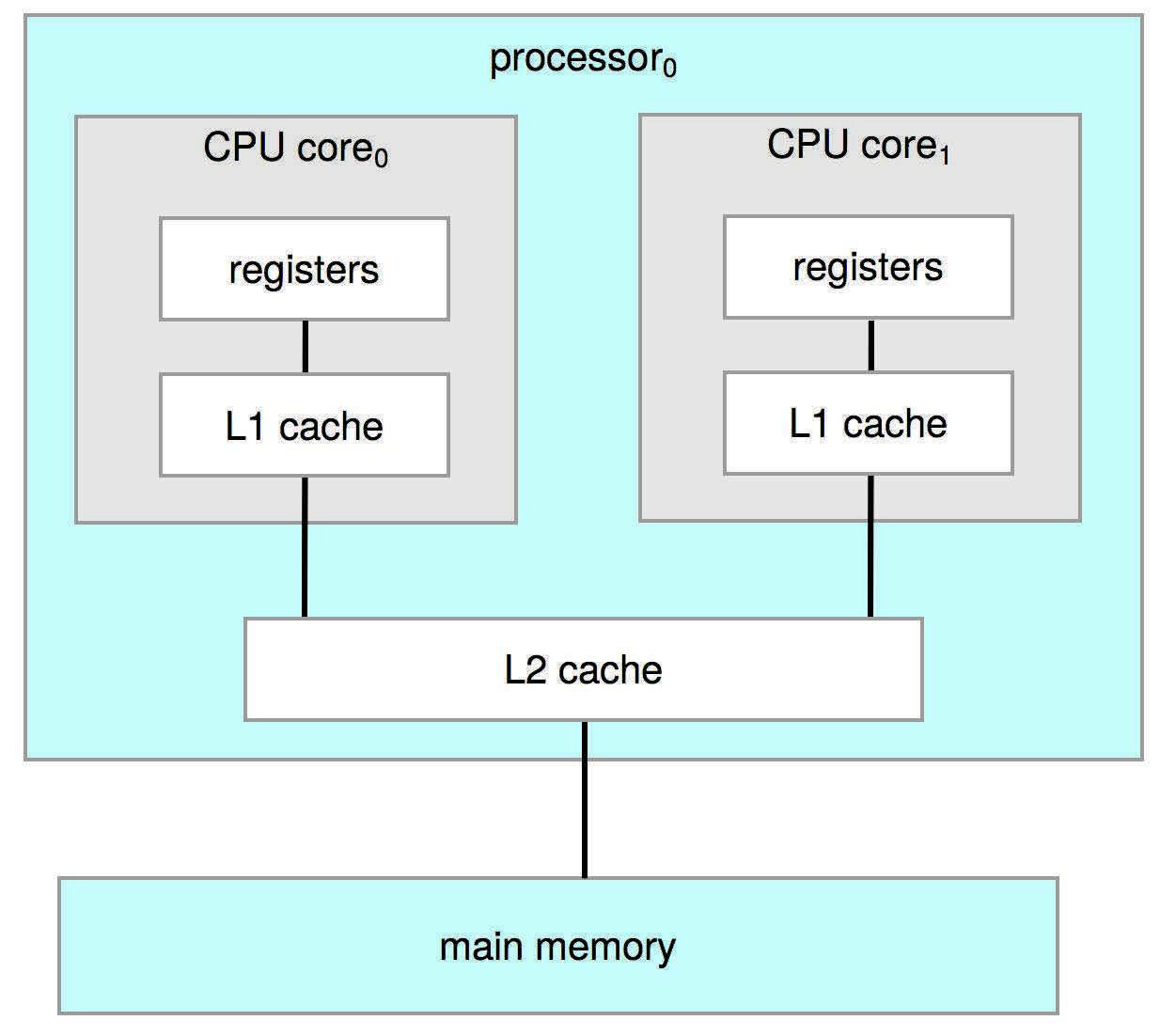
| Processor | Physical chip containing one or more CPUs |
| CPU | Hardware that executes instructions |
| Core | Basic computation unit of the CPU |
| Multicore | Multiple computing cores on the same CPU |
| Multiprocessor | Multiple processors in the system |
1.3.1 Single-Processor Systems 单处理器系统
- One main CPU with a single processing core — capable of executing a general-purpose instruction set including process instructions
- The core executes instructions and has registers for local data storage
- May include special-purpose processors (disk/keyboard/graphics controllers) that run a limited instruction set and do not run processes
- Special-purpose processors relieve the main CPU of overhead (e.g., disk controller manages its own disk queue and scheduling algorithm; keyboard microprocessor converts keystrokes into codes)
1.3.2 Multiprocessor Systems 多处理器系统
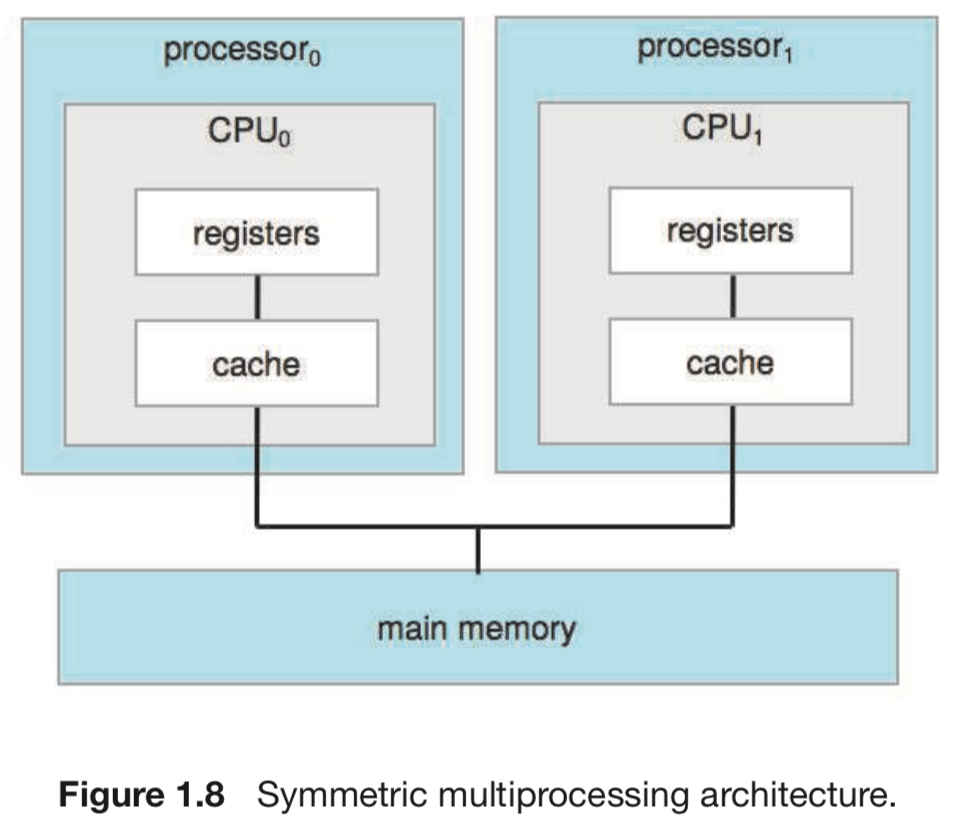
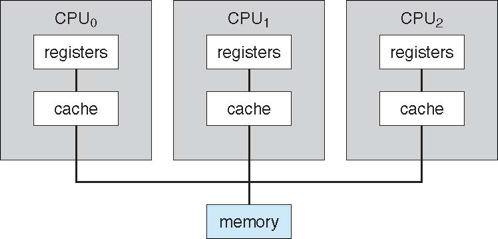
Multiprocessor systems (two or more processors, each with a single-core CPU) now dominate the computing landscape. Processors share the bus, and sometimes clock, memory, and peripheral devices.
Also known as: parallel systems, tightly-coupled systems
Advantages:
- Increased throughput
: N processors allow many processes to run simultaneously; speed-up ratio is less than N due to overhead and resource contention
- Economy of scale
: multiprocessors cost less than equivalent single-processor systems
- Increased reliability
: graceful degradation / fault tolerance — if one processor fails, others continue; no significant performance deterioration
Two types of multiprocessing:
| Type | Behavior |
|---|---|
| Asymmetric Multiprocessing | Each processor is assigned a specific task; boss processor controls others |
| Symmetric Multiprocessing (SMP) | Each processor performs all tasks; all processors are peers sharing main memory |
NUMA 非均匀内存访问
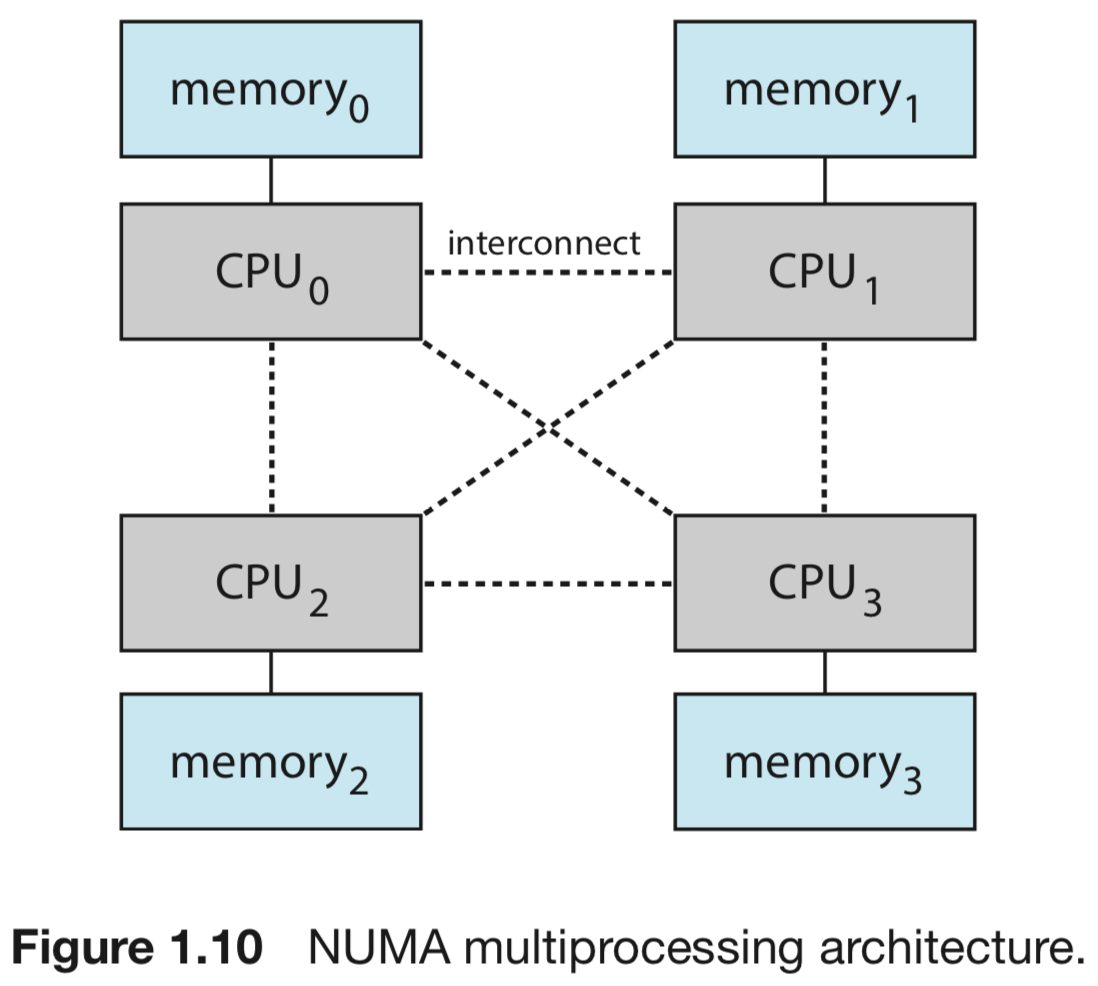
Adding more CPUs to a multiprocessor system increases computing power, but the shared system bus becomes a bottleneck — performance begins to degrade.
NUMA (Non-Uniform Memory Access): provide each CPU (or group of CPUs) with its own local memory accessed via a small, fast local bus. CPUs are connected by a shared system interconnect — all share one physical address space.
| Aspect | Detail |
|---|---|
| Advantage | Faster, no contention when CPU accesses local memory; scales more effectively as processors are added |
| Drawback | Increased latency when a CPU must access remote memory across the system interconnect (performance penalty) |
| OS mitigation | Careful CPU scheduling and memory management minimize the NUMA penalty |
NUMA systems can scale to accommodate large numbers of processors — increasingly popular on servers and HPC systems.
SMP vs NUMA memory topology:
- SMP (Symmetric Multi-Processor)
: processes allocate memory from a single memory space; consistent performance across all memory — but limited scalability due to bus contention
- NUMA
: sections of physical memory are controlled by one or more processors (NUMA nodes); the OS sees all CPUs and memory in each NUMA node; servers now support multi-terabyte configurations because of NUMA
Blade Servers 刀片服务器
Blade servers: multiple processor boards, I/O boards, and networking boards placed in the same chassis. Each blade-processor board boots independently and runs its own operating system. Some blade boards are themselves multiprocessor — these servers consist of multiple independent multiprocessor systems.
1.3.3 Clustered Systems 集群系统
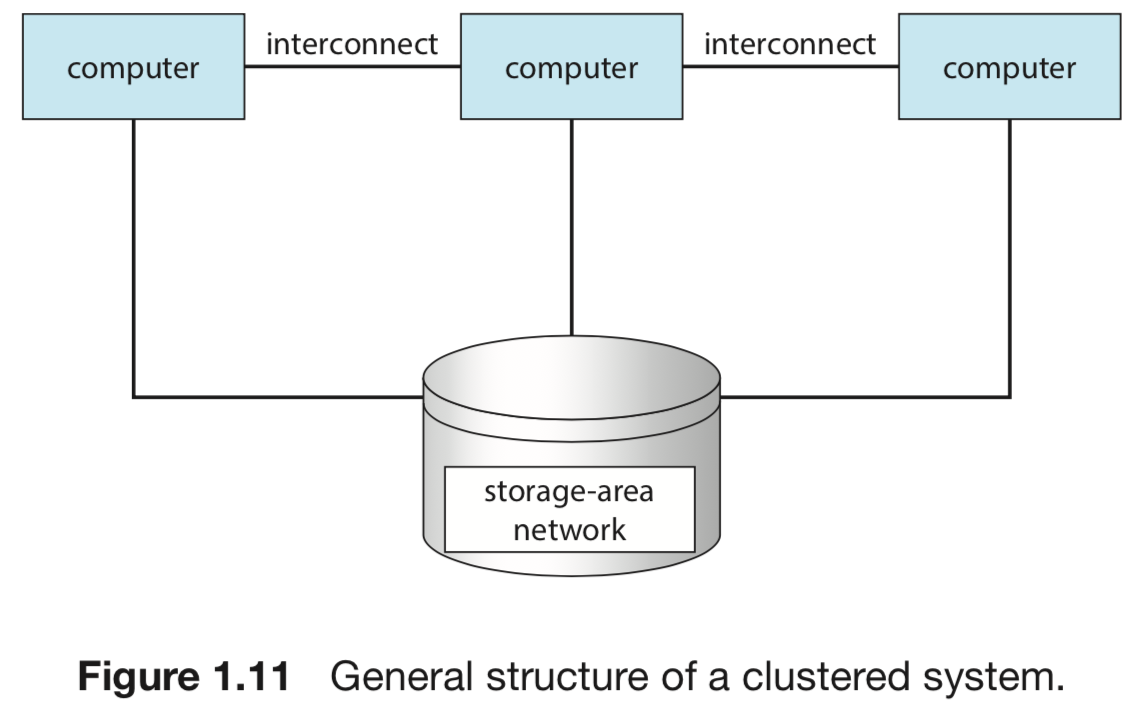
A clustered system gathers together multiple CPUs, differing from multiprocessor systems in that it is composed of two or more individual systems or nodes. Each node is typically a multicore system — considered loosely coupled.
- Clustered computers share storage and are closely linked via LAN or a faster interconnect (e.g., InfiniBand)
- Many cluster products support thousands of systems in a cluster, including nodes separated by miles
- Storage-Area Networks (SANs)
: allow many systems to attach to a pool of storage; if the application and its data are stored on a SAN, the cluster software can assign the application to run on any attached host
Clustering types:
| Type | Behavior |
|---|---|
| Asymmetric clustering | One host runs the application; another is in hot-standby mode monitoring the active host |
| Symmetric clustering | Two or more hosts run applications and monitor each other; more efficient — uses all available hardware |
1.4 Operating-System Operations 操作系统的运行
Bootstrap and Kernel Loading 引导与内核加载
- Computer powered up or rebooted → runs the bootstrap program (simple, stored in firmware)
- Bootstrap program initializes the system (CPU registers, device controllers, memory contents)
- Bootstrap program locates the OS kernel and loads it into memory
- Once the kernel is loaded and executing, it starts providing services to the system and users
- Some services are provided by system daemons 守护进程: loaded into memory at boot time, running the entire time the kernel is running
- On Linux, the first system program is
systemd, which starts many other daemons
- On Linux, the first system program is
A computer operating system typically consists of:
- Process management
- Main memory management
- File management
- I/O system management
- Secondary storage management
- Protection system
1.4.1 Multiprogramming and Multitasking 多道程序设计与多任务
Multiprogramming: increases CPU utilization by organizing programs so the CPU always has one to execute.
- The OS keeps several processes in memory simultaneously
- The OS picks and executes one process; when that process must wait (e.g., for I/O), the OS switches to another process
- As long as at least one process needs to execute, the CPU is never idle
: an extension of multiprogramming where the CPU switches among jobs so frequently that users can interact with each program while it runs.
- Requires an interactive computer system with direct communication between user and system
- Response time should be less than one second
- Requires: CPU scheduling (if multiple processes are ready), swapping (if processes don’t fit in memory), virtual memory (executing processes larger than physical memory)
1.5 Storage Management 文件系统管理
The operating system provides a uniform, logical view of information storage — abstracting from the physical properties of storage devices to define a logical storage unit: the file.
- The OS maps files onto physical media and accesses them via storage devices
- A file is a collection of related information defined by its creator — commonly programs (source and object forms) and data
- Files may be free-form (text files) or formatted rigidly (fixed-format records)
OS file-management responsibilities:
- Creating and deleting files and directories
- Supporting primitives for manipulating files and directories
- Mapping files onto secondary storage
- Backing up files on stable storage
1.6 Data Structures 数据结构基础
1.6.1 Lists, Stacks, and Queues
An array is a simple data structure where each element can be accessed directly (e.g., main memory is constructed as an array).
A linked list is a collection of data values as a sequence, where items are linked to one another:
| Type | Structure |
|---|---|
| Singly linked list | Each item points to its successor |
| Doubly linked list | Each item can refer to either its predecessor or successor |
| Circularly linked list | Last element points back to the first element |
Linked lists accommodate items of varying sizes and can accommodate insertion or deletion while preserving order — better suited than arrays when size varies or order must be preserved during insertions/deletions.
1.7 Virtualization 虚拟化
Virtualization: a technology that abstracts the hardware of a single computer (CPU, memory, disk drives, network interface cards) into several different execution environments, creating the illusion that each separate environment is running on its own private computer.
- Each virtual environment can run a different operating system (e.g., Windows and UNIX simultaneously)
- A user of a virtual machine can switch among operating systems in the same way a user can switch among processes in a single OS
- Virtualization allows operating systems to run as applications within other operating systems
Virtualization vs Emulation:
| Concept | Description |
|---|---|
| Virtualization | Guest OS compiled natively for the CPU; runs on a virtual machine manager (VMM/hypervisor) |
| Emulation | Simulates computer hardware in software; typically used when the source CPU type is different from the target CPU type |
1.8 Distributed Systems 分布式系统
A distributed system is a collection of physically separate, possibly heterogeneous computer systems that are networked to provide users with access to various shared resources.
- Access to shared resources increases computation speed, functionality, data availability, and reliability
- Some operating systems generalize network access as a form of file access (network interface’s device driver handles networking details)
- TCP/IP is the most common network protocol — provides the fundamental architecture of the Internet; most operating systems (including all general-purpose ones) support it
Example protocols and systems:
- FTP
: file transfer with explicit network function invocation
- NFS
: network file system treated like local file access
- Systems typically contain a mix of both modes
Key Takeaways
- OS roles
: resource allocator (manages CPU, memory, I/O), control program (prevents errors and improper use), and kernel (the one program always running).
- Computer system components
: hardware → OS → application programs → user; OS is the intermediary coordinating hardware use.
- Interrupt-driven I/O
: device signals CPU via interrupt-request line on completion; CPU jumps to interrupt handler via interrupt vector; saves state, processes, restores, returns. More efficient than polling.
- Two I/O methods
: synchronous (CPU waits) vs asynchronous (CPU continues; device-status table tracks completion).
- DMA
: device controller transfers entire data blocks directly to/from main memory without CPU intervention — one interrupt per block instead of one per byte.
- Storage hierarchy
: registers → cache → DRAM (volatile, CPU-accessible) → secondary (HDD/SSD, nonvolatile) → tertiary (tape/optical). Bootstrap stored in ROM/firmware, not volatile RAM.
- SMP vs NUMA
: SMP shares one memory bus (limited scalability); NUMA gives each CPU local memory for faster access and better scaling, at the cost of remote-memory latency.
- Multiprocessor advantages
: increased throughput, economy of scale, fault tolerance via graceful degradation.
- Clustered systems
: loosely-coupled nodes sharing SAN storage; asymmetric (hot-standby) or symmetric (both active, monitoring each other).
- Multiprogramming
: keep CPU busy by switching to another process when current one waits. Multitasking: frequent switching for interactive response (< 1 second).
- Virtualization
: abstracts hardware into multiple execution environments; each VM appears to run on its own private computer. Emulation simulates a different CPU type.
References
- Operating System Concepts — Silberschatz, Galvin & Gagne, Chapter 1 (Introduction)
- CS 536 Operating Systems — Lecture notes: Chapter 1
Comments powered by Disqus.