Meow's Security+ - Ch12: Disaster Recovery, Incident Response & Business Continuity
Ch12: Disaster Recovery, Incident Response & Business Continuity
- Ch12: Disaster Recovery, Incident Response \& Business Continuity
Overview
Security+ Chapter 12 covers the three interrelated disciplines that govern organizational resilience: business continuity planning (BCP), disaster recovery (DR), and incident response (IR). BCP ensures critical functions survive disruption; DR provides the technical mechanisms (backups, recovery sites, storage) to restore operations; IR defines the human process for identifying, containing, and learning from security events. Vulnerability scanning underlies all three by proactively surfacing weaknesses before disasters or incidents occur.
1. Vulnerability Scanning 漏洞扫描
1.1 Purpose and Scope
Vulnerability scanningfirst identifies specific vulnerabilities in a network before penetration testers attempt to exploit them.
- Vulnerability scanner
: finds open ports and missing patches
- Configuration compliance scanner
: confirms software, patches, and overall configurations
Key elements of a vulnerability scan:
- Identifying common misconfigurations
- Identifying a lack of security controls
- Attempting to exploit identified weaknesses
The most egregious vulnerability is any aspect of a system where scanning reveals a lack of security controls. Many common vulnerabilities involve misconfiguration.
Popular scanners such as Nessus (tenable.com) help identify common misconfigurations.
1.2 Credentialed vs. Noncredentialed Scanning
Vulnerability scanning can be performed in a credentialed or noncredentialed manner.
| Mode | Description |
|---|---|
| Credentialed scan 信任扫描 | Uses actual network credentials to connect to systems and scan internally |
| Noncredentialed scan | Scans from outside; may surface inactive local accounts but lacks internal visibility |
Benefits of credentialed scanning:
- Does not disrupt operations or consume excessive resources
— operations run on the host itself rather than across the network; port scanning and OS identification are done by running commands locally, then sending results back to the scanner server
- Definitive list of missing patches
— queries the local host to verify whether a patch has been applied; more accurate than remote checks; provides visibility over patch posture across all clients
- Uncovers client-side software vulnerabilities
— by examining installed software versions, finds vulnerabilities otherwise missed in network-based audits
- Additional "vulnerabilities"
— can read password policies, enumerate USB devices, check antivirus configurations, and detect Bluetooth devices
False positives: Whether using credentialed or noncredentialed scanning, expect occasional false positives — instances where the scanner mistakenly identifies something as a vulnerability when it is not. No scanner is perfect.
2. Business Continuity 业务连续性
Business continuityis primarily concerned with the processes, policies, and methods that minimize the impact of a system failure, network failure, or failure of any key component needed for operation — essentially whatever it takes to ensure the business continues.
2.1 Business Continuity Planning (BCP)
Business Continuity Planning (BCP): the process of implementing policies, controls, and procedures to counteract the effects of losses, outages, or failures of critical business processes.
- A management tool that ensures critical business functions can be performed when normal operations are disrupted and alternate practices must be employed
- For each critical business task, at least one alternative business process must be identified in the continuity plan
- Alternate practices should be documented in sufficient detail that someone unfamiliar with them could perform them with minimal training
Two key components for effective BCP:
| Component | Role |
|---|---|
| Business Impact Analysis (BIA) | Evaluates the processes and their importance |
| Risk assessment | Evaluates the risk or likelihood of a loss |
2.2 Critical Business Functions (CBFs)
Critical Business Functions (CBFs): processes or systems that must be made operational immediately when an outage occurs.
- The business cannot function without them
- Most are information-intensive and require access to both technology and data
3. Incident Response 事件响应
3.1 Incident Response Plan (IRP)
Incident response plan (IRP)defines how an organization should respond to an incident.
An IRP must establish at minimum:
- Guidelines for documenting
the incident type and defining its category: lists of information to collect and procedures to gather and secure evidence
- Resources
used to deal with an incident
- Defined roles and responsibilities
for those involved in investigation and response, including identification of cyber-incident response team members
- Reporting requirements and escalation procedures
: list of outside agencies to contact and outside experts who can address issues if needed
3.2 Computer Security Incident Response Team (CSIRT)
According to CERT, a Computer Security Incident Response Team (CSIRT) can be a formalized or ad hoc team. Investing time in the development process makes an incident more manageable — many decisions about dealing with an incident will have been considered in advance. Incidents are high-stress situations; simplifying the process by pre-planning important aspects is critical. If civil or criminal actions are part of the process, evidence must be gathered and safeguarded properly.
3.3 The Six Steps of Incident Response
The six steps of any incident response process:| Step | Name | 中文 |
|---|---|---|
| 1 | Preparation | 准备 |
| 2 | Identification | 识别 |
| 3 | Containment | 控制 / 抑制 |
| 4 | Eradication | 摧毁 / 根除 |
| 5 | Recovery | 恢复 |
| 6 | Lessons Learned | 总结 |
Operational response steps:
- Identifying the Incident — determine that an incident has occurred and its nature
- Investigating the Incident — search logs, files, and other data sources about the nature and scope of the incident
- Recovery / Repairing the Damage — restore systems and services
- Documenting and Reporting the Response — record what happened and how it was handled
- Adjusting Procedures — update policies and plans based on lessons learned
4. Disaster Recovery Plan 灾难恢复计划
A Disaster Recovery Plan (DRP) helps an organization respond effectively when a disaster occurs — system, network, infrastructure, or natural disaster. The primary emphasis is reestablishing services and minimizing losses.
A major DRP component involves the access and storage of information. The backup plan for data is an integral part of this process.
4.1 Backup Plan Issues
A backup plan identifies which information will be backed up, how it will be stored, and for what duration.
Database Systems
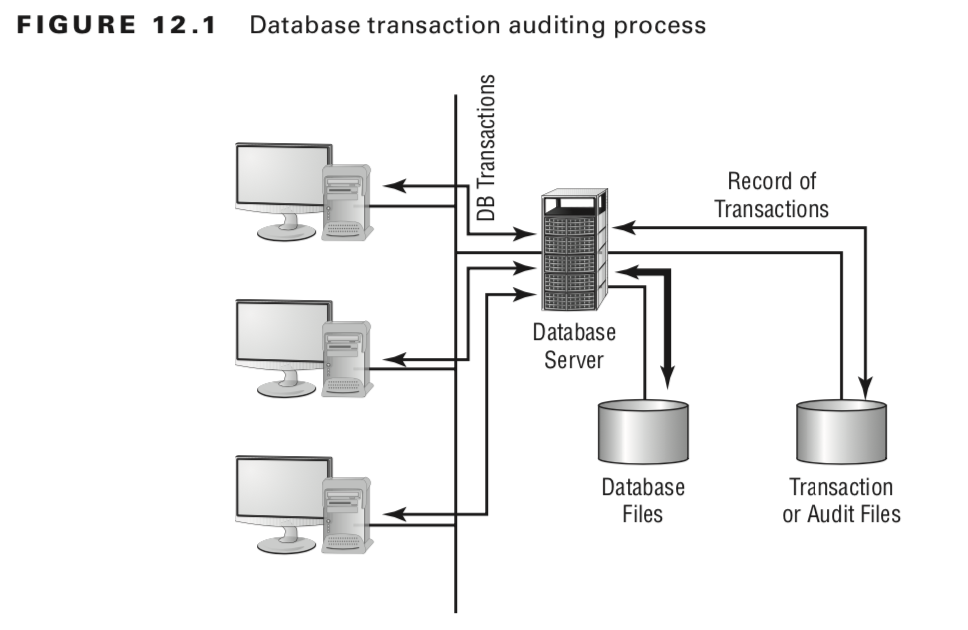
Most modern database systems provide the ability to back up data or sections of the database globally. Larger-scale systems provide transaction auditing and data-recovery capabilities:
- The database can be configured to record each addition, update, deletion, or change in a separate audit or transaction file
- These files can be stored on any archival media (magnetic tape, SSDs…)
- In the event of a system outage, the audit file is used to roll back and forward the database to its last known state
The auditing process writes changes to a digital audio tape (DAT) or equivalent. If an outage occurs, transaction files can be rolled forward to bring the database back to its most current state — reducing potential losses to only those transactions in progress when the system failed.
User Files
- Word processing documents, spreadsheets, and other user files are extremely valuable
- The number of files is large but the rate of change after initial creation is relatively small
- Most operating systems date-stamp files when modified — differential or incremental backups targeting changed files make user file protection manageable
- Including user files in organizational backups is strongly recommended; most users do not back up independently
Applications
- Applications change infrequently; upgrades are usually deployed organization-wide
- A single up-to-date version should be available for download and reinstallation
- Some commercial applications require per-machine license registration — centralized recovery procedures may not work; each machine may need its own copy
5. Backup Types 备份类型
5.1 Full Backup 完整备份
Full Backup: a complete, comprehensive backup of all files on a disk or server.
- Every file is copied; the archive bit on each file is turned off after backup
- Archive bit
: a flag turned on when a file is created or modified — identifies files that have changed
- A full backup is current only at the time it is performed — the system should not be in use during backup, as some files may be skipped
- Full backups can be time-consuming on large systems
5.2 Incremental Backup 增量备份
Incremental Backup: a partial backup that stores only information changed since the last full or last incremental backup.
- Backs up only files with the archive bit turned on (changed or newly created files)
- At the conclusion of backup, the archive bit is turned off for all backed-up files
- Each incremental backup tape must be retained until a full backup is performed
- Restore requires: copy of the last full backup + all incremental copies made since that full backup
- Usually the fastest backups to perform; each tape is relatively small
Example:
| Day | Action |
|---|---|
| Sunday | Full backup |
| Monday | Incremental — contains only changes since Sunday |
| Tuesday | Incremental — contains only changes since Monday |
5.3 Differential Backup 差异备份
Differential Backup: backs up any files altered since the last full backup (not since the last differential).
- Makes duplicate copies of files that have not changed since the last differential backup
- Each successive differential backup grows larger — by the end of the weekly cycle it may approach full backup size
- Restore requires: copy of the last full backup + the most recent differential backup only
Example:
| Day | Action |
|---|---|
| Sunday | Full backup |
| Monday differential | captures Monday’s changes |
| Tuesday differential | captures Monday + Tuesday changes (cumulative) |
| Friday differential | may be nearly as large as a full backup |
Important: Incremental and differential backups cannot be combined in the same backup set.
5.4 Hierarchical Storage Management (HSM)
Hierarchical Storage Management (HSM): provides continuous online backup using optical or tape jukeboxes.
- Appears as an infinite disk to the system
- Can be configured to provide the closest version of a real-time backup
- Over time, infrequently accessed files are moved to slower media and may eventually be stored offline — reduces disk requirements while keeping likely-needed files readily available
Exam tip: HSM is also used for Hardware Security Module — a method of transient cryptographic key exchange. Read exam questions carefully to determine which meaning applies.
6. Backup Plan Models 备份计划模型
6.1 Grandfather, Father, Son Method
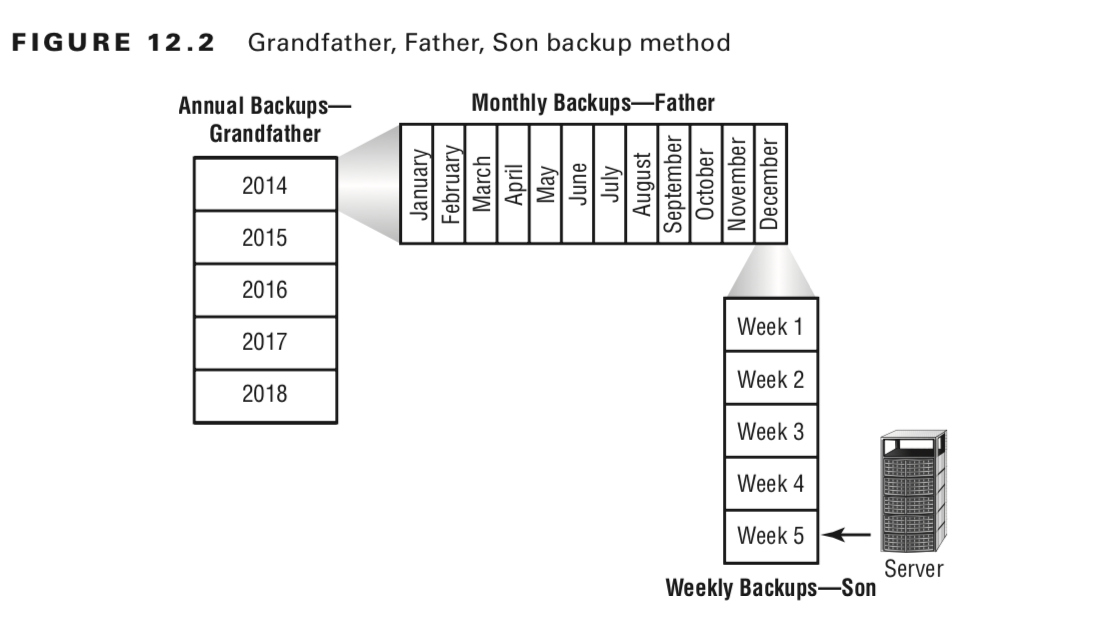
The Grandfather, Father, Son (GFS) method is the most common backup rotation scheme and the one tested on the Security+ exam.
| Level | Frequency | Retention |
|---|---|---|
| Grandfather (annual) | Last full backup of each year | Permanently retained |
| Father (monthly) | Last full backup of each month | Stored offsite for one year |
| Son (weekly/daily) | Incremental backups between full backups | Reused after the next full backup |
- Monthly full backup performed at end of each month; stored offsite; replaces the monthly from the previous year
- Weekly/daily incrementals are stored until the next full backup, then the media is reused
- Annual backups are permanently archived — organizations commonly keep a minimum of seven years
- The last full backup of the year is permanently retained to ensure prior-year data is recoverable
Challenge: Large numbers of tapes constantly flow between the storage facility and computer center; cataloging daily and weekly backups can be complex.
6.2 Full Archival Method
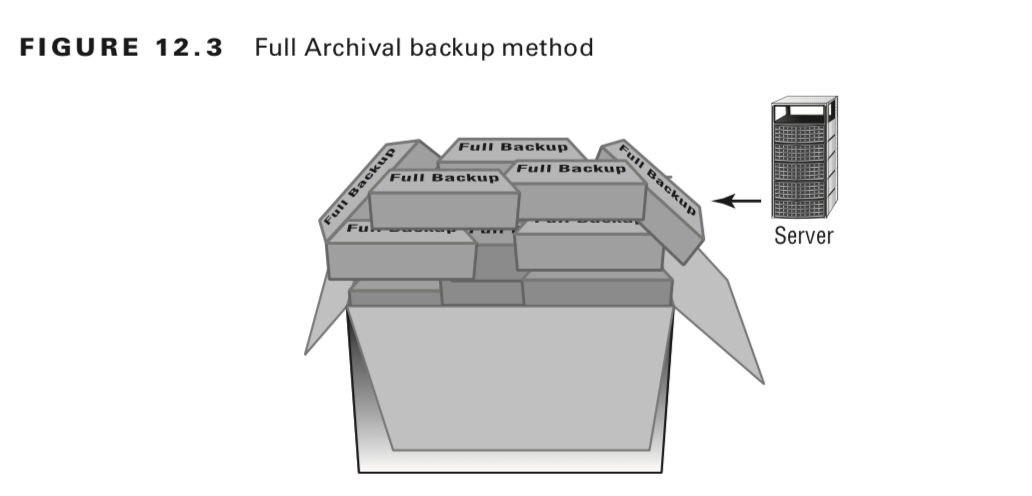
The Full Archival method works on the assumption that any information created on any system is stored forever — all full backups, all incrementals, and all other backups are permanently retained.
- Effectively eliminates potential data loss
- The number of backup copies quickly overwhelms storage — some organizations have needed entire warehouses
- Keeping records of what has been archived is a major administrative challenge
- Most larger organizations do not use this method due to storage and record-keeping requirements
6.3 Backup Server Method
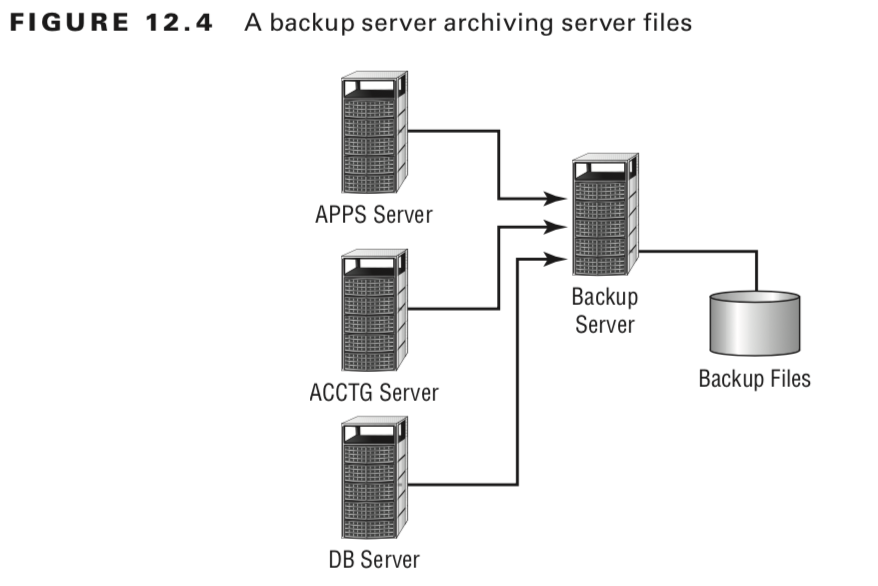
The Backup Server method uses a dedicated server with large amounts of disk space whose sole purpose is to back up data.
- With the right software, the backup server examines and copies all altered files every day
- All backed-up data is available online for immediate access
- The backup server itself can be backed up on a regular basis with specified retention periods
- Backup servers do not need large processors but must have large disk and long-term storage capabilities
- Some software creates hierarchies: infrequently accessed files are moved to slower media and eventually stored offline
Many organizations use two or more of these models in combination. The deciding factor is storage requirements and retention requirements — regulatory agencies (HIPAA, Sarbanes-Oxley) each have different archival requirements; compliance violations can be expensive.
7. Recovery Sites 恢复站点
Recovery sites(also called alternate sites or backup sites) are pre-arranged facilities an organization can use when its primary site is unavailable.
7.1 Hot Site (Active Backup Model)
Hot Site: a location that can provide operations within hours of a failure.
- Has servers, network equipment, and telecom equipment in place to reestablish service quickly
- Provides network connectivity, systems, and preconfigured software
- May also double as an offsite storage facility for immediate access to archives
- Databases can be kept current via network replication
- Most expensive option; primarily suitable for short-term situations
- May include office facilities so a small number of employees can relocate to sustain operations
7.2 Warm Site (Active/Active Model)
Warm Site: provides some hot site capabilities but requires the customer to do more work to become operational.
- Provides computer systems and compatible media capabilities
- Administrators must install and configure systems before resuming operations
- Can be a remote office, a leased facility, or another organization with a reciprocal agreement 互惠的
A reciprocal agreement is an agreement between two companies to provide services in the event of an emergency, usually on a best-effort basis with no guarantee of availability.
- Make sure the reciprocal partner is outside the geographic area — if both sites are affected by the same disaster, the agreement is worthless
- Represents a cost compromise between expensive hot sites and unprepared cold sites
7.3 Cold Site
Cold Site: a facility that is not immediately ready to use.
- The customer must provide all capabilities and do all the work to resume operations
- May provide basic network capability, but typically does not
- The site provides a place for operations to resume; it does not provide supporting infrastructure
- Works well when an extended outage is anticipated
- Least expensive option; requires the most advanced planning, testing, and resources — can take up to a month to make operational
7.4 Cloud-Based Site
Cloud-based Site: the business is always operational with the least amount of man-hours needed. Cloud infrastructure enables near-instant failover without pre-positioning physical equipment.
7.5 Site Selection Considerations
- The likelihood of needing any of these facilities is low — most organizations will never use them
- Costs are usually based on subscription or contracted relationships; justifying expense requires careful planning
- Planning, testing, and maintaining these facilities is ongoing work — a site that is paid for but untested provides no value
- Documentation is essential
— solid records of what is owned, what is in use, and what is needed to operate are required to make any site effective
- Management must factor geographic distance and travel-related costs into site selection
8. Types of Storage Mechanisms 存储机制类型
Reasons to restore from backup: accidental deletion, application errors, natural disasters, physical attacks, server failure, virus infection, workstation failure.
8.1 Working Copies / Shadow Copies
Working copies(shadow copies): partial or full backups kept at the computer center for immediate recovery.
- Updated frequently; generally the most recent backups available
- Not intended as long-term copies — in busy environments may be created every few hours
- Journaled File System (JFS)
: many server filesystems include journaling — a log file of all changes and transactions within a set period
- If a crash occurs, the OS checks log files to see which transactions were committed and which were not
- Allows unsaved data to be written after recovery; restores the system to its pre-crash condition
8.2 Onsite Storage
Onsite storage: a location on the site of the computer center used to store information locally.
- Onsite storage containers
: store backup media in a protected environment within the building; designed and rated for fire, moisture, and pressure resistance
- Containers are fire rated (can protect contents for a specific time in a given situation) — not necessarily fireproof (which implies surviving any fire)
- Paper does not ignite until 451°F; electronic media is typically ruined well before that — general-purpose safes are usually not suitable for storing electronic media
- If depending entirely on onsite storage:
- Containers must withstand worst-case environmental catastrophes
- Place containers where they can be found and accessed after a disaster (near exterior walls, ground floor)
8.3 Offsite Storage
Offsite storage: a location away from the computer center where paper copies and backup media are kept.
- Can be a remote office or a nuclear-hardened, high-security storage facility
- The storage facility should be bonded, insured, and inspected on a regular basis
Selection factors for any storage mechanism:
- Organizational needs and budget
- Availability of storage facilities
- Amount of space required
- Frequency of access needed
- Security during transportation
— do not overlook transit risks
Key Takeaways
- Credentialed vulnerability scanning
provides deeper insight — definitive patch lists, client-side vulns, configuration data — with less network disruption than remote scanning.
- BCP
requires a Business Impact Analysis (BIA) and risk assessment; every critical business function needs at least one documented alternate process.
- The six IR steps
: Preparation → Identification → Containment → Eradication → Recovery → Lessons Learned.
- Full backup
clears the archive bit; incremental backs up changes since the last incremental and clears the bit; differential backs up changes since the last full backup and does not clear the bit.
- Incremental and differential backups cannot be mixed
in the same backup set.
- Grandfather/Father/Son
is the most common and exam-tested backup rotation model; seven-year minimum archive retention is standard practice.
- Hot site
= hours to recover, most expensive; warm site = days, moderate cost; cold site = weeks to a month, least expensive.
- Reciprocal agreements
must be with organizations outside the same geographic area — same-region partners are useless in a regional disaster.
- Fire-rated
≠ fireproof; electronic media requires purpose-built rated containers, not general-purpose safes.
- HSM
appears in two Security+ contexts: hierarchical storage management and hardware security module — read each question carefully.
References
- CompTIA Security+ Study Guide, 4th Edition — Chapter 12: Disaster Recovery and Incident Response
- CERT/CC — Computer Security Incident Response Team definitions and guidelines
- HIPAA, Sarbanes-Oxley — regulatory drivers for archival retention policies
Comments powered by Disqus.