Meow's Cloud - AWS Solution Architecture Design Patterns
AWS Solution Architecture Design Patterns
Overview
A Solution Architect (SA) is the individual responsible for the design, description, and management of the technical solution. A SA bridges business and technical skills to:
- Identify how technology can be used to solve a given business problem
- Determine which framework, platform, or tech-stack creates the optimal solution
- Design how the application’s back end will look, what resources will be used, and how resources will interact
- Plan how the architecture or application will scale and how it will be maintained
- Identify risks with third-party frameworks and platforms
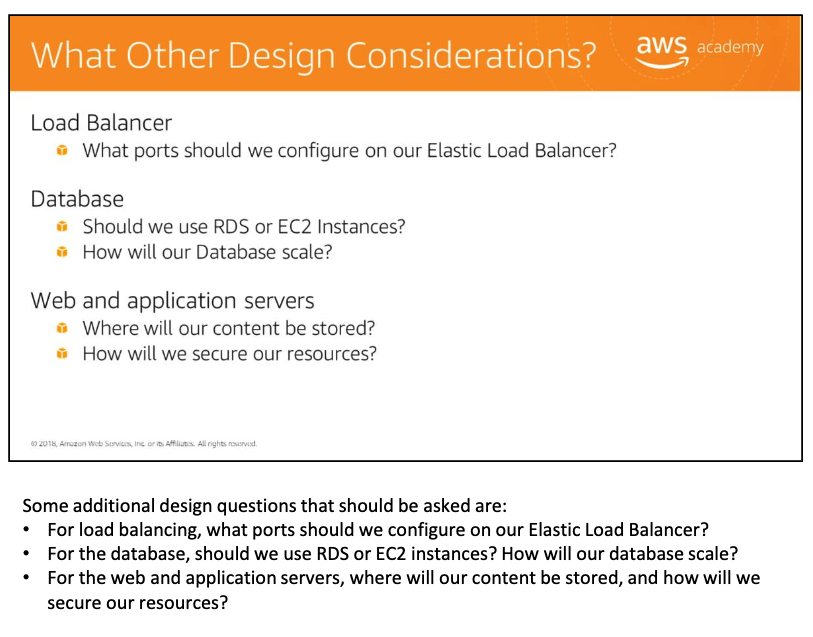
This note covers the core AWS design patterns taught in the AWS Academy curriculum, illustrated with a medical SaaS case study, web-scale media caching, sensor network ingestion, mobile gaming backends, and operational troubleshooting.
Core Design Patterns 核心设计模式
| Pattern | Description |
|---|---|
| Elasticity | Dynamically adjust capacity based on demand; makes workloads cost-effective under variable user load |
| On-Demand | Launch servers and services whenever needed, pay only for use |
| High Availability | Architectural design to accommodate the failure of any single component |
| Least Privilege | Grant access only to the resources needed to perform a task |
Elasticity and Scalability 弹性与可扩展性
Elasticity
弹性 Elasticity is the ability to dynamically adjust the capacity of a service or resource based on demand. Scaling can be vertical (increase instance size) or horizontal (add more EC2 instances).
Relationship between Load Balancing and Elasticity:
- **Load balancing**
: improves the distribution of workloads across multiple computing resources such as EC2 instances.
- helps take the "load" off servers to ensure they don't get overworked.
- helpful when the volume of users is expected to increase.
- Elasticity:
- is the ability of a system to adapt to workload changes.
- Can the system provide the same level of response whether there are 1,000 or 10,000 users?
- The system accomplishes this by **provisioning and de-provisioning resources automatically**.
Scalability
Scalability: Scalable systems divert traffic to the instances with the least load. When one instance has a smaller load, it diverts traffic to that instance to give others a chance to lessen their load.
As a best practice of enabling scalability, anticipate needs and have more capacity available before it is too late:
- A monitoring solution — such as Amazon CloudWatch — detects and triggers in whatever way needed.
- When that alarm is triggered, EC2 Auto Scaling launches a new instance.
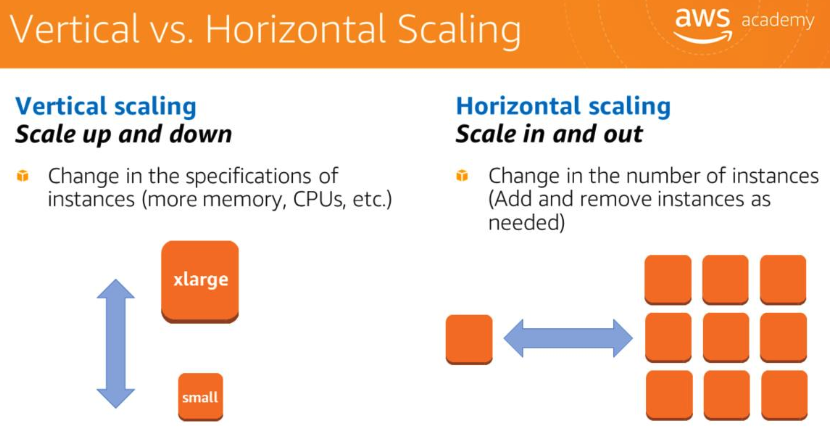
Vertical scaling (scale up/down):
- Changes the specifications of instances — adding memory, CPUs, etc.
- Has an upper limit; eventually reaches the maximum available instance size.
Horizontal scaling (scale in/out) — virtually limitless:
- Changes the number of instances.
- A better solution for handling growing workloads.
High Availability 高可用性
Goals and Definitions
goal is to **have minimal service interruption** in an event of a failure.- **Availability**: the amount of time a system is in a functioning condition.
- Architectural design to accommodate the failure of any single component.
- Ensure the app has a minimum to no downtime.
- site stays up and requires no human intervention.
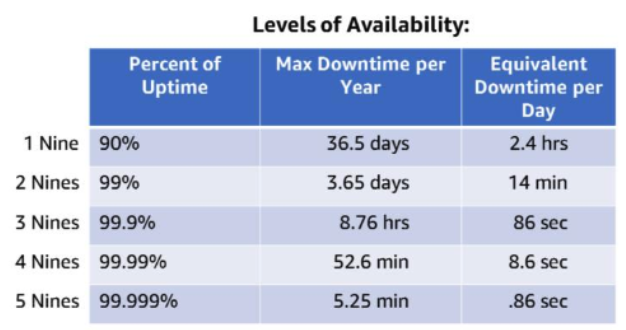
Anti-Pattern: Single Point of Failure
An anti-pattern is a common response to a recurring problem that is usually ineffective and risks being counterproductive. The main HA anti-pattern is the single point of failure (SPOF).
- Avoid the single point of failure
— does not mean every component has to be duplicated.
- Depending on downtime SLAs, use automated solutions that only launch when needed, or a managed service where AWS automatically replaces malfunctioning hardware.
Two key metrics to plan around:
- **RTO (Recovery Time Objective)**
: how long can the system be down?
- **RPO (Recovery Point Objective)**
: how much data can be lost?
HA Factors
| Factor | Description |
|---|---|
| **Fault Tolerance** | Built-in redundancy of application components — avoids single points of failure |
| **Recoverability** | Policy, process, and procedures for restoring service after a catastrophic event |
| **Scalability** | Ability to accommodate growth without changing design; how quickly infrastructure can respond to increased capacity needs |
Inherently HA vs. Requires Right Architecture
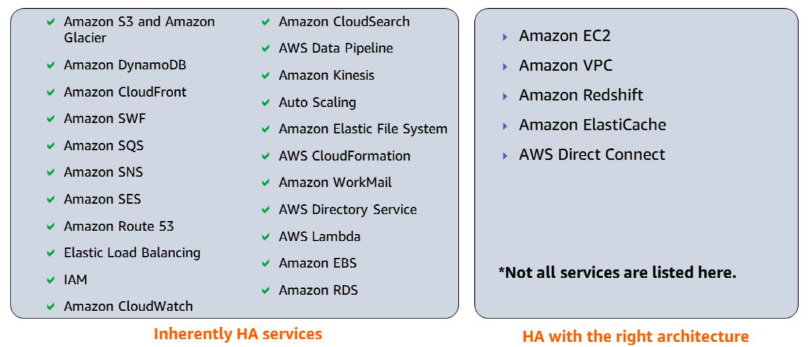
- services that are inherently highly available
: Amazon S3, DynamoDB, CloudFront, SQS, SNS, Route 53, IAM, CloudWatch, Auto Scaling, EFS, CloudFormation, WorkMail, Directory Service, Lambda, EBS, and RDS.
- services are not inherently HA, but can be designed to be HA
: Amazon EC2, VPC, Redshift, ElastiCache, and AWS Direct Connect.
Why HA:
- High availability is about ensuring that the application has a minimum to no downtime.
- High availability design ensures the architecture can survive a disaster and usually focuses on one failure that might be predictable.
- Disaster recovery is being able to recover data and re-establish IT services when multiple failures occur.
Testing HA with CloudFormation
Infrastructure as code enables repeatable HA testing:
- scale out to multiple servers using saved AWS CloudFormation templates.
- Have the entire infrastructure saved in a template — roll it out when needed.
- If testing does not go as expected, adjust the template and relaunch.
- When testing is complete, tear down the infrastructure.
Multi-Region Trade-offs
- Multi-Region deployment increases availability, cost, and complexity.
- Default is a single Region
unless a multi-Region deployment is necessary.
- Choose to deploy in another Region by looking at distance, availability, and costs.
- If using a single Region due to compliance, laws, or regulations — maintain at least two Availability Zones for a high availability solution.
HA Design Patterns 高可用架构模式
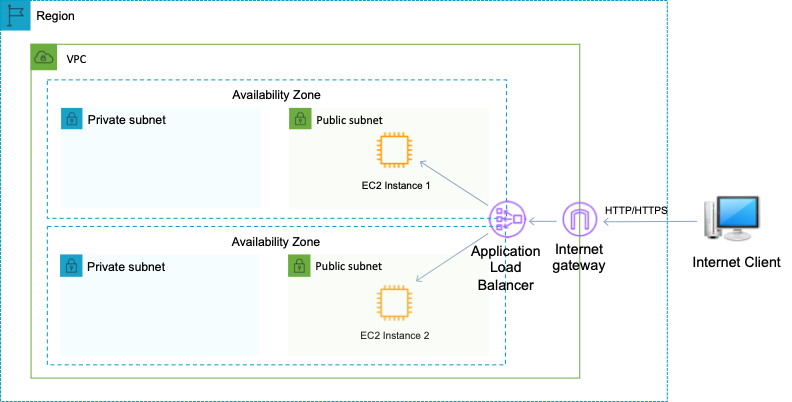
Multi-AZ Pattern
Problem: An AZ failure should not bring down the entire application.
Solution: Deploy across multiple Availability Zones behind an Elastic Load Balancer.
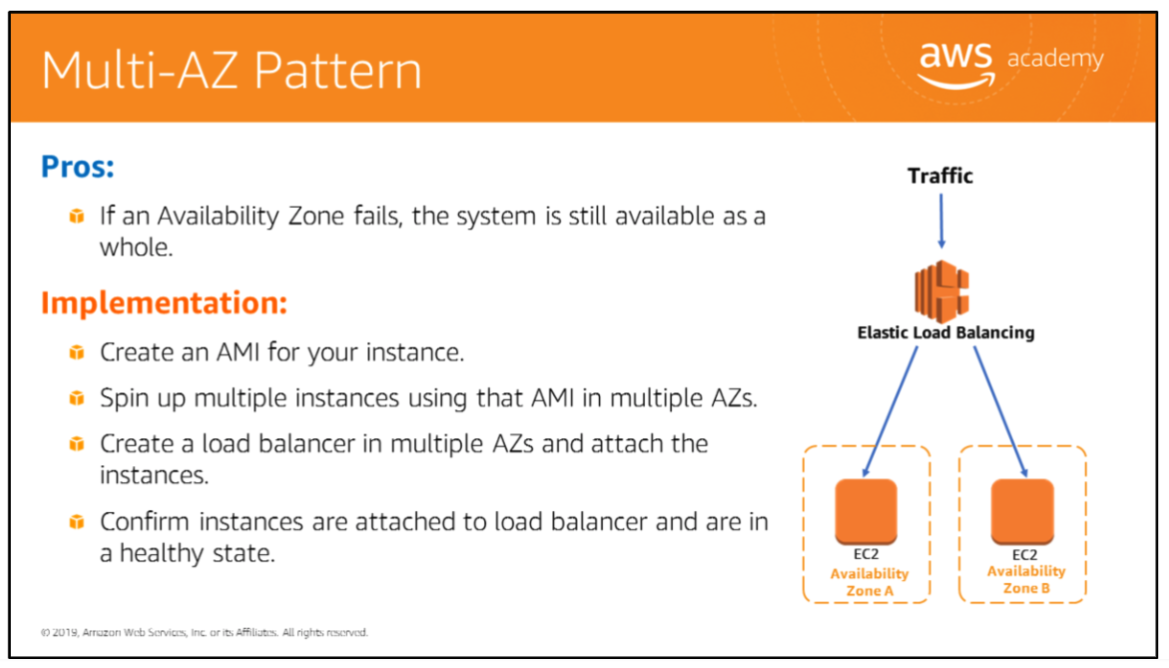
Implementation:
- Create an AMI for the instance.
- Launch multiple instances from that AMI in multiple AZs.
- Create a load balancer spanning multiple AZs and attach the instances.
- Confirm instances are attached and in a healthy state.
A simple ELB multi-AZ deployment with two EC2 instances behind an Application Load Balancer and Internet Gateway:
High-Availability Database Pattern
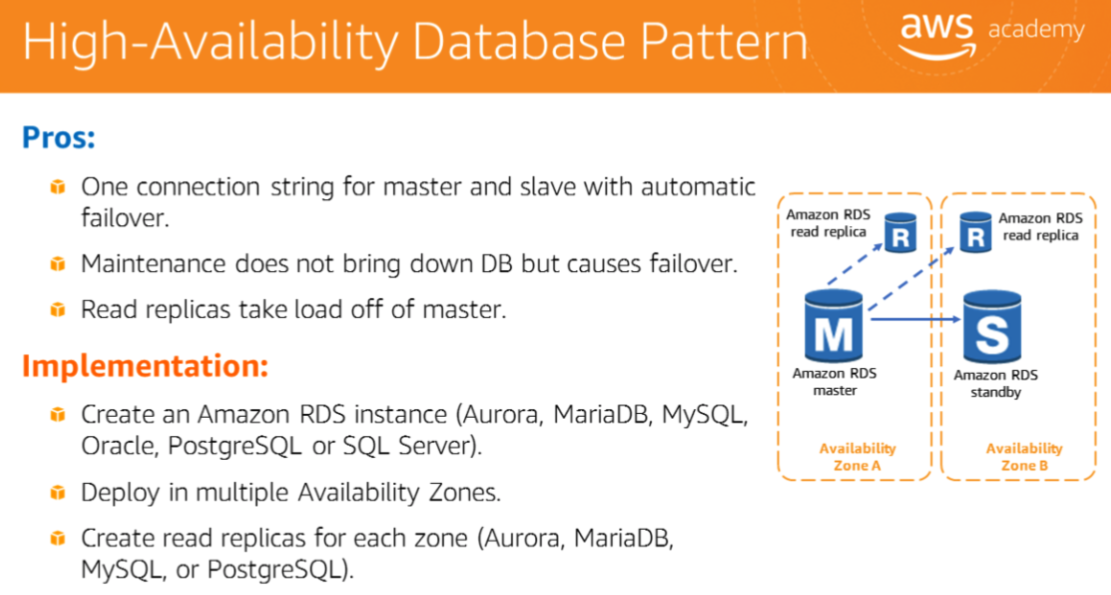
Problem: A database failure or maintenance window causes downtime.
Solution: Use Amazon RDS Multi-AZ with read replicas.
Advantages:
- One connection string for master and slave with automatic failover.
- Maintenance does not bring down the DB; it causes failover.
- Read replicas take load off the master.
Implementation:
- Create an RDS instance (Aurora, MariaDB, MySQL, Oracle, PostgreSQL, or SQL Server).
- Deploy in multiple Availability Zones.
- Create read replicas for each zone.
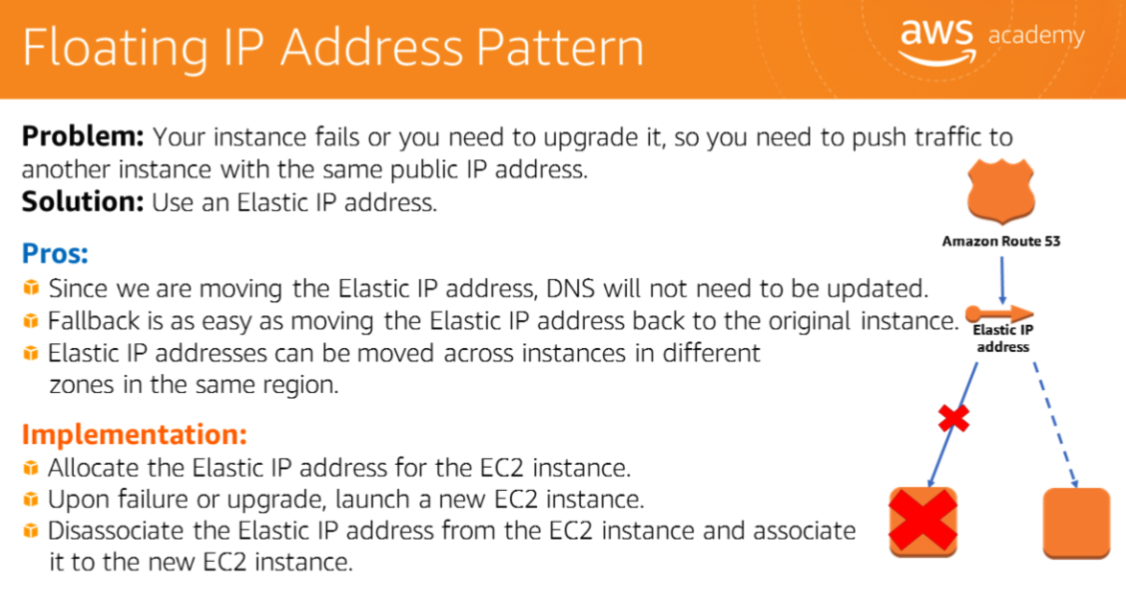
Floating IP Address Pattern
Problem: An instance fails or needs upgrading; traffic must move to a new instance with the same public IP address.
Solution: Use an Elastic IP address.
Advantages:
- DNS does not need to be updated since the Elastic IP moves with the configuration.
- Fallback is as easy as moving the Elastic IP back to the original instance.
- Elastic IPs can be moved across instances in different zones within the same Region.
Implementation:
- Allocate an Elastic IP for the EC2 instance.
- Upon failure or upgrade, launch a new EC2 instance.
- Disassociate the Elastic IP from the old instance and associate it to the new instance.
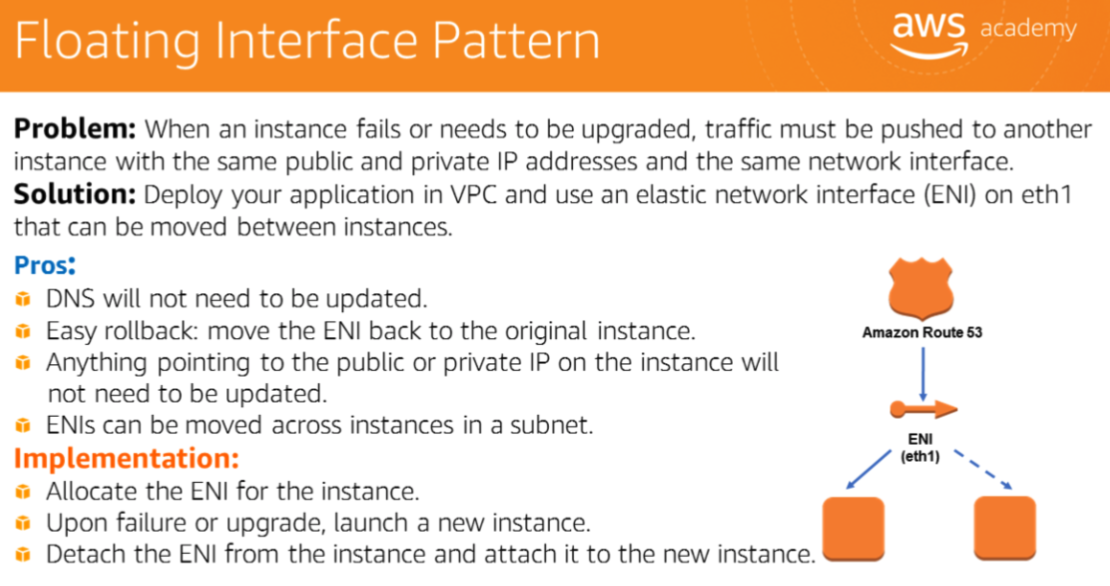
Floating Interface Pattern
Problem: An instance fails or needs upgrading; traffic must be pushed to another instance with the same public and private IP addresses and the same network interface.
Solution: Deploy the application in a VPC and use an Elastic Network Interface (ENI) on eth1.
Advantages:
- DNS does not need to be updated.
- Fallback is as easy as moving the ENI back to the original instance.
- ENIs can be moved across instances in a subnet.
Implementation:
- Allocate the ENI for the instance.
- Upon failure or upgrade, launch a new instance.
- Detach the ENI from the old instance and attach it to the new instance.
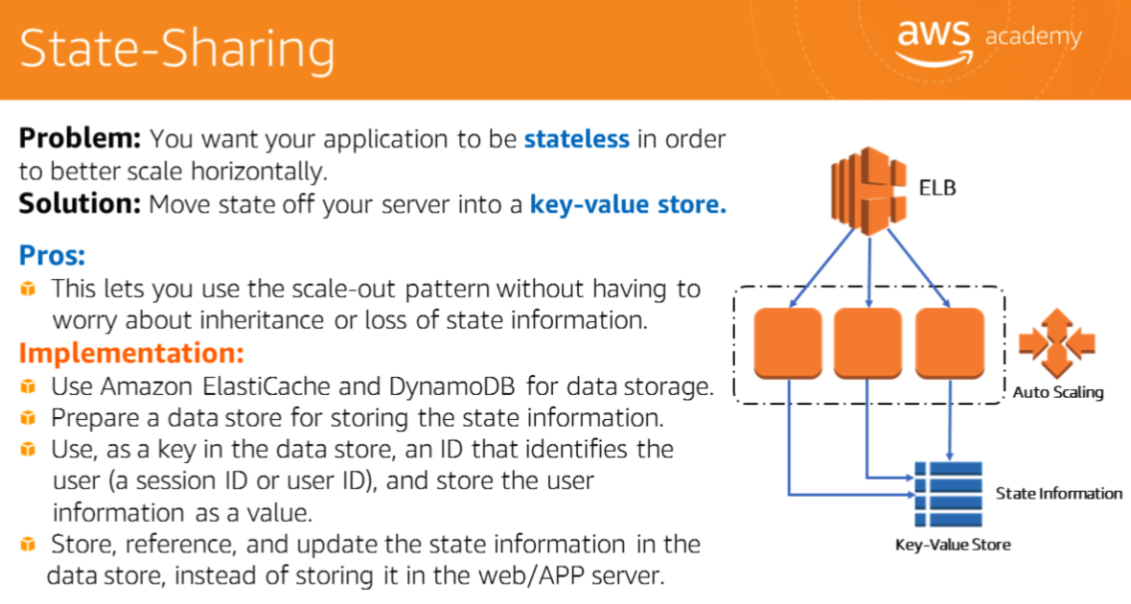
State-Sharing Pattern
Problem: Stateful applications are difficult to scale horizontally.
Solution: Move state off the web/app server into a key-value store.
Advantages:
- Use the scale-out pattern without having to worry about inheritance or loss of state information.
Implementation:
- Use Amazon ElastiCache and DynamoDB for data storage.
- Prepare a data store for storing state information.
- Use a key in the data store that identifies the session ID or user, and use the session ID or user as a value in the key-value store.
- Reference, update, and store state in the data store instead of in the web/app server.
Scheduled Scale-Out Pattern
Problem: Application traffic does not scale organically but has large jumps at specific times of the day or for an event.
Solution: Use Scaling by Schedule or Scaling by Policy.
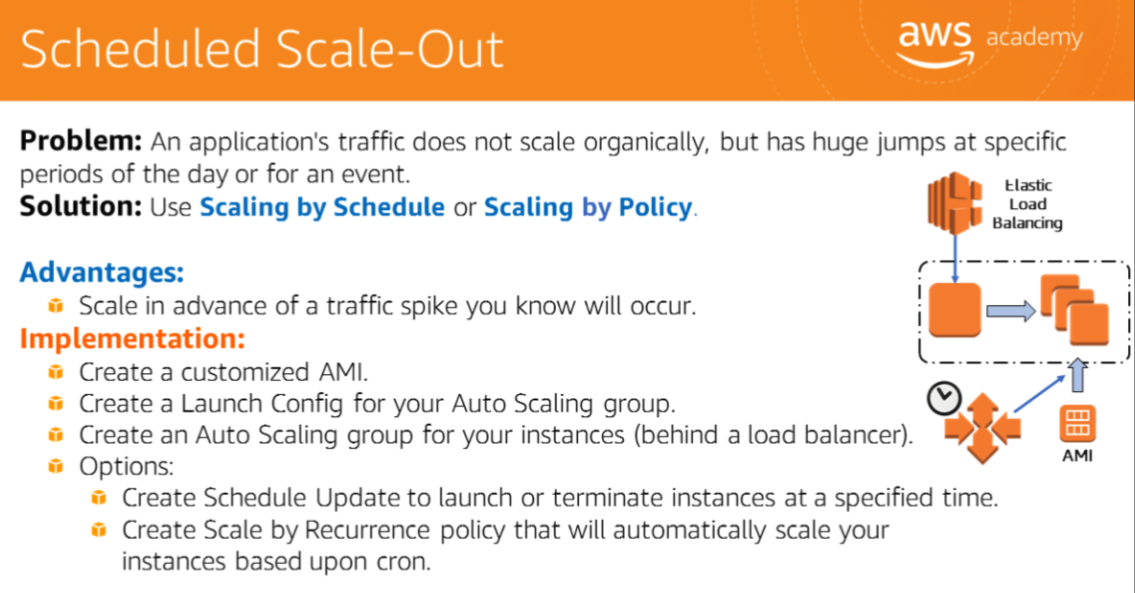
Advantages: Scale in advance of a traffic spike known in advance.
Implementation:
- Create a customized AMI.
- Create a Launch Configuration for the Auto Scaling group.
- Create an Auto Scaling group for the instances behind a load balancer.
- Options:
- Create a Schedule Update to launch or terminate instances at a specified time.
- Create a Scale by Recurrence policy that automatically scales based on cron.
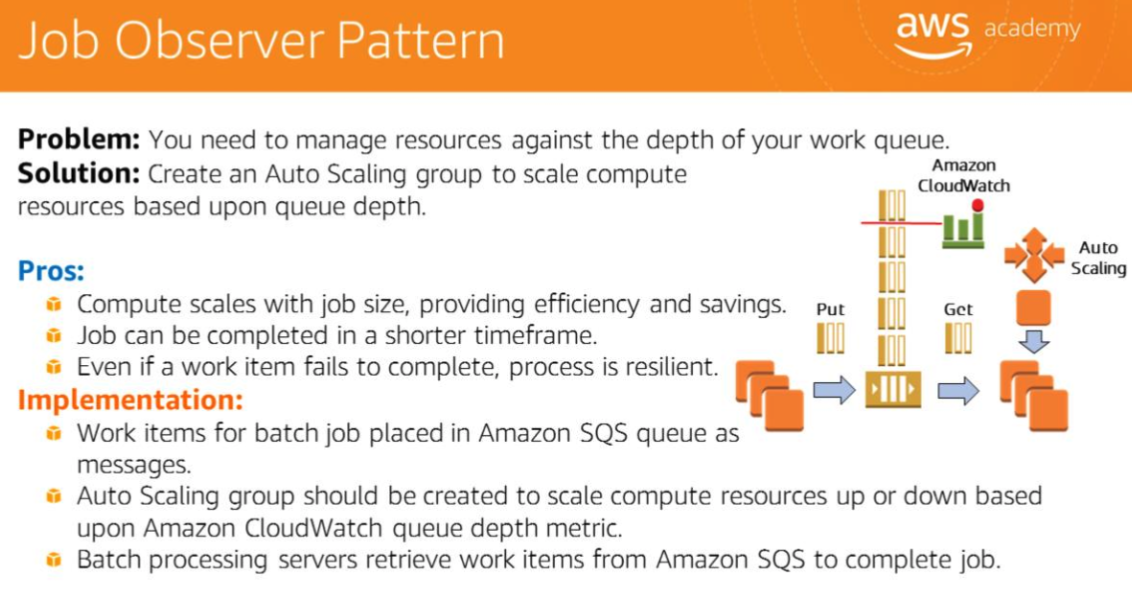
Job Observer Pattern
Problem: Resource management against the depth of a work queue.
Solution: Create an Auto Scaling group sized based on queue depth to compute resources up or down based on Amazon SQS queue depth.
Advantages:
- Compute scales by queue depth, providing efficiency and savings.
- Even if a job item fails, the application can be considered resilient.
Implementation:
- Work items are placed in Amazon SQS as messages.
- The Auto Scaling group scales compute resources up or down based on the CloudWatch queue depth metric.
- Batch processing workers retrieve work items from SQS to complete the job.
Bootstrapping and Golden Images 引导程序与黄金镜像
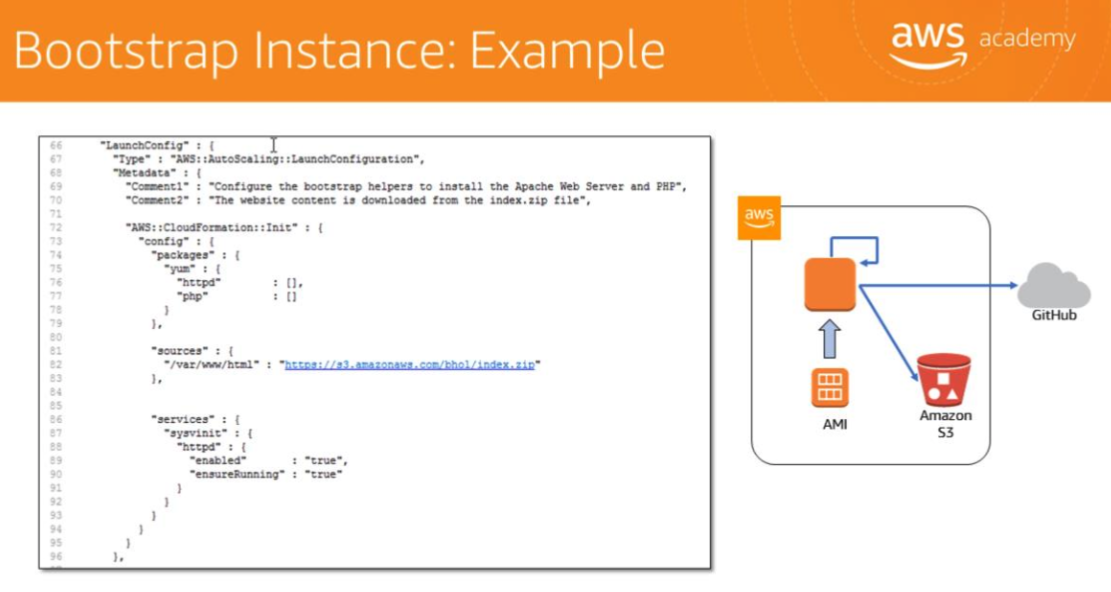
Bootstrapping — the execution of automated actions to services such as EC2 and RDS. Typically in the form of scripts that run when instances are launched.
Golden Images are snapshots of pre-configured EBS volumes used to launch new instances. Created using Amazon Machine Images (AMIs).
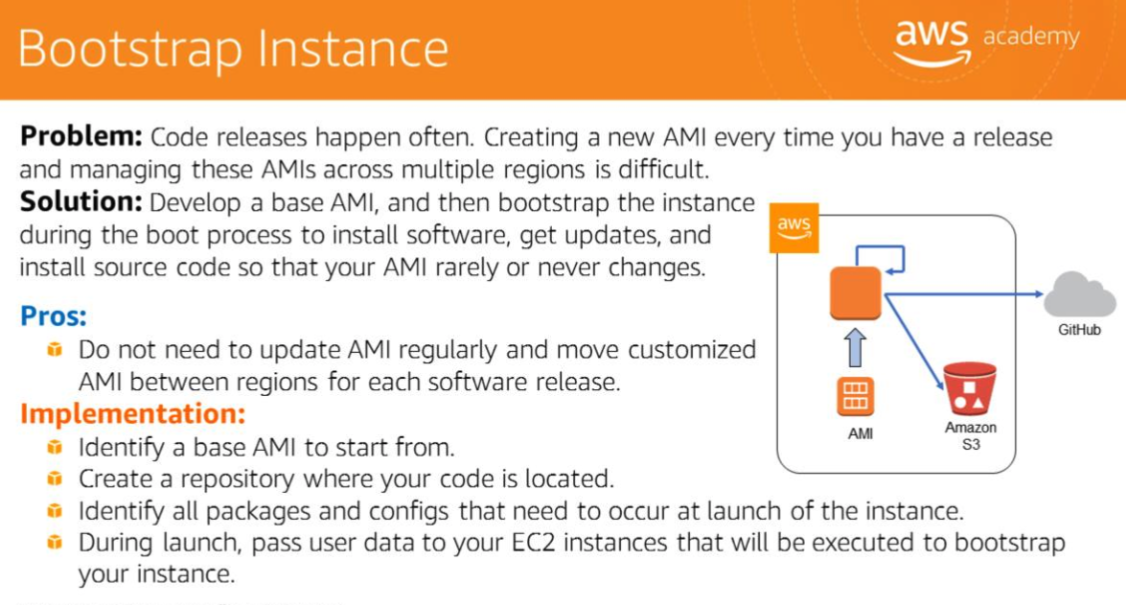
Bootstrap Instance: Developing a base AMI and using user data to bootstrap the instance at launch. Code releases happen often; creating a new AMI every time a release happens across multiple regions is difficult.
Advantages:
- Do not need to update AMIs regularly or maintain customized AMIs.
Implementation:
- Identify a base AMI to start from.
- Create a repository where source code is located.
- Identify all packages and configs that need to occur at launch of the instance.
- During boot the process uses user data to install software, get updates, and run the instance.
Containers are packaged software that runs in a Docker image. Services such as Amazon ECS and Fargate run Docker containers.
Workflow automation orchestrates automated actions. Associated with services such as Chef, Puppet, and AWS OpsWorks.
Fault Tolerance and Resilience 容错与弹性恢复
**fault tolerance**- deploying resources across multiple availability zones
- if one AZ goes down, the other AZ remains operational, making the application more fault tolerant.
: Multiple Availability Zones within a Region ensure the application recovers from partial failures.
**Decoupling 解耦**- host an environment that reduces interdependencies and blast radius, so failures do not affect other components of the application.
- In microservice architectures, applications are built and deployed as highly decoupled, focused services.
- decoupled application architecture
allows each component to perform its tasks independently.
- components remain completely autonomous and unaware of each other.
- ensures different components can be managed and maintained separately.
Web-Scale Media and Caching 大规模媒体与缓存
Performance Impact
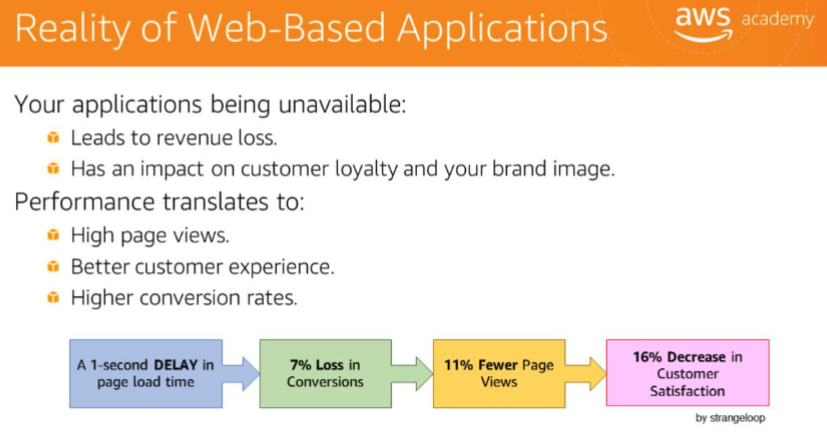
Application unavailability leads to revenue loss and impacts customer loyalty and brand image. Performance translates directly to higher page views, better customer experience, and higher conversion rates. A 1-second delay in page load time results in:
- 7% loss in conversions
- 11% fewer page views
- 16% decrease in customer satisfaction
Caching Concepts
Caching is the process of temporarily storing data or files in an intermediary location between the requester and permanent storage, making future requests faster and reducing network throughput.
Architectural best practice:
- implement caching at multiple layers of an architecture to reduce cost and latency and increase application performance.
- more cost-effective to distribute files from CloudFront than from an S3 bucket.
Anti-Pattern vs. Best Practice
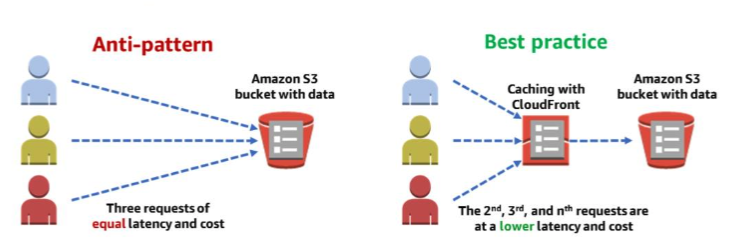
Anti-pattern (S3 direct): Three users request a file from an S3 bucket — each request takes the same time and incurs the same cost.
Best practice (S3 + CloudFront):
- First request checks CloudFront; if not found, pulls from S3 and stores at the nearest edge location.
- Subsequent requests are served from the CloudFront edge — lower latency and lower cost.
- After the first request, no transfer cost is incurred from S3.
Dynamic vs. Static Content TTL
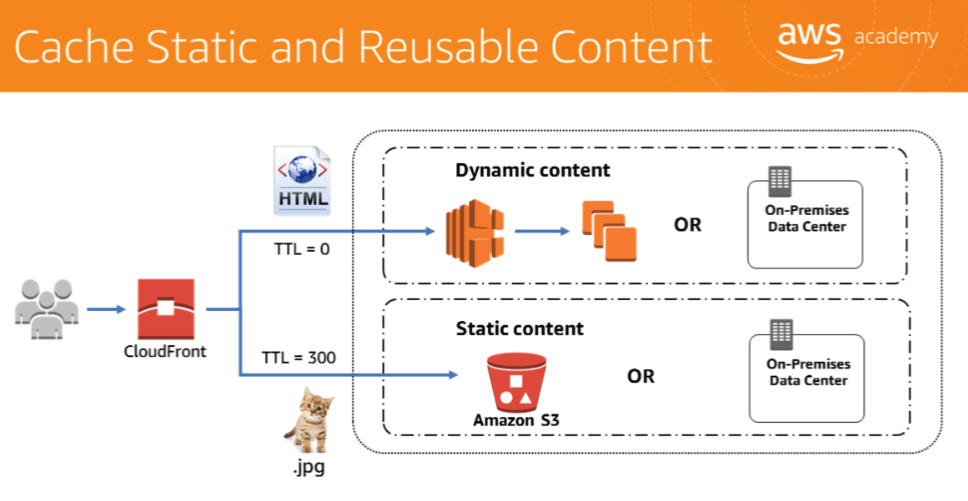
- TTL = 0 for dynamic or personalized content: CloudFront passes through to the origin on every request.
- TTL = 300 (or longer) for static content such as images: CloudFront caches at the edge.
- CloudFront can pull content from S3, reducing load on on-premises data centers, enabling smaller instances and lower cost.
Full Web Hosting Architecture
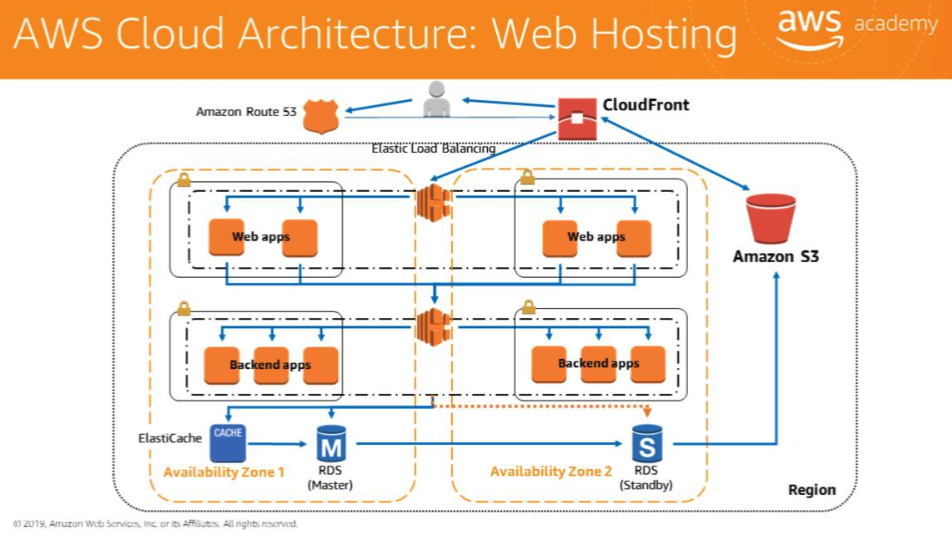
- End users are directed to CloudFront via Amazon Route 53.
- Load balancers pull content and data from S3, RDS, or ElastiCache.
- ElastiCache can serve as a read replica if content is cached there.
- CloudFront in front of the hosting architecture reduces the number of times requests must reach the load balancer.
Case Study: Medical SaaS Migration 医疗 SaaS 迁移案例
Company Background
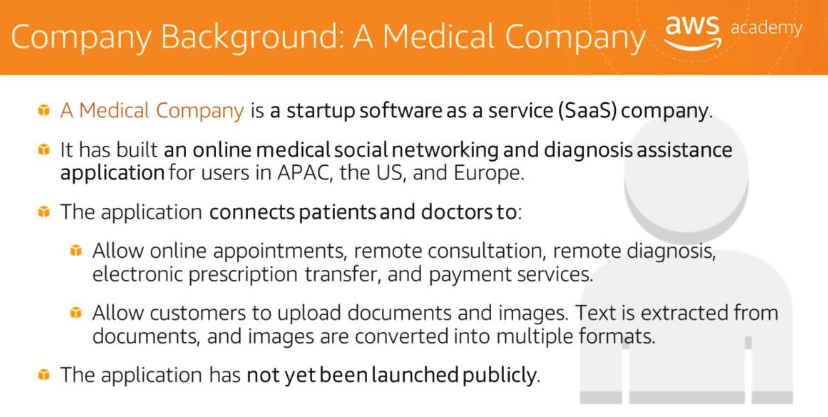
A Medical Company is a startup software as a service (SaaS) company that built an online medical social networking and diagnosis assistance application for users in APAC, the US, and Europe. The application connects patients and doctors to:
- Allow online appointments, remote consultation, remote diagnosis, electronic prescription transfer, and payment services.
- Allow customers to upload documents and images; text is extracted from documents and images are converted into multiple formats.
The application had not yet been launched publicly and was planning to migrate from a hosted server company to AWS.
Current On-Premises Architecture
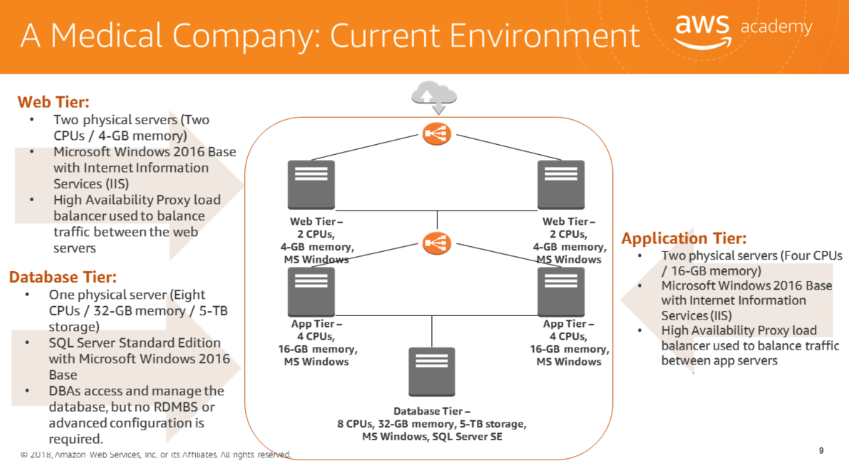
| Tier | Servers | Specs | Stack |
|---|---|---|---|
| Web | 2 physical | 2 CPUs / 4-GB memory | Windows 2016 + IIS + HA Proxy |
| Application | 2 physical | 4 CPUs / 16-GB memory | Windows 2016 + IIS + HA Proxy |
| Database | 1 physical | 8 CPUs / 32-GB memory / 5-TB storage | SQL Server SE + Windows 2016 |
Solution Design Requirements
**solution design**requirements:
- **Configure** access **permissions**
to conform with AWS best practices.
- **Build** networks
that conform to AWS best practices while providing all necessary network services across different environments.
- **Build an** architecture
that matches the current architecture and can handle doubling the number of servers.
- Architecture’s ability to accommodate future growth.
- Security: Secure all sensitive medical information (PII).
- **Utilize Load balancers**
for web tier and application tier that must support HTTP, HTTPS, and TCP protocols.
- **Architecture should be resilient**
(built for business continuity).
- **Configure auditing**
to track all user actions.
IAM: User Authentication
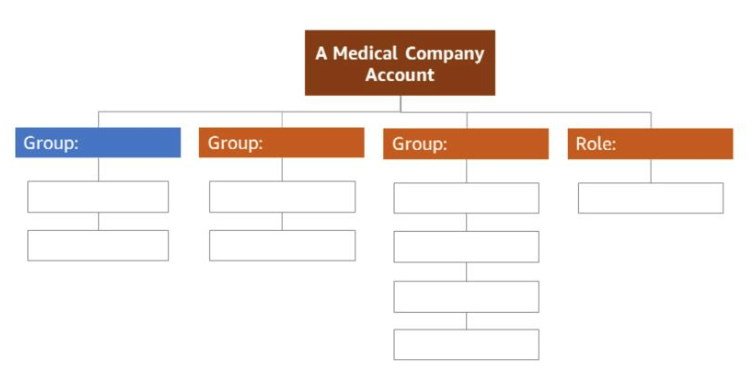
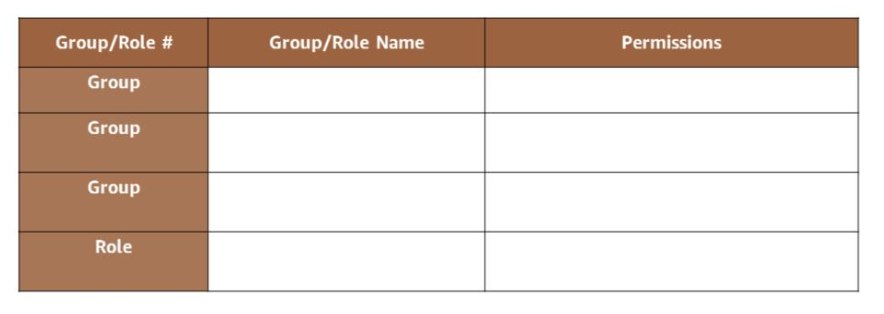
Three IAM groups with AWS access:
| Group | Users | Access Type |
|---|---|---|
| System Administrator | 2 | Programmatic + Console (with Virtual MFA) |
| Database Administrator | 2 | Programmatic + Console (with Virtual MFA) |
| Monitoring | 4 | Console only (EC2, S3, RDS for the app) |
All other users: Console access only, username + password.
IAM password policy:
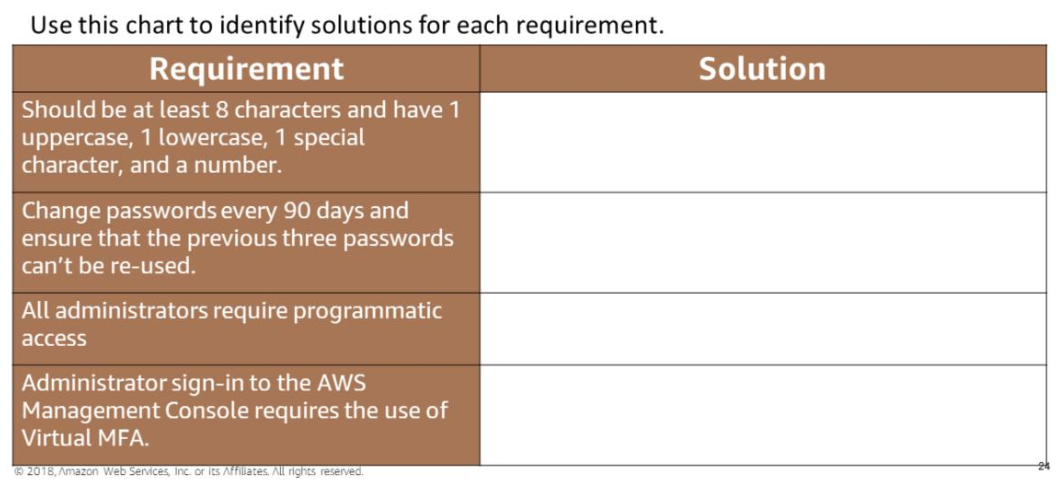
- Minimum 8 characters: at least 1 uppercase, 1 lowercase, 1 number, 1 special character.
- Forced password change every 90 days.
- No reuse of previous three passwords.
- Administrators require Virtual MFA for console sign-in.
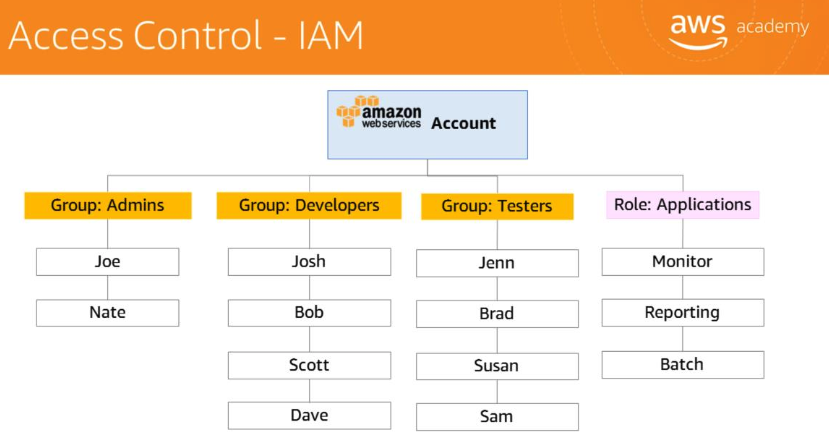
GoGreen IAM reference for group design (Admins, Developers, Testers, Role: Applications):
Network: VPC Design
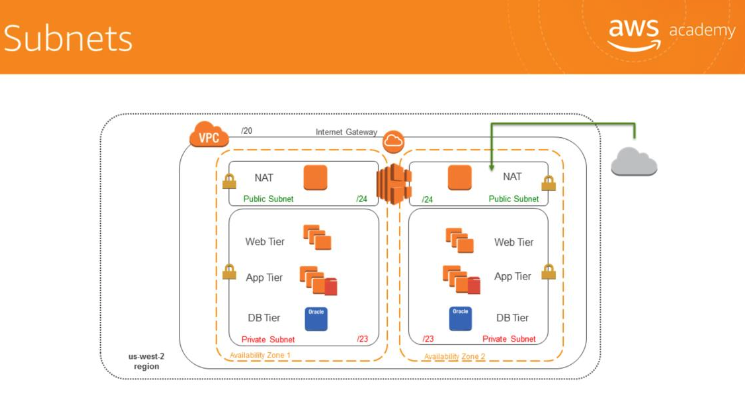
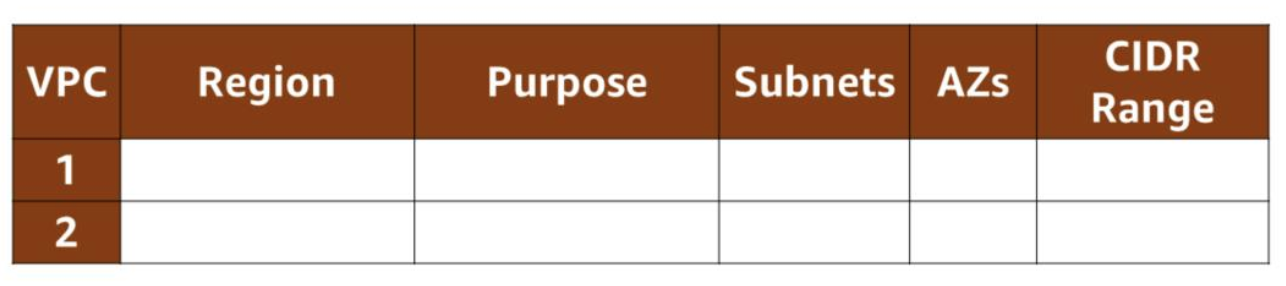
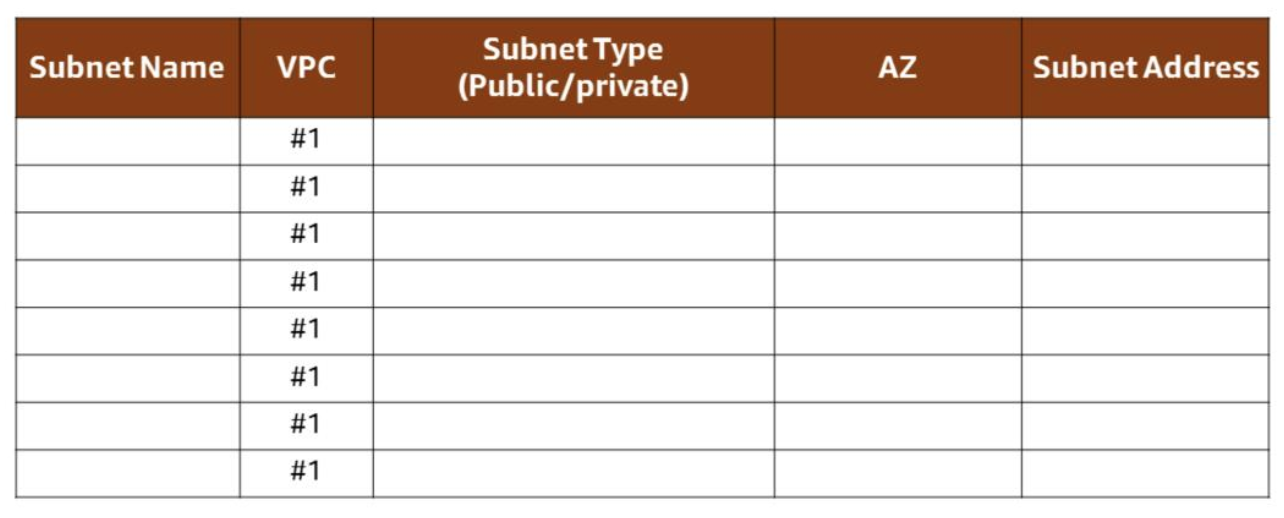
VPC planning considerations:
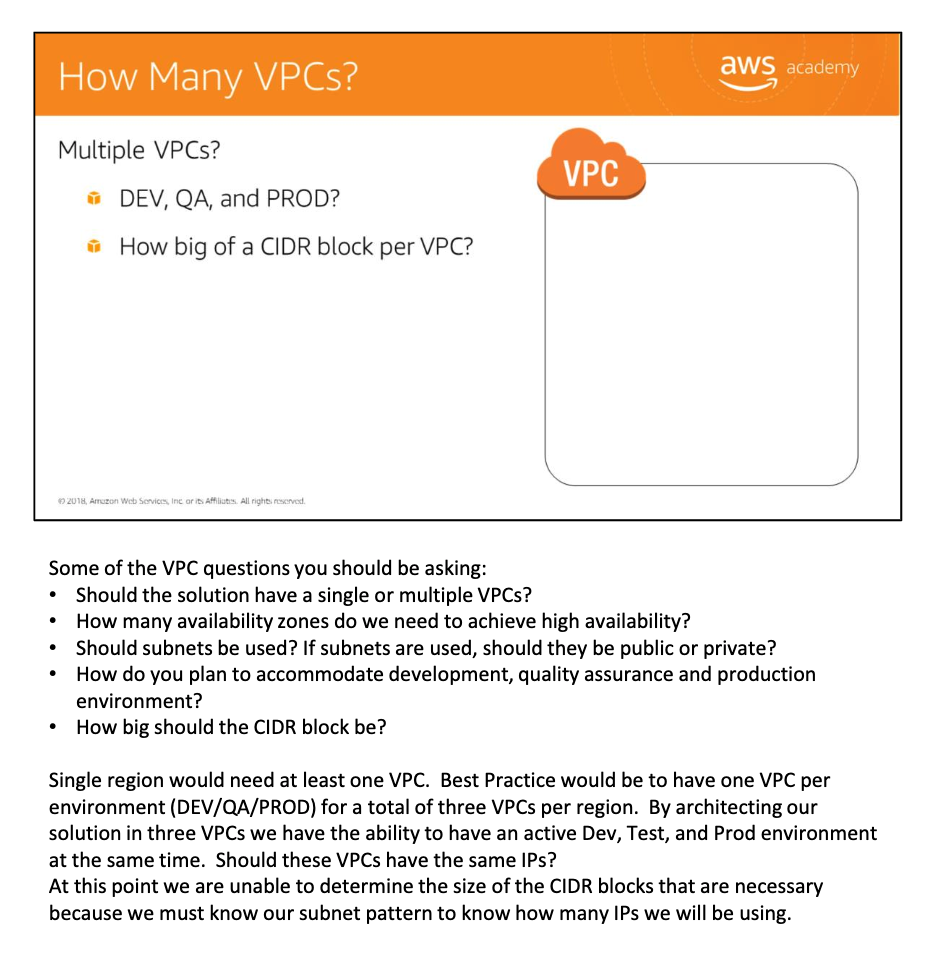
- Single region should have at least one VPC per environment (DEV/QA/PROD).
- Best practice: one VPC per environment per region.
Network security rules:
- Achieve **high availability** for all tiers to reduce downtime.
- **Control access** to the application and limit public entry points.
- Note: There should be no external access to the application or database tiers.
- **Minimize IP address** usage to reduce the attack surface.
- Maintain separate networks for development, testing, and production environments.
- The web tier load balancer can receive requests from the Internet on port 443.
- **Web tier servers** can receive requests from the web tier load balancer only on port 443.
- The Application Load Balancer can receive requests from the application tier load balancer only on port 443.
- Database servers can receive requests from application servers only on port 1433.
- Note: Not all AWS Regions support RDS Multi-AZ with Mirroring for SQL Server — affects region selection.
EC2 Instance Configuration
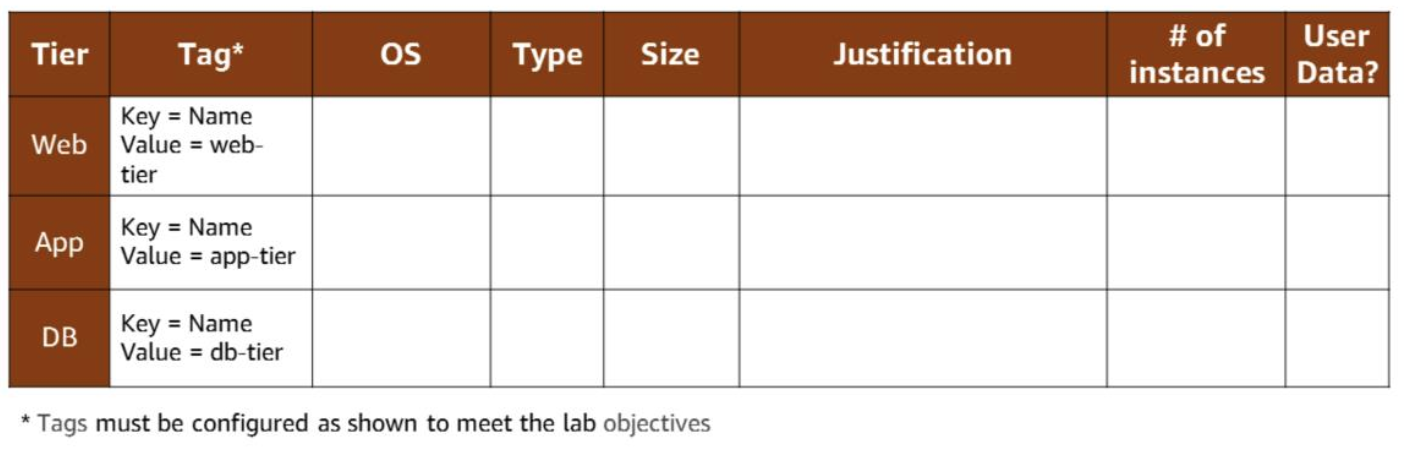
- All web tier instances tagged:
Key = Name, Value = web-tier. - All app tier instances tagged:
Key = Name, Value = app-tier. - All application tier instances must support EBS optimization.
- Load balancers must support HTTP, HTTPS, and TCP protocols.
Installing IIS via user data (PowerShell):
1
2
3
4
5
6
7
8
9
<powershell>
Set-ExecutionPolicy Unrestricted -Force
New-Item -ItemType directory -Path 'C:\temp'

# Install IIS and Web Management Tools.
Import-Module ServerManager
install-windowsfeature web-server, web-webserver -IncludeAllSubFeature
install-windowsfeature web-mgmt-tools
</Powershell>
Both Web and Application tier servers need IIS installed. Installing via user data is the quickest approach. Without IIS installed, port 80 health checks for the ELB will fail because Windows 2016 does not open ports or install IIS by default.
Load Balancer Configuration
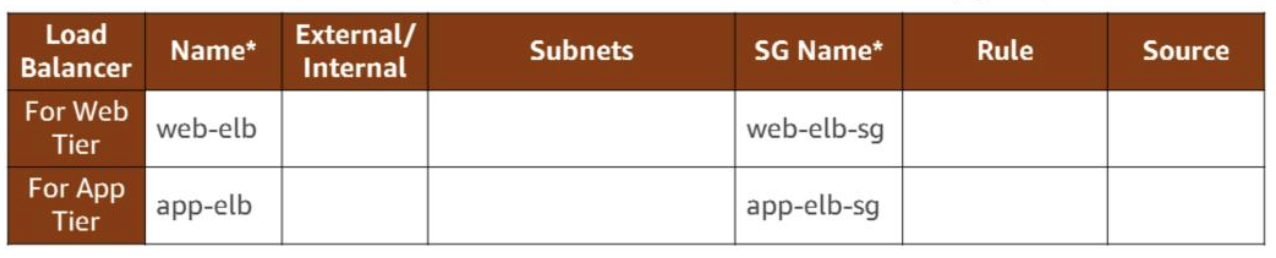
| Load Balancer | Name | Traffic |
|---|---|---|
| Web tier | web-elb | Internet → port 80 |
| App tier | app-elb | Web tier servers → port 8080 |
- Web tier servers receive requests from
web-elbon port 80. - App tier servers receive requests from
app-elbon port 80. - Database servers receive requests from app tier servers on port 1433.
Auto Scaling for Business Continuity
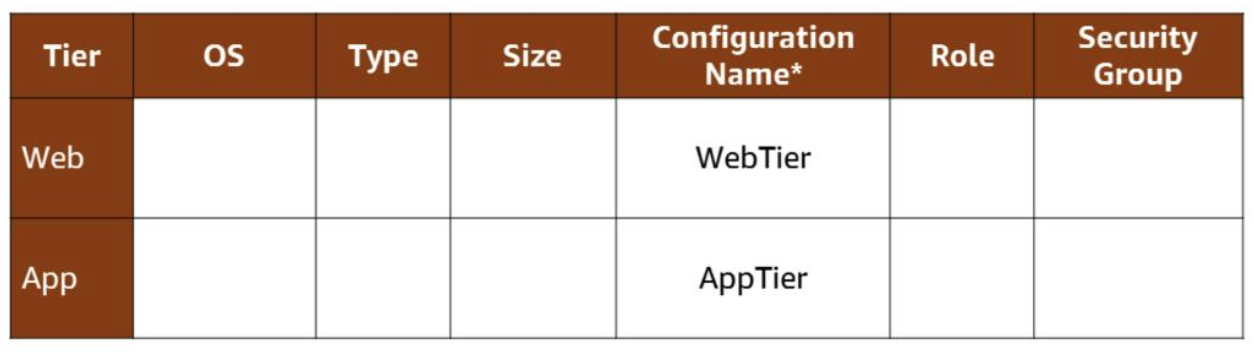
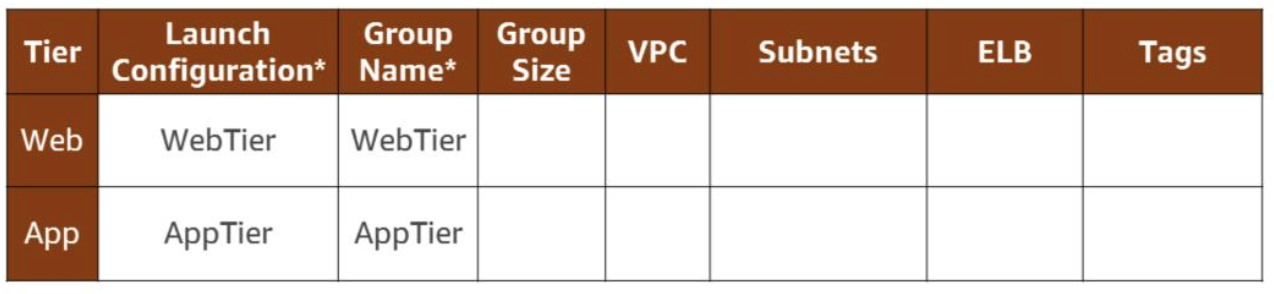
- Web and application tiers: resilient, designed for business continuity.
- Database tier: Multi-AZ deployment.
- Auto Scaling groups: minimum capacity = 2, maximum capacity = 4.
- The architecture is designed to handle doubling the number of servers to support rapid growth.
Auditing with CloudTrail
Auditing requirements:
- Continuously monitor and retain account activity across AWS infrastructure.
- Log event history of AWS account activity — Console, SDKs, CLI, and other AWS services.
- Ensure an audit trail exists for all executed API calls.
- Ensure logs are stored in a secure location.
Service: AWS CloudTrail satisfies all four requirements.
GoGreen Reference Architecture
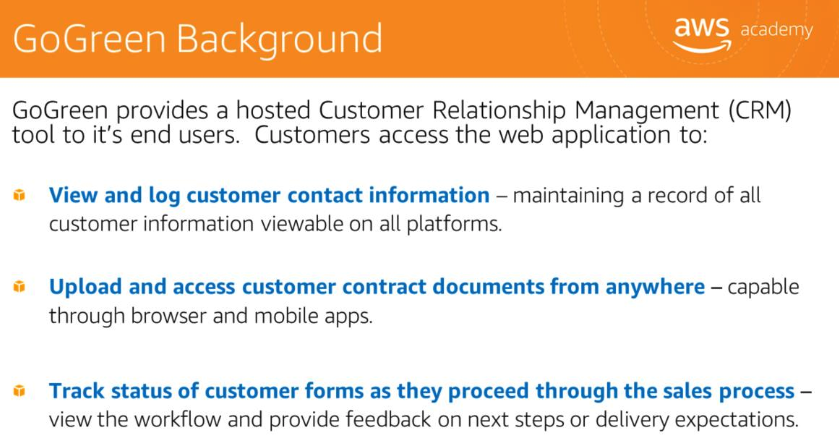
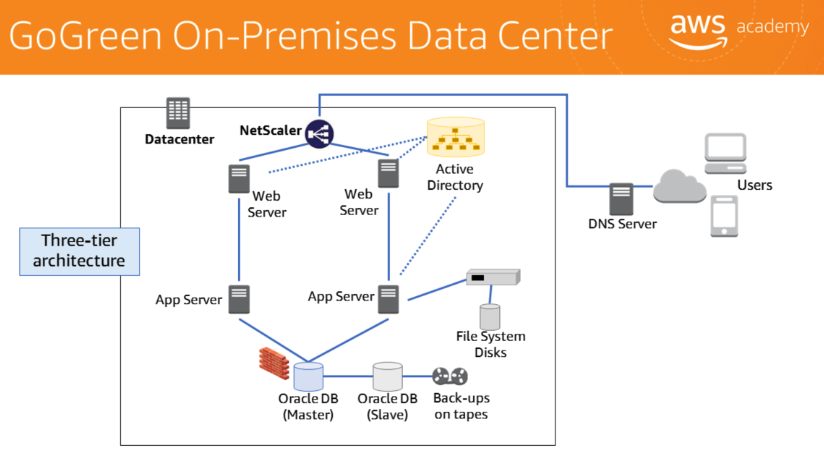
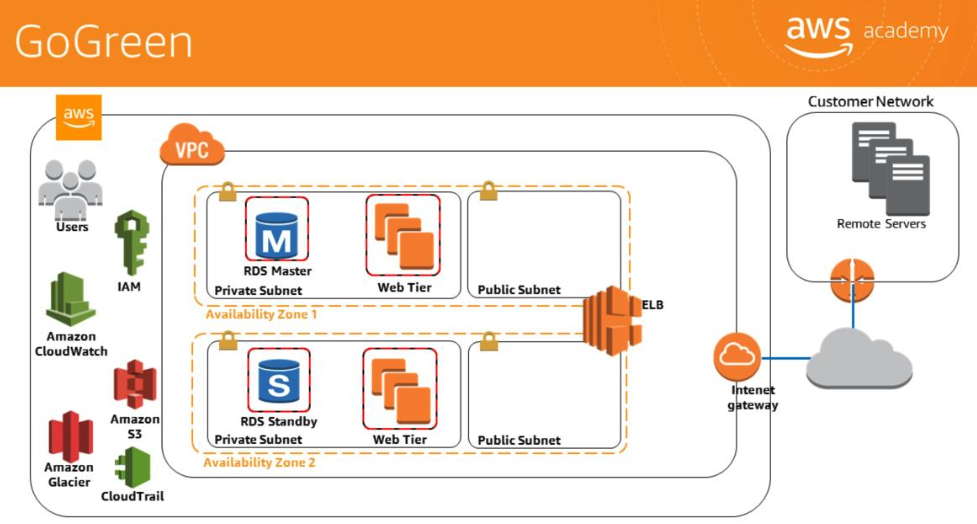
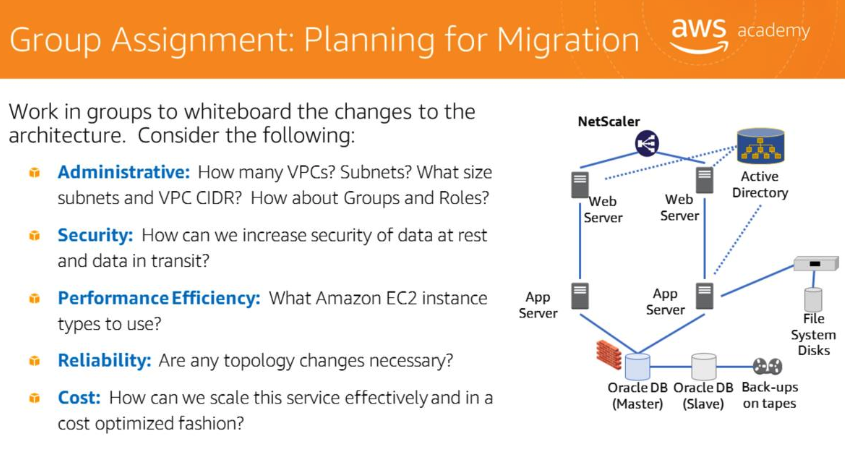
GoGreen provides a hosted Customer Relationship Management (CRM) tool. The final migrated architecture:
Go-Green Security Checklist 安全检查清单
When reviewing a migrated architecture for security hardening, consider:
- Move resources to private subnets — avoid unnecessary public exposure.
- Implement AWS Direct Connect instead of internet routing for corporate traffic.
- Verify least privilege on all IAM users and roles.
- Ensure separation of duties through IAM group design.
- Ensure Amazon CloudWatch has monitors for utilization, abnormal traffic, and AWS CloudTrail logs.
- Enable AWS CloudTrail for full API audit logging.
- Verify S3 bucket ACL policies and bucket policies are restrictive.
- Verify Amazon S3-SSE (server-side encryption) is enabled for sensitive data.
- Ensure users do not have delete privileges for Amazon Glacier.
- Use security groups for web tier and Amazon RDS — restrict ingress to necessary sources only.
- Ensure SSH requests come only from the administrator IP address.
Sensor Network Data Ingestion 传感器网络数据采集
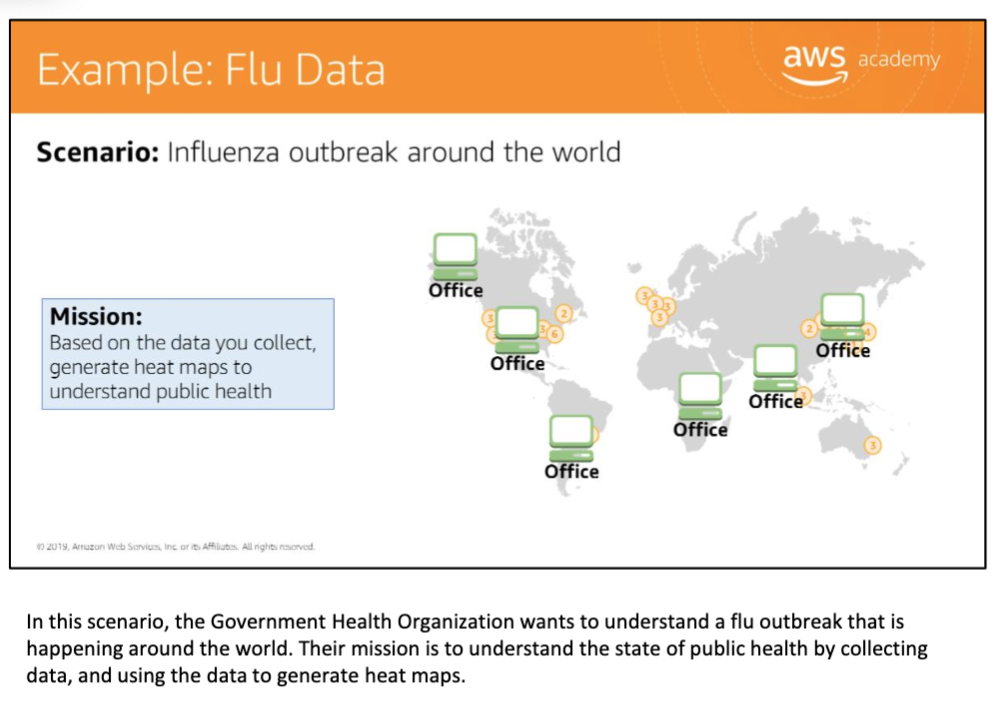
Use Case: Flu Heat Map
The Government Health Organization needs to understand flu outbreaks worldwide. The mission: collect data from global offices and generate heat maps to understand public health.
Generation 1: FTP-Based (Anti-Pattern)
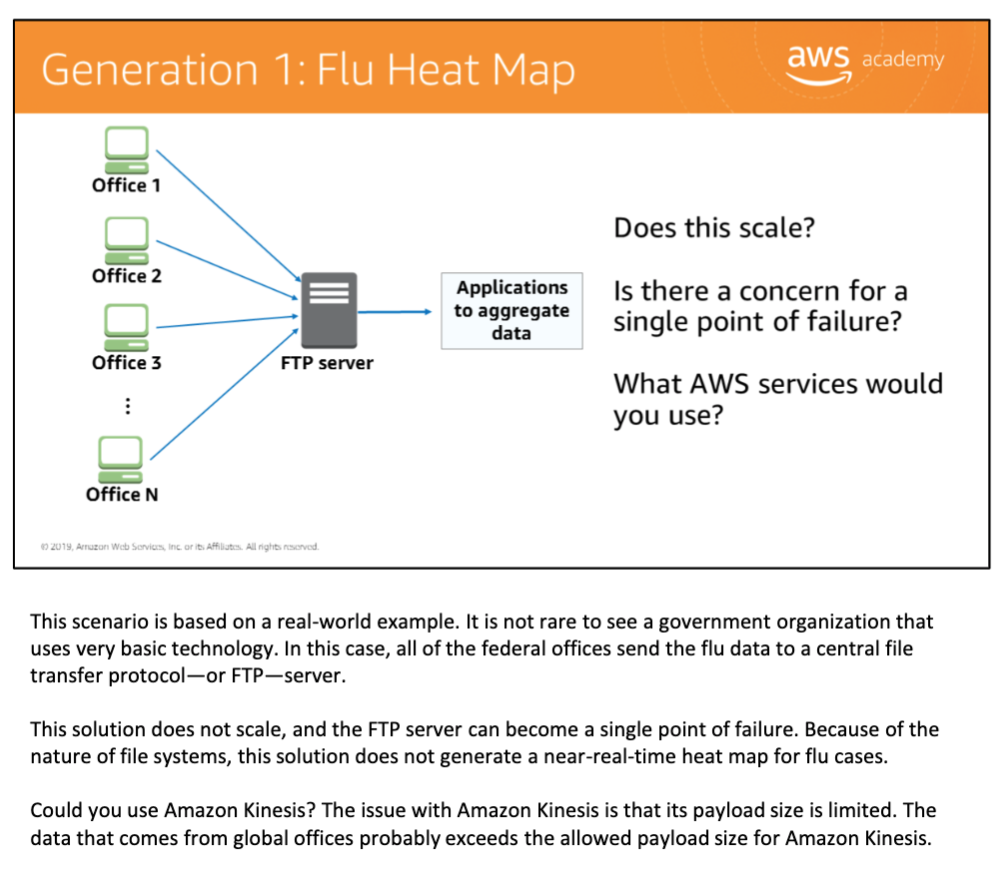
All federal offices send flu data to a central FTP server. Problems:
- Does not scale.
- The FTP server is a single point of failure.
- Near-real-time heat maps are not achievable.
- Amazon Kinesis payload size limit prevents direct use with global large-payload reports.
Generation 2: CloudFront + S3 + Redshift
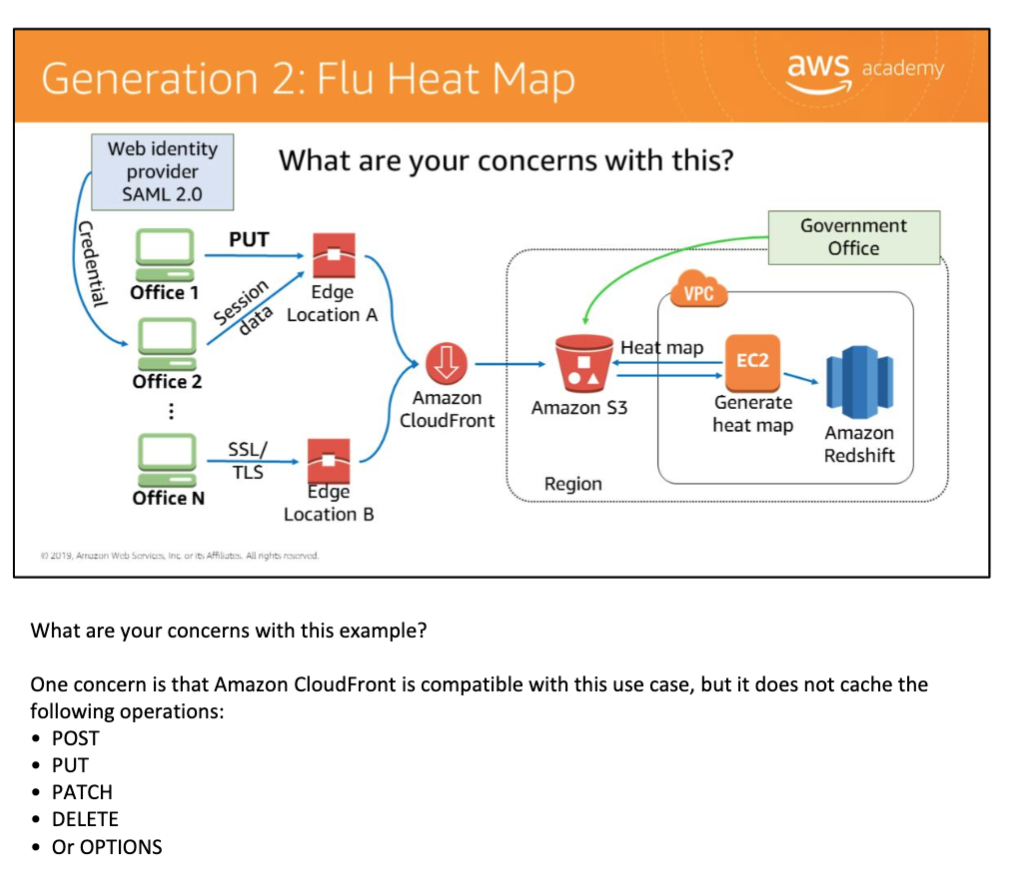
Offices authenticate via SAML 2.0, upload via PUT to CloudFront edge locations using SSL/TLS, data lands in S3, EC2 generates heat maps stored in Amazon Redshift.
Concern: Amazon CloudFront does not cache POST, PUT, PATCH, DELETE, or OPTIONS operations — data upload bypasses CloudFront caching.
Generation 3: Kinesis Data Streams
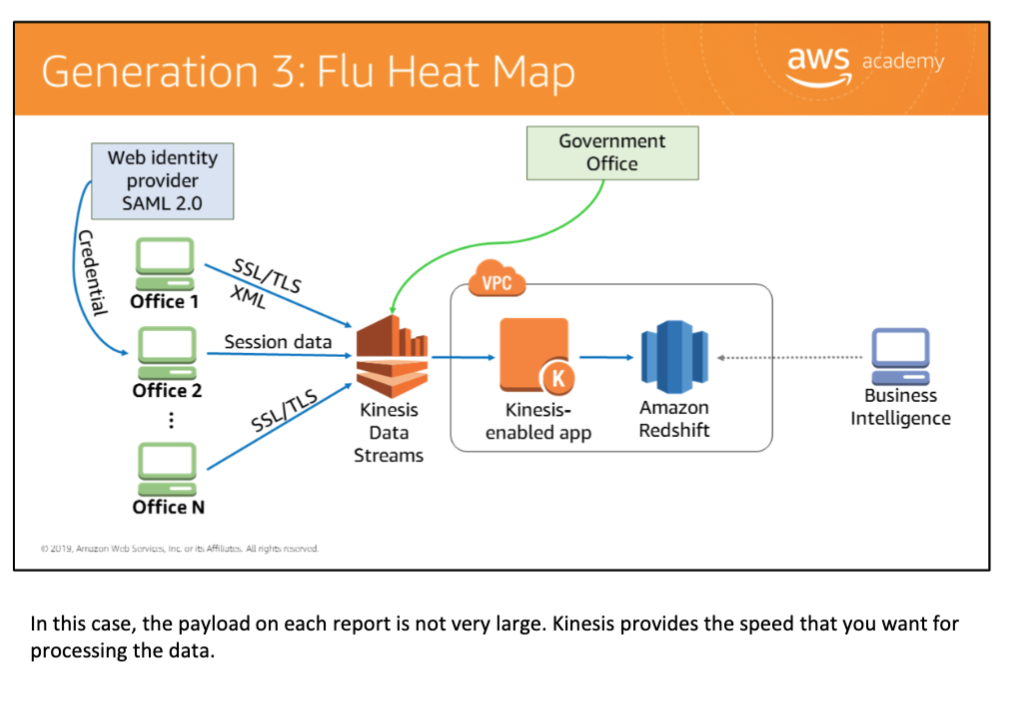
Offices send SSL/TLS XML session data directly to Amazon Kinesis Data Streams. A Kinesis-enabled application processes the stream and writes results to Amazon Redshift for business intelligence. Per-report payload is small — Kinesis provides the speed needed for near-real-time processing.
Mobile Gaming Architecture 移动游戏架构
Backend Technologies
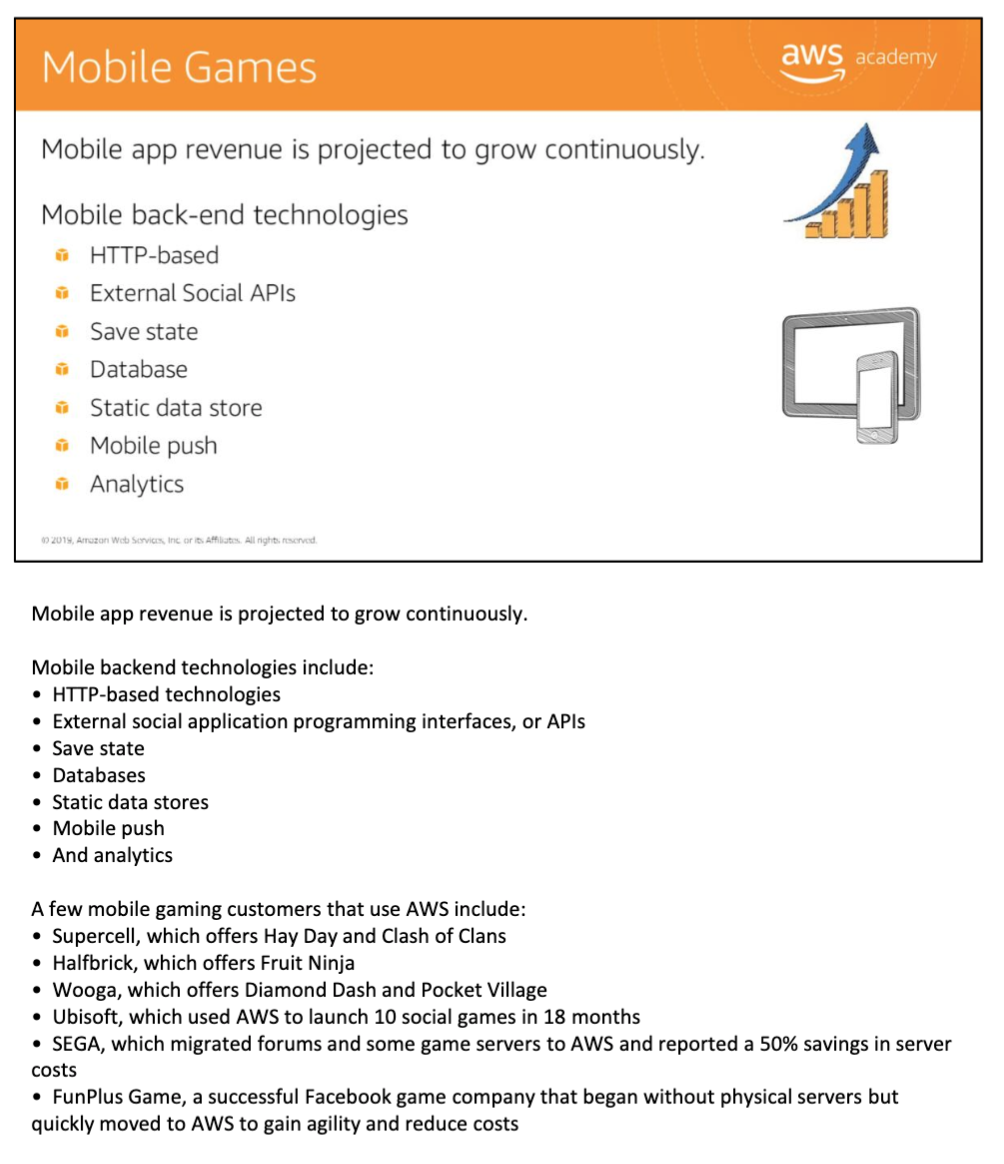
Mobile game backends are increasingly similar to web application backends:
- HTTP-based technology
- External social application programming interfaces (APIs)
- Databases
- Static data stores
- Push notifications
- Analytics
Elastic Beanstalk Architecture
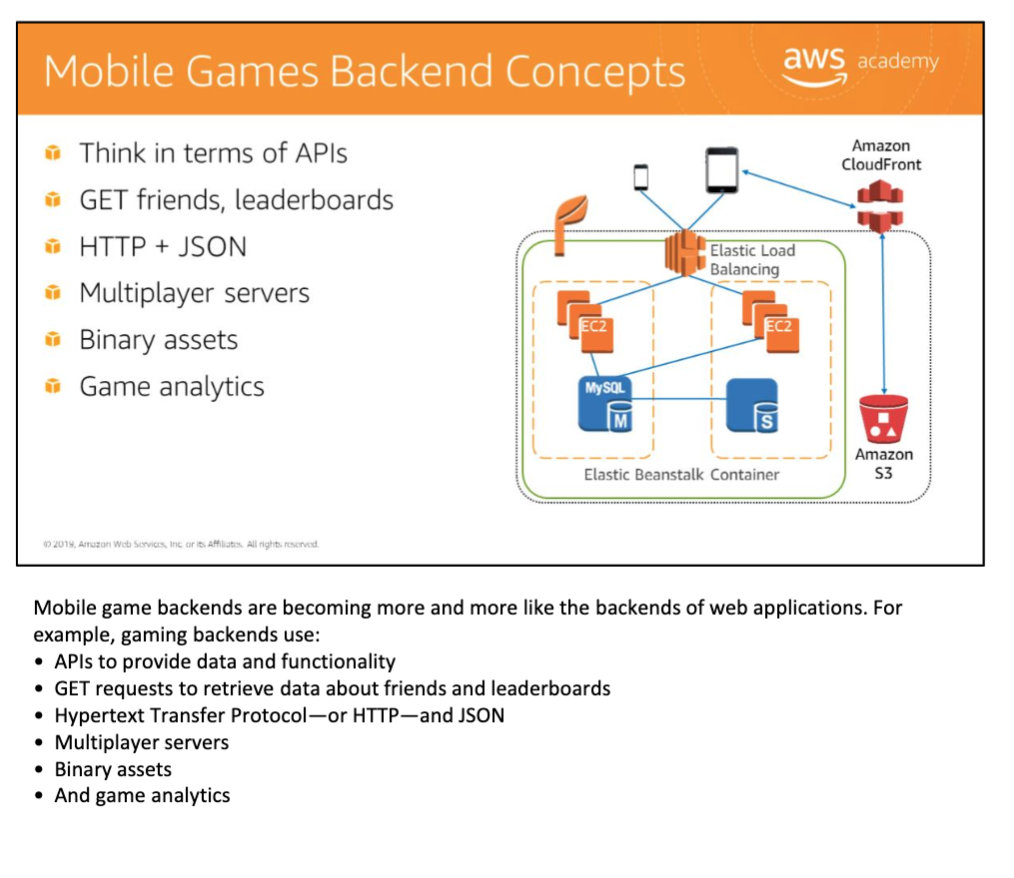
A typical mobile gaming backend on AWS:
- Amazon CloudFront for binary asset delivery.
- Elastic Load Balancing inside an Elastic Beanstalk container.
- EC2 + MySQL (Master) for game state and leaderboards.
- Amazon S3 for static binary assets.
Game Improvement via Data Analytics
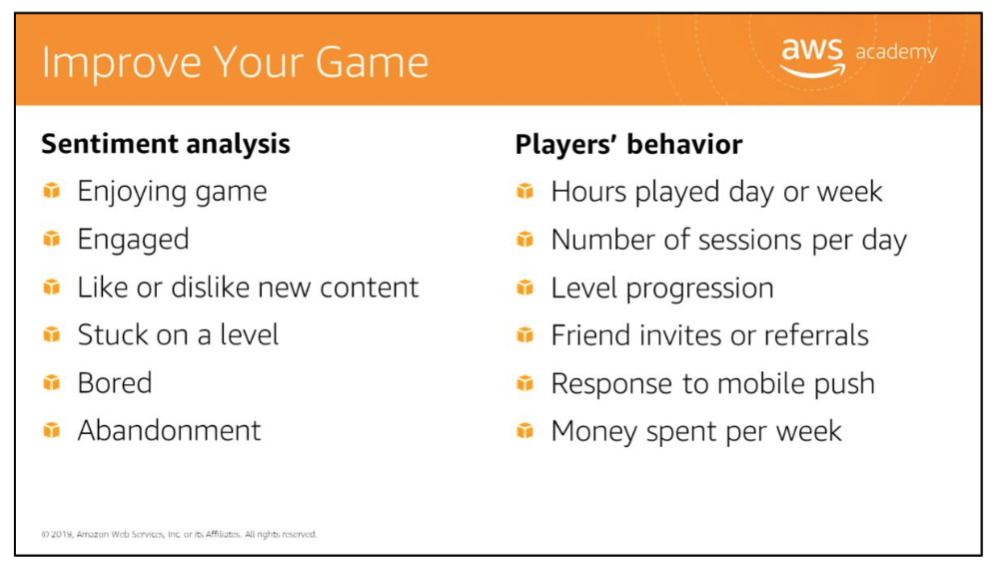
Sentiment analysis signals: enjoying, engaged, like/dislike new content, stuck on a level, bored, abandonment.
Player behavior metrics: hours played per day or week, sessions per day, level progression, friend invites or referrals, response to mobile push, money spent per week.
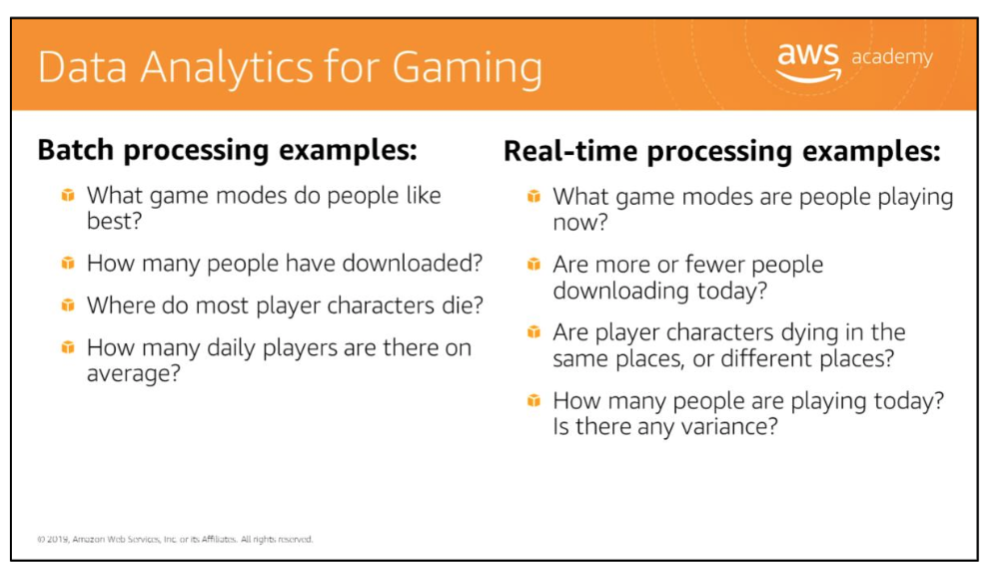
| Type | Examples |
|---|---|
| Batch processing | What game modes do people prefer? How many daily players on average? Where do most characters die? |
| Real-time processing | What game modes are people playing now? Are player characters dying in the same places? |
Gaming Analytics Reference Architecture
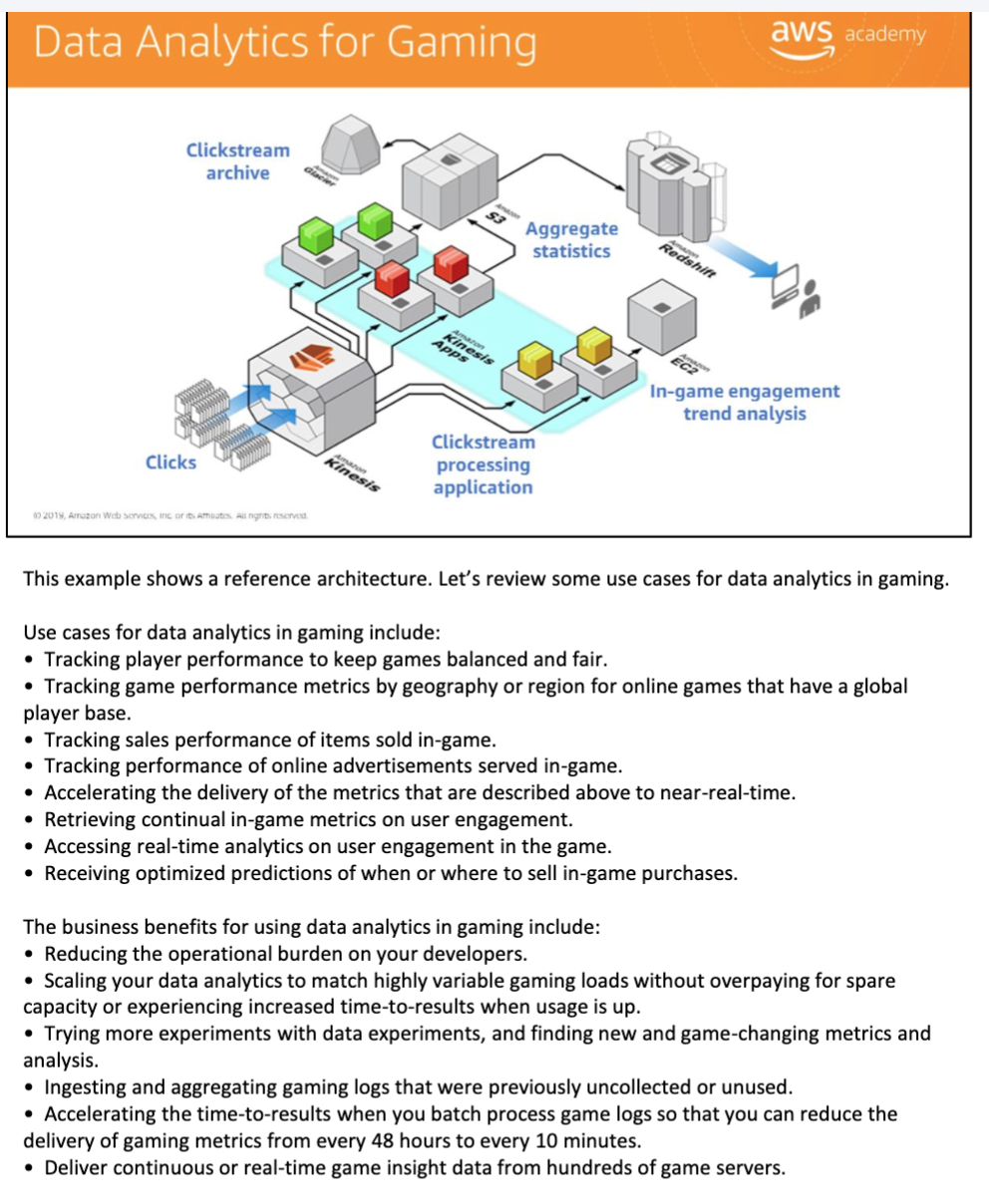
Business benefits of data analytics in gaming:
- Reduce operational burden by managing loads without overpaying for spare capacity.
- Increase experiments per iteration; find and fix bugs faster.
- Try more experiments with data; find new and unused game-changing metrics.
- Accelerate delivery of metrics from every 48 hours to every 10 minutes.
- Deliver continuous real-time game data from hundreds of game servers.
Cost Optimization 成本优化
Cost Optimization Architecture Review
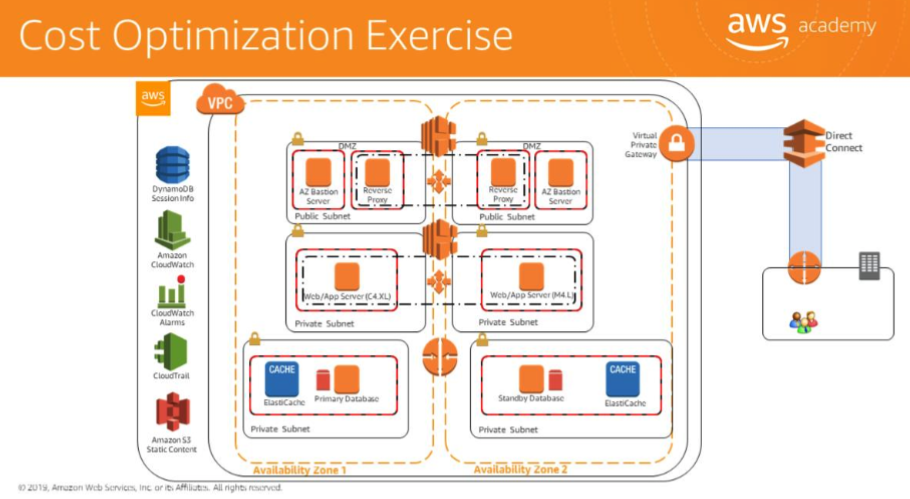
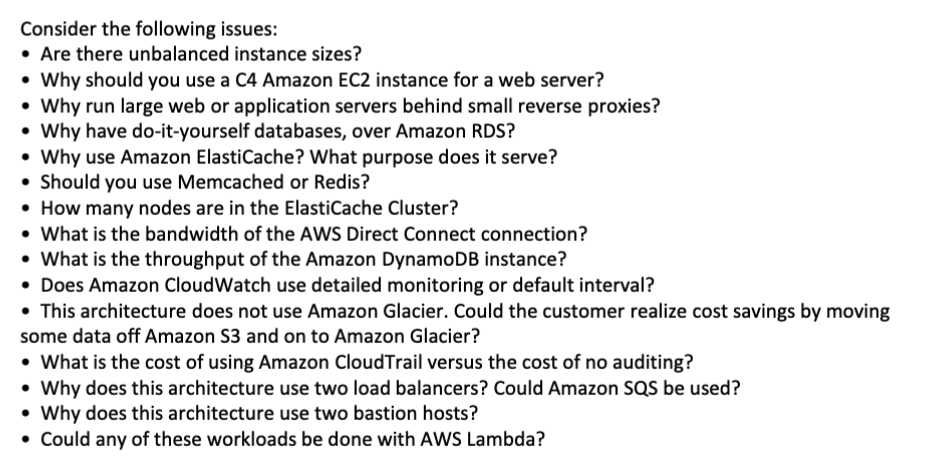
Key cost optimization questions to ask about any architecture:
- Are there unbalanced instance sizes?
- Why use a large web server instead of a C4 EC2 instance?
- Why run large web or application servers behind small reverse proxies?
- Why have DIY databases over Amazon RDS?
- Should ElastiCache be Memcached or Redis?
- How many nodes are in the ElastiCache cluster?
- What is the bandwidth of the AWS Direct Connect connection?
- What is the throughput of the Amazon DynamoDB instance?
- Does Amazon CloudWatch use detailed monitoring or default intervals?
- Could some data move from S3 to Glacier to realize cost savings?
- Why does this architecture use two load balancers?
- Why does this architecture use two bastion hosts?
- Could any of these workloads run on AWS Lambda?
Troubleshooting 故障排除
instance connection timed out
- **Check routes:**
- IGW: confirm routing table is configured correctly — public subnets need internet-bound traffic routed to an IGW.
- Virtual private gateway: verify VPN routing type (dynamic or static) is correct.
- **Check security group rules:**
instances need both inbound and outbound rules permitting traffic; security groups deny all traffic by default. Publicly accessible hosts should be behind DNS, AWS WAF, or ELB.
- Check network ACLs: verify ACLs allow traffic to and from the connecting computer; verify corporate firewall allows port 22 (Linux/SSH) or port 3389 (Windows/RDP).
- Verify the instance has a public IP address — if not, attach an Elastic IP address without restarting the instance.
- **Check CPU load**
via Amazon CloudWatch — if overloaded, scale up (larger instance type) or scale out (more instances behind a load balancer).
network performance is poor
- Consider changing instance type to one with enhanced networking — higher performance, more packets per second, lower latency, lower jitter.
- If using a NAT instance on EC2, evaluate whether it needs to be scaled up; an AWS NAT Gateway handles high throughput natively.
- If jumbo frames are enabled on one instance, ensure all instances it communicates with (including NAT instances) also have jumbo frames enabled.
- Consider **VPC endpoints** and **AWS PrivateLink**
— S3 connections are faster through an S3 VPC endpoint than over the internet.
the input/output to Amazon EBS volumes is too low
- Review instance and EBS types.
- Use EBS-optimized instance types for applications with heavy disk I/O.
- Use an EBS type with high I/O: Provisioned IOPS SSDs can provision up to 32,000 IOPS per volume.
the CPU load on Amazon RDS instances is too high
- Optimize queries: identify the slowest queries and review for optimization.
- Use read replicas: direct read requests to a read replica to relieve CPU load on the master RDS instance.
- Evaluate instance type: if queries require more CPU or memory, test against more powerful instance types.
get an 'access denied' error when making a request to an AWS service
- verify the principal has **permission** to call the action on the resource
, including any required conditions.
- **verify resource policies**
for services such as Amazon S3, Amazon SNS, and Amazon SQS — confirm the policy specifies the principal and grants access.
Key Takeaways
- Elasticity separates from load balancing: load balancing distributes traffic; elasticity adjusts the number of resources automatically.
- Horizontal scaling is virtually limitless; vertical scaling has a ceiling.
- HA is measured in nines of availability; 5 Nines = 99.999% = 5.25 minutes downtime per year.
- Multi-AZ is the minimum HA posture; Multi-Region is for disaster recovery.
- CloudFront + S3 is the caching best practice; TTL = 0 passes dynamic content through, TTL > 0 caches static content.
- For bootstrapping, a base AMI + user data is preferred over creating new AMIs for every release.
- State-Sharing pattern enables horizontal scaling by offloading session state to ElastiCache or DynamoDB.
- CloudTrail is the required service for API-level auditing across all AWS account activity.
- In the GoGreen and Medical SaaS case studies, the security checklist consistently applies: private subnets, least privilege IAM, MFA for admins, CloudTrail, S3 encryption, security groups, no public DB tier.
References
- AWS Academy Cloud Architecting course materials (2020)
- AWS Well-Architected Framework: Reliability Pillar
- AWS Architecture Center: High Availability
Comments powered by Disqus.